
Web
Creative Website Solutions: Innovative Ideas for Your Online Presence
Sep 14, 2024
Transform Your Online Presence with Creative Website Solutions
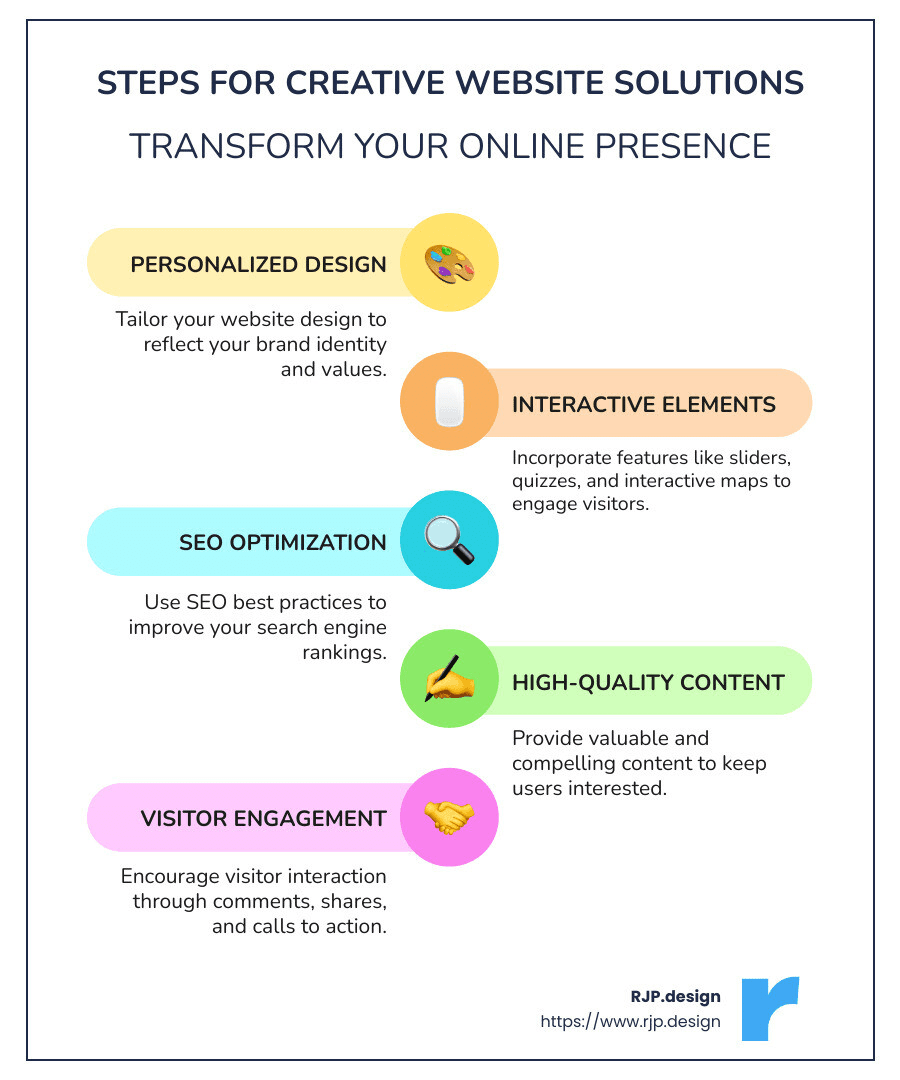
Creative website solutions are crucial for any business looking to improve its digital presence and attract more customers. If you’re curious about what makes a website stand out, you’ve come to the right place. Let’s begin with a quick list of what goes into these innovative strategies:
Personalized design custom to your brand
Interactive elements to engage visitors
SEO optimization for better search engine visibility
High-quality content for a compelling user experience
In today’s digital age, having a robust online presence is non-negotiable. Your website is often the first point of contact between your business and potential customers. An outdated or poorly designed site can drive visitors away and tarnish your brand’s reputation. Conversely, a well-crafted website can captivate your audience, convey your brand’s values, and convert visitors into loyal customers.
I’m Ross Plumer, a digital marketing and website design expert with years of experience in creative website solutions. My background working with businesses that have marketed over $20 million in revenue equips me to offer impactful, innovative solutions for your online success.
Stay tuned as we dig deeper into how you can transform your website with creative and effective design ideas.
Creative Website Design Ideas
Interactive Elements
Interactive elements make your website more engaging. Think of features like quizzes, calculators, or interactive maps. These elements not only captivate visitors but also encourage them to spend more time on your site. For example, a study from Forbes found that interactive content can increase user engagement by up to 40%. This can lead to higher conversion rates and a more memorable user experience.
Original Illustrations
Original illustrations set your website apart from the competition. Custom artwork can communicate your brand’s unique personality and values. Unlike stock images, original illustrations are exclusive to your brand, making your website more distinctive and authentic. This approach is evident in Wendy Ju’s website where custom visuals create a unique and engaging user experience.
Animation
Animation can bring your website to life. Simple animations, like hover effects or animated logos, can make your site more dynamic and engaging. More complex animations, such as explainer videos or animated infographics, can help to convey complex information in a more digestible format. Tesla’s home page uses captivating animations to showcase its products, making the site visually appealing and informative.
Unique Fonts
Fonts play a crucial role in your website’s design. Choosing unique, readable fonts can improve the overall aesthetic and improve user experience. Chanel’s use of its Couture font ensures brand consistency and a luxurious feel, enhancing the user’s experience across the site.
Product Photos
High-quality product photos are essential for capturing the attention of your visitors. They help to showcase your products in the best light and can significantly impact purchasing decisions. Tesla’s use of high-quality images of its cars and accessories makes it easier for viewers to imagine themselves using the products, even if they’re only seeing them online.
Content Focus
Content is king. High-quality, well-optimized content can significantly improve your website’s search engine ranking and user experience. Ensure your content is relevant, engaging, and valuable to your audience. Forbes suggests that poor content strategy can hinder your website’s performance on search engines. Therefore, investing in high-quality content is crucial for your website’s success.
Visitor Engagement
Keeping your visitors engaged is key to a successful website. Features like live chat support, forums, or customer reviews can make your site more interactive and user-friendly. Partake Foods’ home page uses a clear call-to-action that mobile users can easily click, enhancing user engagement and driving conversions.

By incorporating these creative website solutions, you can significantly improve your website’s appeal and functionality. Whether it’s through interactive elements, original illustrations, or high-quality content, these strategies will help you create a more engaging and effective online presence.
Stay tuned as we dig deeper into how you can design a website step-by-step, incorporating best practices and helpful tools to ensure your online success.
How to Design a Website
Designing a website can seem daunting, but breaking it down into manageable steps makes it achievable. Here’s a simple guide to get you started.
Step-by-Step Guide
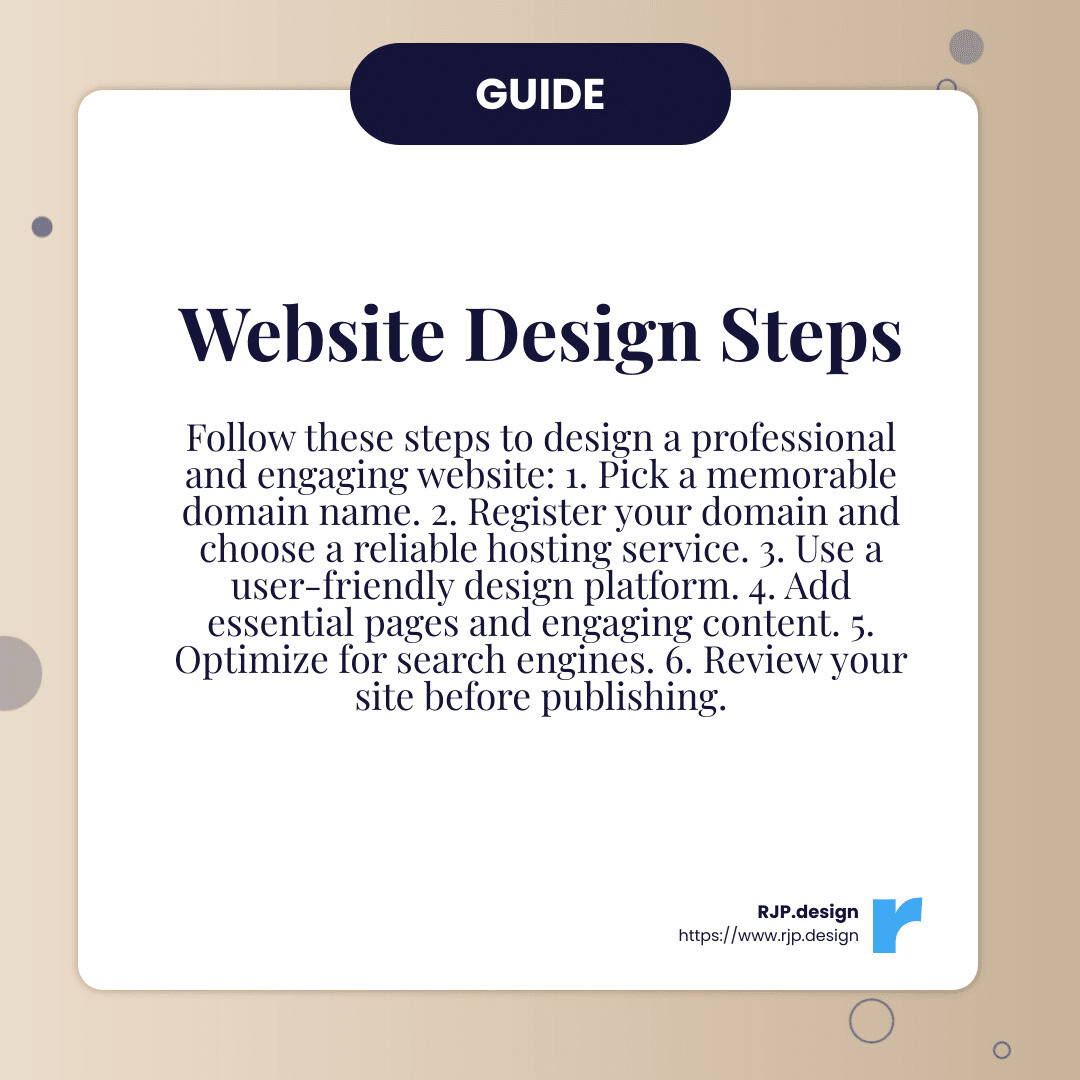
1. Pick a Domain Name
Your domain name is your website’s unique address. It should reflect your brand and be easy to remember. Keep it short, avoid numbers and hyphens, and consider using keywords relevant to your business.
2. Register Your Domain and Choose Hosting
Once you’ve picked a domain, you need to register it. You can use services that offer both domain registration and hosting. Hosting is where your website lives on the internet. Look for features like tech support and SSL certificates for security.
3. Choose a Design Platform
If you’re not a coder, use platforms that offer drag-and-drop functionality, making it easy to design your site without technical skills.
4. Add Useful Pages and Engaging Content
Your website should have essential pages like Home, About, Services, and Contact. Ensure the content is engaging and relevant. High-quality images and concise text work best.
5. Optimize for Search Engines
SEO (Search Engine Optimization) is crucial for visibility. Use relevant keywords, meta descriptions, and alt text for images. This helps search engines understand your content and rank your site higher.
6. Review and Publish
Before going live, review your site for errors. Check links, proofread content, and ensure images load correctly. A thorough review helps create a professional impression.
Best Practices
Consistency in Colors and Fonts
Limit your color palette to five colors: one white, one black, and three brand-related colors. Use consistent fonts across your site to maintain a cohesive look. This makes your site look professional and easy to steer.
High-Quality Images
Use high-resolution images, especially for product photos. They should be clear and well-lit. High-quality images can significantly impact a visitor’s perception and decision-making.
Uncluttered Design
Avoid too much text and multiple CTAs (Calls to Action) in one area. A clean, simple design helps visitors find what they need quickly and easily.
Single CTA on the Home Page
Include one clear CTA on your home page. It guides visitors on what to do next, whether it’s signing up for a newsletter, making a purchase, or contacting you.
Helpful Tools
Canva and Adobe Creative Cloud
For design, tools like Canva and Adobe Creative Cloud are invaluable. They allow you to create custom graphics and embed them into your site.
WordPress Plugins
Plugins can add functionality to your site without coding. Popular ones include Yoast SEO for optimization and WooCommerce for e-commerce.
Design Principles
User Experience (UX)
Your site should be easy to steer. Use clear menus, logical page structures, and ensure it’s mobile-responsive. Mobile users should have the same quality experience as desktop users.
Visual Hierarchy
Organize content so important information stands out. Use headings, subheadings, and bullet points to break up text. This makes it easier for visitors to scan and find what they need.
By following these steps and best practices, you can design a website that is both functional and visually appealing. Next, we’ll explore the best practices for small business websites to help you optimize user experience and conversion rates.
Best Practices for Small Business Websites
Creating a small business website that stands out requires a blend of smart design principles, a focus on user experience, and strategic conversion optimization. Here are some best practices to ensure your website not only looks great but also performs well.
Design Principles
Consistency in Colors and Fonts
Maintain a cohesive look by limiting your color palette to a few key colors. Use one white, one black, and three brand-related colors. Consistent fonts across your site also help in creating a professional appearance. This makes your site visually appealing and easy to steer.
High-Quality Images
Use high-resolution images, especially for product photos. Clear, well-lit images can significantly impact a visitor’s perception and decision-making. According to Forbes, high-quality visuals are essential for a striking homepage and engaging content.
Uncluttered Design
Simplicity is key. Avoid overcrowding your pages with too much text or multiple Calls to Action (CTAs) in one area. A clean, simple design helps visitors find what they need quickly and easily.
Single CTA on the Home Page
Include one clear CTA on your home page. Whether it’s signing up for a newsletter, making a purchase, or contacting you, a single, focused CTA guides visitors on what to do next.
User Experience (UX)
Mobile Responsiveness
With more than half of web traffic coming from mobile devices, ensuring your website is mobile-friendly is crucial. Your site should offer the same quality experience on smartphones as it does on desktops. This includes easy navigation, quick load times, and readable text.
Clear Navigation
Use clear menus and logical page structures. Visitors should be able to find what they’re looking for without any hassle. A well-organized navigation system improves user experience and keeps visitors on your site longer.
Accessibility
Make your site accessible to all users. Use contrasting colors for text and backgrounds, add alt text for images, and ensure your site can be steerd using a keyboard. These practices make your site usable for people with disabilities, enhancing your overall user experience.
Conversion Optimization
A/B Testing
Test different elements of your site to see what works best. For example, Groove doubled its conversion rate by making data-driven changes to its sales page. A/B testing helps you make informed decisions about design and content.
SEO Optimization
Search Engine Optimization (SEO) is crucial for visibility. Use relevant keywords, meta descriptions, and alt text for images. Regularly update your content to keep it fresh and relevant. This helps search engines rank your site higher, making it easier for potential customers to find you.
Engaging Content
Share compelling content to establish yourself as an expert in your industry. This could include blogs, videos, case studies, or testimonials. Engaging content not only attracts visitors but also keeps them coming back.
Examples of Effective Small Business Websites
Case Study: Online Bookings Up 200%
One of our clients saw a 200% increase in online bookings after redesigning their website with us. The new design focused on user experience and clear CTAs, making it easier for customers to book services.
Client Testimonial: Increased Business by 20%
Another client reported a 20% increase in business after switching to our services. They highlighted our knowledge and helpfulness in achieving these positive results.
By following these best practices, you can create a small business website that not only looks great but also drives results. Next, we’ll explore the top web design software of 2024 to help you choose the right tools for your project.
Top Web Design Software of 2024
Choosing the right web design software is crucial for creating an engaging and functional website. Here, we’ll look at the best tools available in 2024, focusing on prototyping, user experience, design flexibility, and software comparison.
Prototyping
Prototyping is essential for visualizing your website before it goes live. It helps you plan the layout, user flow, and design elements.
RJP Prototyper: Known for its robust prototyping features, RJP Prototyper allows you to create interactive prototypes with ease. You can also share them with your team for feedback.
RJP Collaborate: RJP Collaborate is a cloud-based tool that excels in collaboration. Multiple team members can work on a prototype simultaneously, making it ideal for remote teams.
User Experience (UX)
A great user experience keeps visitors on your site longer and encourages them to take action.
RJP Sketcher: RJP Sketcher is popular for its UX design capabilities. It offers a range of plugins and integrations that make designing user-friendly interfaces straightforward.
RJP Animator: RJP Animator focuses on creating seamless user experiences. Its advanced animation features help bring your designs to life, making your site more engaging.
Design Flexibility
Design flexibility allows you to customize your website to match your brand’s identity.
RJP Builder: RJP Builder offers a drag-and-drop editor that’s perfect for beginners. Its extensive template library and customization options make it easy to create a unique site.
RJP CMS: RJP CMS is highly flexible, offering thousands of themes and plugins. It’s suitable for both beginners and advanced users who want full control over their site’s design.
Software Comparison
Let’s compare some of the top web design software options based on key features:
Software | Prototyping | UX Design | Design Flexibility | Collaboration | Price |
|---|---|---|---|---|---|
RJP Prototyper | Yes | Good | Moderate | Yes | Subscription |
RJP Collaborate | Excellent | Good | Moderate | Excellent | Subscription |
RJP Sketcher | Moderate | Excellent | Moderate | Good | One-time fee |
RJP Animator | Good | Excellent | Moderate | Good | Subscription |
RJP Builder | Basic | Basic | Excellent | Limited | Free/Paid |
RJP CMS | Basic | Good | Excellent | Good | Free/Paid |
RJP Prototyper and RJP Collaborate are standout choices for prototyping and collaboration, making them ideal for teams. RJP Sketcher and RJP Animator are excellent for UX design, offering tools that help create a smooth user experience. For design flexibility, RJP Builder and RJP CMS are top contenders, allowing for extensive customization.
Conclusion
Selecting the right web design software depends on your specific needs. If you prioritize collaboration and prototyping, RJP Collaborate is a great choice. For those focused on UX design, RJP Sketcher and RJP Animator are excellent options. If design flexibility is your main concern, RJP Builder and RJP CMS won’t disappoint.
Next, we’ll address some frequently asked questions about creative website solutions to help you make the most of your online presence.
Frequently Asked Questions about Creative Website Solutions
How do I make my website look creative?
Interactive elements are a great way to make your website stand out. Think of features like interactive maps, quizzes, or even games that engage visitors directly. For example, adding a live chat feature can provide instant support and boost user engagement.
Original illustrations and unique fonts can set your website apart. Custom graphics and distinctive typography not only make your site visually appealing but also help in conveying your brand’s personality.
Animation is another powerful tool. Simple animations, like hover effects or animated page transitions, can make your site feel more dynamic and engaging.
Finally, focus on content. High-quality, relevant content keeps visitors on your site longer and encourages them to explore more.
What is website creatives?
Website creatives encompass all the visual and audio elements used to improve a website. This includes ads, images, videos, and audio clips. These elements create a rich digital environment that can capture visitors’ attention and convey your brand message effectively.
For example, using videos to explain your products or services can be more engaging than text alone. Similarly, high-quality images and audio can make your site more appealing and professional.
How can Creative Website Solutions boost my business?
Creative website solutions can significantly boost your business by improving customer attraction and increasing online bookings. For instance, one of our clients reported a 200% increase in online bookings after revamping their website with our services.
Professional and responsive web design also helps in building trust with your audience. According to a testimonial, switching to Creative Web Solutions resulted in a 20% increase in business for one of our clients.
Incorporating features like interactive elements, unique fonts, and original illustrations can make your site more engaging and memorable. This not only improves visitor engagement but also improves your site’s SEO, driving more traffic to your site.
In summary, creative website solutions can transform your online presence, making it easier for potential customers to find and engage with your business.
Conclusion
At RJP.design, our mission is to help your business shine online. We specialize in creating websites that are not just visually appealing but also highly functional and easy to find. Our team is dedicated to client satisfaction, ensuring that every project meets your unique needs and goals.
Client satisfaction is at the heart of what we do. We listen to your requirements, conduct thorough research, and develop strategies custom to your business. Our clients often share stories of how our creative website solutions have transformed their online presence and boosted their business.
We pride ourselves on delivering high-quality service. From the initial research phase to the final launch, our team works diligently to ensure your website not only looks great but also performs exceptionally well. Whether it’s through engaging content, interactive elements, or unique design features, we make sure your website stands out.
Improving your online presence is our ultimate goal. A well-designed website can increase visibility, drive traffic, and convert visitors into customers. Our expertise in SEO, social media, and digital marketing ensures that your site reaches the right audience and achieves the best possible results.
Join us at RJP.design and find how our creative website solutions can lift your business. Let’s create something extraordinary together.