
Web
Redesigning for Success: A Step-by-Step Guide for Small Businesses
May 2, 2025

The Digital Storefront: Why Your Business Needs a Website Upgrade
Think of your website as your 24/7 digital storefront. When was the last time you gave it a fresh coat of paint? In today’s online-first world, a small business website redesign isn’t just about looking pretty—it’s about staying competitive and connected to your customers.
I’ve seen businesses transform their fortunes with thoughtful website updates. A small business website redesign refreshes your digital presence by improving how your site looks, works, and performs for both visitors and search engines.
The process typically flows through seven key phases: We start with a thorough assessment of what’s working (and what isn’t). Then we create a strategic plan custom to your business goals. The design phase brings your brand to life visually, followed by development where we build everything with clean, modern code. Rigorous testing ensures everything works perfectly across all devices before launch day. Finally, ongoing maintenance keeps your site performing at its best.
First impressions happen in milliseconds online. A staggering 88% of users won’t return after a bad website experience, while 62% view an unprofessional site as a serious red flag. Your outdated website isn’t just sitting there—it’s actively sending potential customers to your competitors.
“Design is not only the way things look. It is also the way something functions.”
The numbers don’t lie: 80% of American consumers search for local businesses online every week, with nearly a third doing so daily. With over 60% of web traffic now coming from mobile devices, a site that doesn’t work beautifully on smartphones is missing most of your audience.
Speed matters tremendously. Research shows that as page load time increases from 1 second to 10 seconds, the probability of mobile users bouncing increases by a whopping 123%. Every second counts when converting visitors into customers.
I’m Ross Plumer, and I’ve guided countless small businesses through successful small business website redesign projects that have generated millions in revenue. My approach blends technical know-how with business strategy to deliver websites that don’t just look good—they work hard for your bottom line.
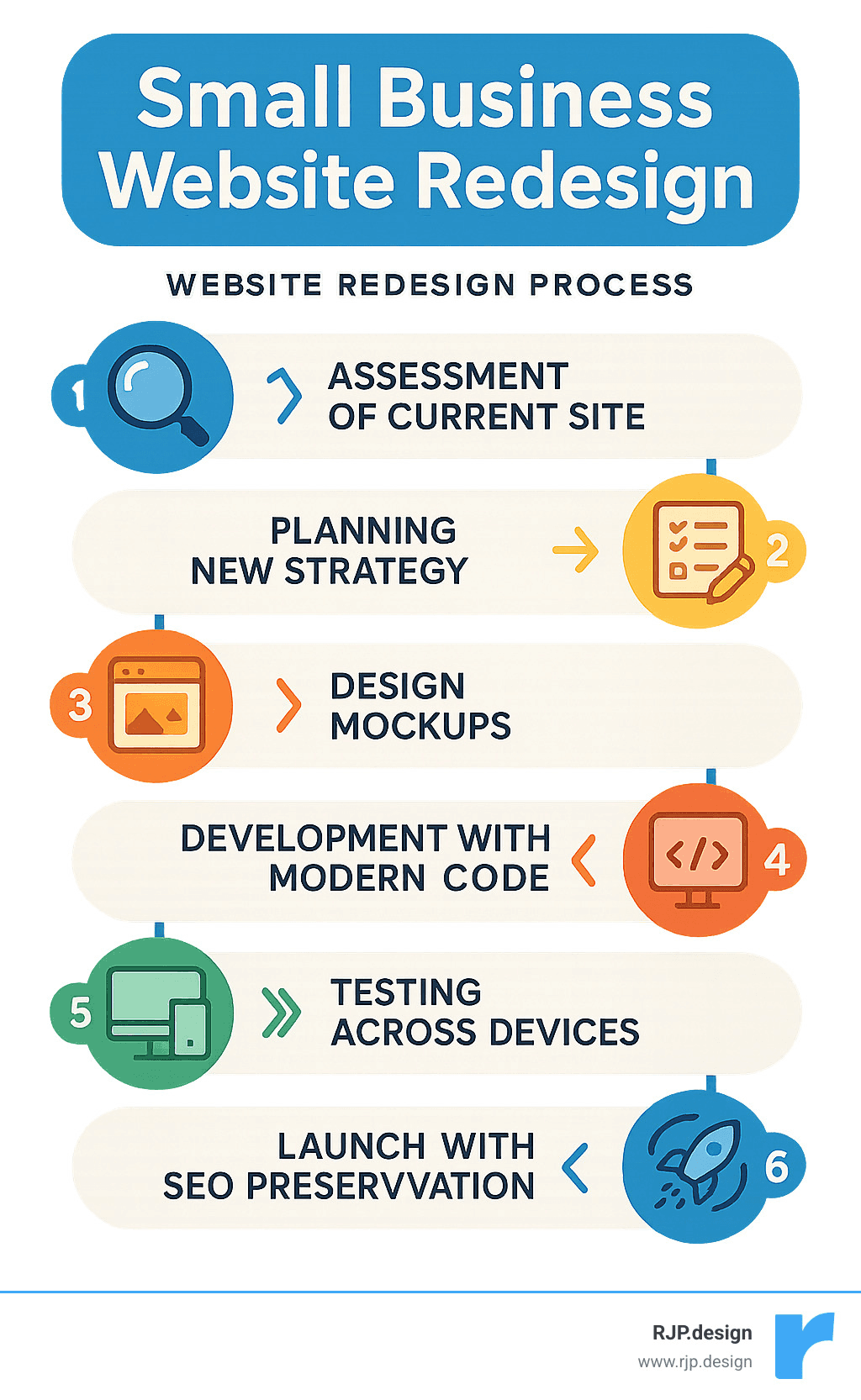
Terms related to small business website redesign:
– professional web design
– small business web design services
– web design company site
Why and When to Redesign Your Small Business Website
Is your website working as hard as you do? If you’re scratching your head wondering if it’s time for a small business website redesign, you’re in good company. Many business owners struggle with timing this investment. Let’s talk about the signs that are practically screaming “redesign me!” and the real benefits waiting on the other side.
Key warning signs you can’t ignore
Your website might be quietly costing you customers without you even realizing it. When visitors land on a site that looks like it was built during the flip phone era, they make snap judgments about your business.
That mobile experience matters tremendously. With over 60% of people browsing on their phones, a site that forces users to pinch, zoom, and scroll sideways is essentially hanging a “closed” sign for most of your potential customers.
Speed issues are just as damaging. According to Google’s research on mobile page speed, when your page load time creeps from 1 second to 10 seconds, the probability of visitors bouncing increases by a whopping 123%. In fact, 53% of mobile users will abandon ship if your site takes longer than three seconds to load. That’s barely enough time to blink!
Security warnings are instant trust-killers. When browsers display those alarming “Not Secure” messages, visitors flee faster than you can say “HTTPS.” With 58% of malware attacks targeting small businesses specifically, security isn’t something you can afford to overlook.
“I didn’t realize how many customers we were losing until we fixed our website,” one of our clients told us. “Our inquiries doubled within the first month after launch.” This experience isn’t unusual – it’s the norm.
That DIY website that served you well when you first started? It might now be showing its age through outdated design elements, clunky navigation, or a content management system so frustrating that you avoid updating it altogether. When updating your own website feels like a chore, it’s definitely time for a change.
Benefits of a modern, user-friendly site
Investing in a small business website redesign isn’t just about looking pretty – it delivers concrete results that directly impact your success:
Increased credibility and trust comes standard with professional design. A striking 75% of consumers admit they judge a company’s reliability based solely on website appearance. First impressions really do matter in the digital world.
Your search visibility gets a serious boost too. Modern websites built with SEO best practices help you climb those search rankings, putting you in front of more potential customers. Considering that 53% of all website traffic comes from organic search, this visibility is pure gold for growth.
Higher conversion rates aren’t just possible – they’re probable. When your site guides visitors naturally toward taking action with clear calls-to-action and intuitive navigation, you’ll see more inquiries, sales, and sign-ups. The math is simple: better user experience equals better business results.
Mobile optimization becomes your silent salesperson, ensuring customers have a seamless experience regardless of device. Meanwhile, faster loading speeds mean visitors spend less time waiting and more time engaging with what you offer.
The accessibility improvements in modern websites aren’t just nice-to-have features – they expand your potential customer base by making your content available to users with disabilities, often fulfilling legal requirements in the process.
The results speak for themselves. Take the Fitness19 franchise – after consolidating their scattered microsites into one cohesive, SEO-optimized website, their monthly visitors jumped from 29,000 to 140,000, with conversions increasing by an impressive 329% year-over-year.
A well-designed website creates brand cohesion across all your marketing channels, reinforcing your identity and messaging. It also provides that crucial competitive edge – when potential customers compare you with competitors, a professional site helps you stand out for all the right reasons.
Ready to explore how a Professional Website Redesign could transform your business? The right redesign isn’t just about keeping up with the times – it’s about setting your business up for its next chapter of growth.
The Small Business Website Redesign Roadmap
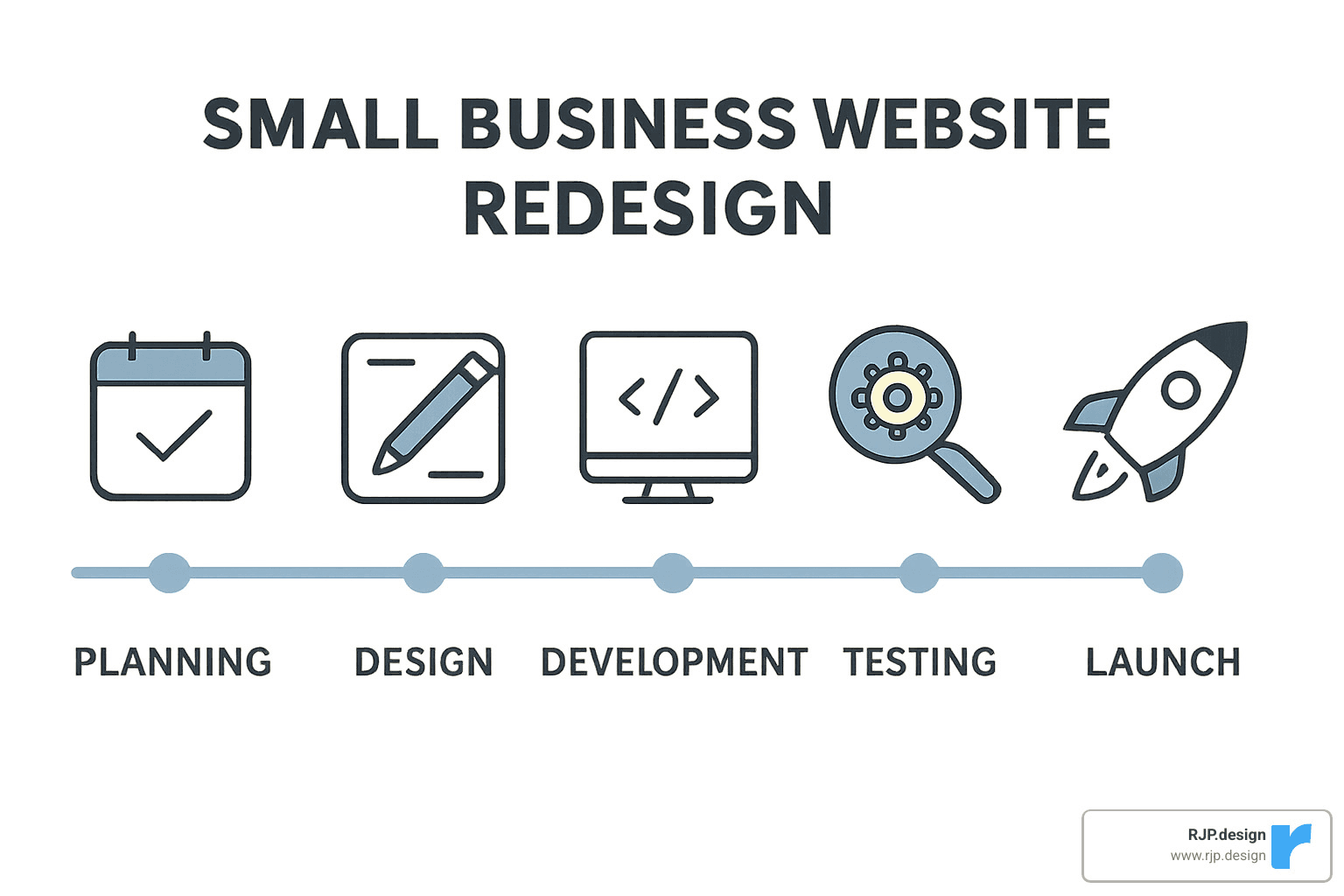
Ready to transform your online presence? Let me walk you through our proven approach to a small business website redesign. Think of this as your friendly GPS for the journey ahead—one that won’t lead you down any frustrating dead ends!
Step 1: Define goals & KPIs
Before we pick color schemes or debate button shapes, let’s get crystal clear on what success looks like for your business. Your website isn’t just a pretty digital brochure—it’s a hardworking member of your team!
Start by setting SMART goals that will guide every decision moving forward. Are you hoping to boost online sales by 25%? Generate 50 qualified leads monthly? Maybe you want to cut down those repetitive customer service questions by 30%?
Beyond business targets, consider user experience improvements like reducing your bounce rate to under 40% or increasing how long visitors stick around. Your brand positioning matters too—is it time to refresh your visual identity or clarify your messaging to stand out from competitors?
Don’t forget the technical side! Aim for that satisfying 90+ PageSpeed score, ensure your site works beautifully on mobile devices, and bake in security from the ground up.
Share these goals with everyone involved in the project. They’ll serve as your North Star when decisions get tough and give you clear benchmarks to celebrate when you succeed.
Step 2: Audit & preserve SEO assets
One of the biggest heartbreaks in a small business website redesign is watching your hard-earned Google rankings vanish overnight. Let’s make sure that doesn’t happen to you!
Start with a thorough content inventory using tools like ScreamingFrog to document all your existing URLs, page titles, and content. Then put on your detective hat and identify your high-performing pages through Google Analytics and Search Console. Which pages bring in the most traffic? Which ones convert visitors into customers?
Create a careful URL mapping strategy that shows how old addresses will connect to new ones through proper 301 redirects. This is like leaving a forwarding address when you move—it ensures visitors and search engines can still find you.
As one of our clients finded: “When we redesigned our site, we almost deleted a blog post that was driving 30% of our organic traffic. A proper content audit saved us from making a costly mistake.”
Good content is precious! Don’t toss out articles or pages that are performing well—instead, give them a refresh while maintaining the keyword targeting that’s already working for you.
Small business website redesign mistakes to avoid
Let me share some hard-won wisdom that could save you significant headaches:
Beware of prioritizing pretty designs over functionality. Yes, your site should look good, but a beautiful site that doesn’t convert visitors is like a sports car with no engine. Balance is key!
Mobile optimization isn’t optional anymore—it’s essential. Google now looks primarily at your mobile site for ranking, so design with smartphones in mind from day one.
Rushing to launch without proper testing is a recipe for embarrassment. Take the time to check everything across different devices and browsers. Your customers will notice those details even if you hope they won’t!
SEO needs careful handling during migration. Without proper redirects, you might as well be hanging a “closed” sign on your digital door. Similarly, skipping content strategy leaves you with beautiful but empty templates—remember that content should drive design, not the other way around.
And please, resist the temptation of “feature creep”—adding just one more thing, then another, then another. This extends timelines, bloats budgets, and often complicates the user experience.
Finally, always have complete backups before making any changes. Think of it as your safety net for the high-wire act of redesign.
Step 4: Design for UX, accessibility & speed
Modern website design juggles several priorities that all deserve your attention:
Start with user-centered design that creates intuitive paths based on how real people behave. Clear visual hierarchies guide visitors toward important actions without them having to think too hard.
Build on responsive frameworks with flexible grid systems that adapt seamlessly to any screen size. Your site should look just as good on a smartphone as it does on a desktop monitor.
Accessibility isn’t just nice to have—it’s essential for reaching all potential customers. Follow WCAG guidelines by ensuring sufficient color contrast, adding alt text to images, supporting keyboard navigation, using proper heading structure, and clearly labeling forms. These small details make a huge difference for users with disabilities.
Performance optimization focuses on Core Web Vitals: aim for Largest Contentful Paint under 2.5 seconds, First Input Delay under 100 milliseconds, and Cumulative Layout Shift under 0.1. These technical-sounding metrics translate to “your site loads fast, responds quickly, and doesn’t jump around while loading”—all things that keep visitors happy.
As one happy client reported: “Our small business website redesign improved our Google PageSpeed score from 43 to 92. We immediately saw longer session times and higher conversion rates.”
Don’t forget security foundations—implement SSL certificates, secure your contact forms, and follow best practices from the ground up. Your visitors need to know their information is safe with you.
Small business website redesign success metrics
How will you know if all this work was worth it? By measuring what matters:
Track user behavior through reduced bounce rates, more pages per session, longer time on site, improved conversion funnels, and heat maps showing where visitors engage most. These metrics tell you if people are finding what they need and taking action.
Performance improvements show up in faster page loads, better mobile usability scores, and Core Web Vitals compliance. Your site should run like a well-oiled machine.
Business outcomes are the ultimate test: increased conversion rates, more qualified leads, higher average order values, improved customer satisfaction, and fewer confused customer service inquiries all point to success.
Search visibility matters too—maintained or improved organic rankings, increased organic traffic, more featured snippets, and better local search performance all indicate your SEO strategy worked.
Plan to check these metrics right after launch, then again at 30, 60, and 90 days. This regular monitoring helps you spot trends and identify opportunities for continued optimization.
The journey of a small business website redesign might seem complex, but with this roadmap in hand, you’re already ahead of the game. Your website isn’t just a digital business card—it’s often your most hardworking employee, representing your business 24/7/365.
Budget, Timeline & Choosing the Right Help
Let’s talk money and time—two things small business owners never seem to have enough of! Understanding what you’re getting into with a small business website redesign helps set realistic expectations from the start.
Estimating realistic costs & timelines
The question I hear most often is “How much will this cost me?” The honest answer is: it depends on what you need. Think of website pricing like buying a car—there’s a big difference between a basic model and a luxury vehicle with all the bells and whistles.
For a basic informational site with 5-10 pages, expect to invest $1,000-$5,000 with a timeline of about 2-4 weeks. This gets you a responsive design that looks good on all devices, a content management system so you can make updates yourself, and basic SEO to help customers find you.
If you need something more substantial—say 10-20 pages with custom design elements and content creation—the investment typically ranges from $5,000-$15,000 with a 4-8 week timeline.
For complex business websites with 20+ pages, custom functionality, or specialized features, you’re looking at $15,000-$30,000+ and 8-12 weeks of development time. E-commerce sites vary even more dramatically ($5,000-$50,000+) depending on your inventory size and feature requirements.
One of our clients, a local bakery owner, told me: “We initially balked at spending $8,000 on our redesign, but it paid for itself within three months through increased leads. I wish we’d done it sooner.”
Don’t forget about the ongoing costs that keep your site healthy after launch:
– Hosting ($150-$600 annually)
– Domain renewal ($10-$20 annually)
– Regular maintenance ($250-$1,000 annually)
– Security monitoring ($100-$500 annually)
These aren’t just expenses—they’re investments in keeping your digital storefront open and secure.
DIY vs CMS vs Agency—pros and cons
You’ve got three main paths for your small business website redesign, each with its own tradeoffs.
The DIY route using website builders like Wix or Squarespace is tempting for its low upfront cost ($100-$500) and quick setup. You don’t need technical skills, which is a big plus. The downside? Limited customization options, potential SEO handicaps, recurring subscription fees, and—this is the big one—the time YOU need to invest. Is building a website really the best use of your valuable time as a business owner?
The middle path uses a Content Management System like WordPress with pre-made templates. This offers a good balance of customization and ease at a moderate cost ($1,000-$5,000). These sites are scalable as you grow, but there’s a learning curve for management and potential security issues if not properly maintained. This option works well for growing businesses with some technical comfort or budget for occasional developer help.
Working with a professional web design agency provides a custom solution with a strategic approach. Yes, it requires a higher investment ($5,000+) and longer timeline, but you get professional results, ongoing support, and—importantly—you save your own time to focus on running your business. We’ve had many clients come to us after trying the DIY route first, frustrated by the limitations and the time sink it became.
Selecting a design partner
If you decide to work with a professional for your small business website redesign, finding the right match is crucial. This is a relationship that impacts your business success, so choose carefully.
Start by reviewing their portfolio—look beyond pretty pictures to see if they’ve worked in your industry or with similar requirements. Pay attention to both aesthetics and functionality. Do their sites look good AND work well?
Check references and testimonials from past clients. Ask specific questions about communication style, timeline adherence, and most importantly, results achieved. A beautiful website that doesn’t generate leads or sales isn’t doing its job.
Evaluate their process—a good partner will have a clear, structured approach that includes findy, planning, design, development, testing, and launch phases. Beware of anyone who wants to jump straight to design without understanding your business goals first.
Communication style matters enormously. You’ll be working closely with this team, so ensure they speak your language—literally. Do they explain complex concepts clearly or hide behind technical jargon? Do they listen more than they talk? These are good signs.
Understand what happens after launch. A website isn’t a “set it and forget it” tool—it needs ongoing care. Clarify maintenance agreements, update procedures, and how they handle ongoing optimization.
Verify their technical expertise in current web standards, SEO best practices, and security protocols. And finally, confirm their pricing structure is transparent with clearly defined deliverables and milestones.
As one of our clients wisely noted: “The best design partner isn’t necessarily the cheapest or the one with the flashiest portfolio. It’s the one who truly understands your business goals and can translate them into an effective website.”
At RJP.design, we pride ourselves on being that kind of partner—one who balances technical expertise with business strategy to ensure your redesign delivers real results.
Launch, Secure & Grow: Post-Redesign Best Practices
So, you’ve just unveiled your shiny new website—congratulations! But as any smart business owner knows, launching your small business website redesign is just the beginning of your digital journey, not the finish line. Think of your website like a garden—it needs regular tending to truly flourish.
Security, accessibility & maintenance checklist
Beautiful car you bought years ago that looked terrible after you skipped oil changes and regular maintenance? Websites work the same way.
Your newly redesigned site needs consistent care to stay secure and effective. Set up weekly or monthly security scans to catch potential vulnerabilities before they become problems. Trust me, finding malware after it’s compromised your customer data is a conversation no business owner wants to have.
“We set up a monthly maintenance schedule after our redesign,” one of our small business clients shared with me recently. “It takes just 2-3 hours per month but has prevented several potential issues from affecting our customers.”
Make sure you’re backing up your site daily—and storing those backups somewhere safe and separate from your hosting. I’ve seen too many businesses lose everything because their only backup was on the same server that crashed. It’s like keeping your spare house key hidden… inside your house.
For accessibility, conduct quarterly checks against WCAG standards. This isn’t just about compliance—it’s about making sure everyone can use your site, regardless of ability. Plus, with 61 million adults in the US living with a disability, that’s a significant market you don’t want to exclude.
Keep your software and plugins updated. Yes, those update notifications can be annoying, but they often contain critical security patches. Ignoring them is like leaving your store’s back door open uped overnight—eventually, someone unwelcome will wander in.
Measuring ROI & continuous optimization
A small business website redesign is an investment that should pay dividends. To know if you’re getting a good return, you need to track the right metrics.
Start by documenting your pre-redesign performance—conversion rates, average order values, lead generation numbers, and traffic statistics. These become your baseline for measuring improvement. Without these numbers, you’re essentially flying blind.
After launch, compare your new performance at 30, 60, and 90-day intervals. This structured approach helps you identify trends rather than reacting to daily fluctuations that might just be normal variance.
Don’t be afraid to test different approaches on your site. We helped one client increase their lead conversion rate from 1.8% to 4.3% within just 60 days of launch. By implementing additional optimizations based on user behavior data, they reached 5.7% by the six-month mark—a 216% improvement overall. Those aren’t just nice numbers; they represented real revenue growth for their business.
User feedback is gold—collect it through surveys, feedback forms, and session recordings. What users tell you directly often reveals blind spots you never considered. One of our clients finded through feedback forms that customers were confused about their shipping policies, which was causing abandonment at checkout. A simple clarification led to an immediate 15% boost in completed purchases.
The most successful businesses view their websites as evolving tools. They test variations of key elements, analyze the results, and implement improvements in a continuous cycle of refinement.
Frequently Asked Questions about Small Business Website Redesign
How often should a site be redesigned?
Most small business websites benefit from a major redesign every 3-5 years, with smaller updates happening continuously. But this isn’t a one-size-fits-all rule. Your timeline might be shorter if:
Your business offerings have changed significantly. The site you designed for your initial service might not work well after you’ve expanded your offerings.
Your industry’s design standards have evolved. What looked modern three years ago might now signal to customers that you’re behind the times.
Your site’s performance is declining. If your bounce rates are climbing or conversions dropping, don’t wait for an arbitrary timeline—address the issues now.
Think of your website as a living representation of your business. As your business evolves, your website should too.
What is the biggest SEO risk during a redesign?
The most dangerous SEO pitfall during a small business website redesign is losing your hard-earned search visibility because of improper URL handling. It’s like changing your business address without telling anyone where you’ve moved—customers simply can’t find you anymore.
When URLs change without proper 301 redirects in place, all the search authority you’ve built up essentially vanishes. We’ve seen businesses lose 50-70% of their organic traffic overnight due to this simple oversight.
To avoid this nightmare scenario, create a complete inventory of your existing URLs before redesigning. Develop a detailed redirect strategy that maps old URLs to new ones. And perhaps most importantly, preserve high-performing content—don’t throw out pages that rank well just because they don’t fit your new design aesthetic.
After launch, monitor your search performance closely. If you notice dramatic drops in visibility for important keywords, you can often correct the issues if you catch them early.
How do I know if the redesign succeeded?
Success looks different for every business, but it should always tie back to the goals you established at the beginning of your project.
If you redesigned primarily to increase lead generation, then your lead metrics should show significant improvement. Looking for more completed purchases? Your conversion rate and average order value should be climbing.
Beyond business metrics, user experience indicators like decreased bounce rate, increased pages per session, and longer average time on site all suggest that visitors find your new site more engaging and useful.
At RJP.design, we establish clear success metrics with every client before beginning a redesign project, then provide detailed reporting at 30, 60, and 90 days post-launch. This accountability ensures we’re delivering real business value, not just a pretty new design.
The ultimate measure of success is impact on your bottom line. A beautiful website that doesn’t drive business results is like a stunning storefront with no customers inside—nice to look at, but not serving its purpose.

Conclusion
A small business website redesign is more than just a visual refresh—it’s a strategic investment in your company’s future. In today’s digital-first marketplace, your website often forms the first impression potential customers have of your business. Making that impression count isn’t just nice to have—it’s essential for growth.
The process we’ve outlined provides a roadmap for success, from recognizing when it’s time for a redesign to measuring the impact after launch. By following these steps, you can avoid common pitfalls and ensure your redesign delivers real business value.
Remember these key takeaways:
Start with strategy, not design
Define clear goals and success metrics before making any visual decisions.
Preserve what works
Conduct thorough content and SEO audits to maintain valuable assets.
Focus on the user experience
Design decisions should always prioritize how real people will interact with your site.
Build for performance
Speed, security, and mobile responsiveness are fundamental, not optional.
Plan for ongoing optimization
Launch is just the beginning—continuous improvement drives long-term success.
At RJP.design, we specialize in guiding small businesses through successful website redesigns that deliver measurable results. Our down-to-earth team combines technical expertise with strategic insight to create websites that not only look great but also perform exceptionally well.
Whether you’re just starting to consider a redesign or ready to take the next step, we’re here to help make the process smooth and successful. Your business deserves a website that works as hard as you do.
Ready to transform your online presence? Contact us today to discuss how we can help with your small business website redesign.