
Web
Revamp Your WordPress: The Ultimate Redesign Playbook
Nov 7, 2025
WordPress Website Redesign: 3 Ultimate Steps
Why Your WordPress Website Redesign Matters Now
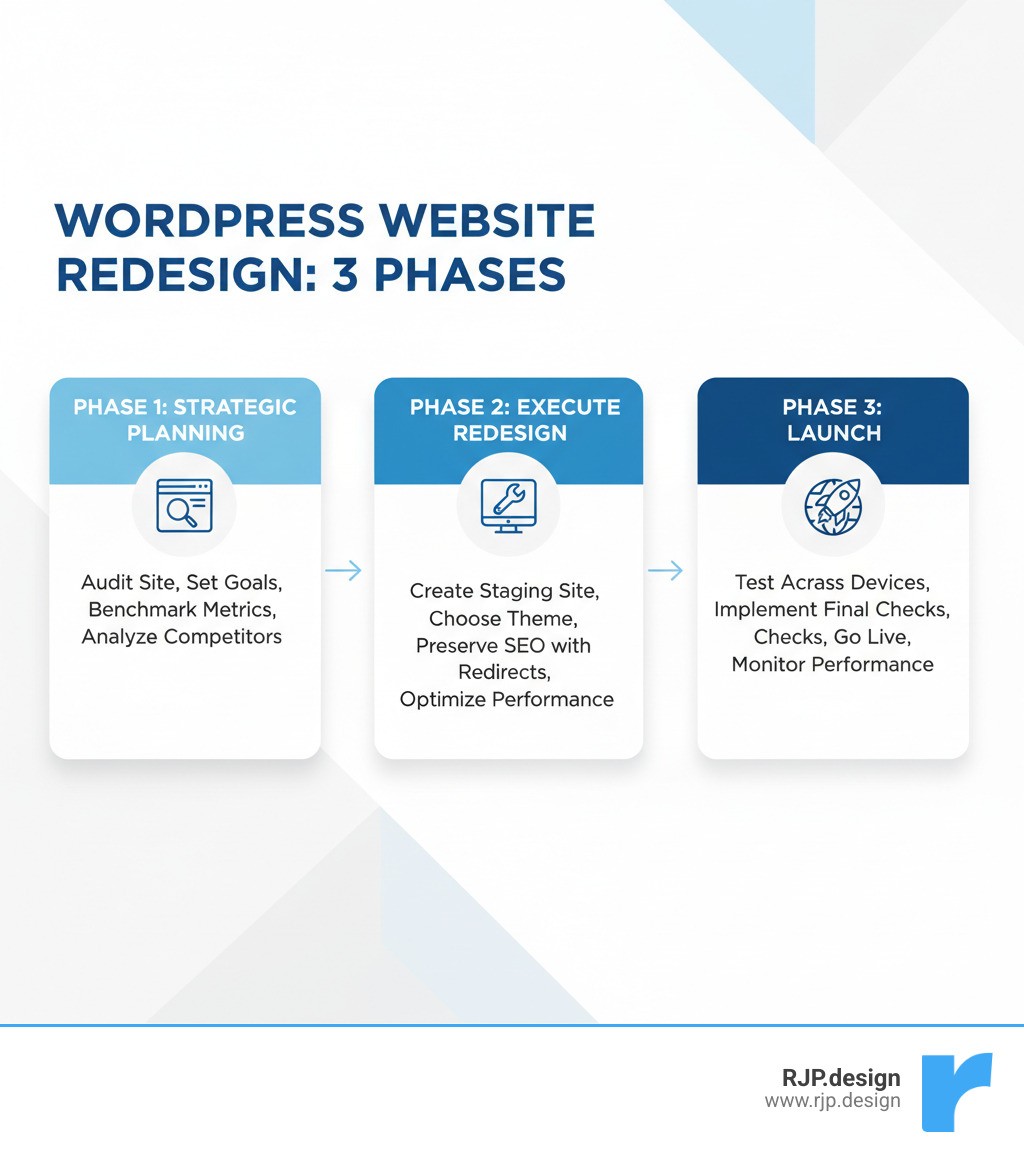
A wordpress website redesign is more than a fresh coat of paint—it’s a strategic overhaul to make your site work harder for your business. A successful redesign can solve existing problems, improve Core Web Vitals, boost conversion rates, and improve user experience. The process involves three key phases:
Plan: Audit your current site, set clear goals, and benchmark metrics.
Execute: Build in a staging environment, preserve SEO, and optimize for speed.
Launch: Test thoroughly, implement redirects, and monitor performance.
Key reasons to redesign:
Declining traffic or conversion rates
Outdated design that doesn’t reflect your brand
Poor mobile experience or slow loading times
Security vulnerabilities from old themes or plugins
However, redesigns are significant undertakings. Without proper execution, you risk losing SEO rankings, confusing visitors, or creating technical problems. That’s why a clear roadmap is essential.
I’m Ross Plumer, and I’ve helped businesses market over $20 million in revenue through strategic wordpress website redesign projects. My approach balances aesthetics with performance, integrating psychology and user behavior research to create sites that don’t just look good—they convert.
Essential wordpress website redesign terms:
Phase 1: Strategic Planning Before You Begin
Successful wordpress website redesign projects start with a solid plan. This phase lays the groundwork for everything that follows, saving you time, money, and stress. It’s about understanding where you are, where you want to go, and how you’ll measure success.
Why and When to Redesign Your WordPress Site
How do you know it’s time for a redesign? Your website needs regular attention to stay healthy. Look for these common signs:
Your design looks outdated. An old-fashioned design can make your business seem out of touch and erode trust. Your site should represent who you are today.
Mobile users are struggling. With over half of web traffic coming from mobile, a poor mobile experience is like turning away customers at the door. A responsive design is essential.
Your site loads slowly. Visitors will leave if a page takes more than a few seconds to load. Slow speed hurts both user experience and search rankings.
People are bouncing. A high bounce rate signals a disconnect between what visitors expected and what they found, whether it’s due to confusing navigation or irrelevant content.
Your brand has evolved. If you’ve rebranded or shifted your business focus, your website must reflect these changes to maintain brand consistency.
Conversions are disappointing. Your site should generate leads and sales. If it’s not converting, a redesign can streamline user journeys and optimize calls to action.
Security is a concern. Older themes and plugins can have security vulnerabilities. A redesign is an opportunity to update to more secure, modern tools.
Your business goals have changed. If your current site can’t support new goals like e-commerce or improved accessibility, it’s time for an upgrade.
Setting Clear Goals and Benchmarking
Without clear, measurable goals, a redesign can lack direction. We need specific targets tied to your business objectives.
Start by evaluating your current site. Before changing anything, use analytics to understand what’s working and what isn’t. Common goals include improving Core Web Vitals, increasing conversion rates, or reducing bounce rates.
Establish your baseline. You can’t measure improvement without knowing your starting point. Collect data on traffic, bounce rates, conversion rates, and session duration using tools like Google Analytics. Use Google PageSpeed Insights and WebPageTest to benchmark performance.
Listen to your users. Numbers tell you what is happening, but user feedback tells you why. Use tools like the UserFeedback plugin for surveys or Microsoft Clarity for heatmaps and session recordings to see your site through your visitors’ eyes.
Next, decide whether to handle the redesign yourself or hire professionals.
Feature | DIY Redesign | Professional Agency Redesign |
|---|---|---|
Cost | Lower monetary cost, higher time investment | Higher monetary cost, lower time investment |
Control | Full control over every aspect | Collaborative, expert-guided process |
Expertise | Relies on your own skills | Access to specialized design, development, and SEO experts |
Time | Can be lengthy if you’re learning | More efficient, faster execution |
Quality/Uniqueness | Varies based on skill and tools | Higher chance of unique, high-quality, custom design |
Support | Self-support or community forums | Ongoing support and maintenance often included |
While DIY can save money, hiring professionals provides expertise, efficiency, and support. At RJP.design, our team is dedicated to helping your business grow with high-quality service.
The Crucial Pre-Redesign Audit
A comprehensive audit is a full health checkup for your website. It identifies strengths, weaknesses, and opportunities, ensuring the redesign improves your site without accidentally harming it.
Content audit: Review all content for quality, relevance, and SEO performance. Identify content to update, consolidate, or remove.
SEO audit: Use a tool like Screaming Frog to inventory URLs, meta data, and internal links. Analyze keyword rankings and identify technical SEO issues.
Performance audit: Assess loading times and Core Web Vitals with Google PageSpeed Insights and WebPageTest to find opportunities for speed improvements.
User experience (UX) audit: Analyze user flows, navigation, and calls to action. Use tools like Microsoft Clarity to see where users get stuck.
Competitive analysis: Review competitors’ websites to identify industry standards and find opportunities to differentiate your brand.
Plugin and technical review: Evaluate all current plugins for necessity, performance impact, and security. Document any technical debt or accessibility issues.
This audit provides the foundation for a wordpress website redesign that is not just prettier, but performs better for your business.
Phase 2: Executing Your WordPress Website Redesign
With a solid plan, it’s time to start building. Careful execution in this phase is the difference between a smooth transition and a chaotic mess. Here’s how to bring your vision to life.
Setting Up a Safe Redesign Environment
The golden rule of any wordpress website redesign is to never work directly on your live site. Doing so turns your visitors into unwitting testers for unproven features. Instead, use a safe, isolated environment.
Staging Sites: A staging site is a clone of your live website on a separate server where you can experiment freely without affecting visitors. Most quality hosts offer one-click staging. Remember to check the “Discourage search engines from indexing this site” option in WordPress to avoid duplicate content issues.
Local Development: For more complex projects, tools like Local WP let you install WordPress on your computer. This provides complete control and lightning-fast development speed.
Backups: Before making any changes, create a complete backup of your site using a plugin like Duplicator. This is your safety net if anything goes wrong.
Version Control: For larger projects, systems like Git track every change, allowing for easy collaboration and rollbacks. It’s like an unlimited “undo” button for your website.
Using a proper development environment ensures your visitors only see the polished final result.
Preserving SEO During a WordPress Website Redesign
Losing search rankings during a redesign is a common but avoidable mistake. SEO should be a primary consideration from the start, not an afterthought. The goal is to preserve and improve your existing rankings.
URL Mapping and 301 Redirects: This is the most critical step. If any URLs change, map each old URL to its new one and implement 301 (permanent) redirects. This passes SEO value and prevents 404 errors. Ensure all previous redirects also remain intact.
Meta Data Migration: Carefully transfer and refresh existing title tags, meta descriptions, and schema markup. This is a great opportunity to improve them for better click-through rates.
Internal Linking: Maintain or improve your internal linking structure to help search engines understand your site’s hierarchy and distribute authority effectively.
XML Sitemap: After making changes, regenerate and resubmit your XML sitemap via Google Search Console to help search engines find your new pages quickly.
Image Alt Text: Ensure every image has descriptive alt text. This helps with image SEO and improves accessibility for users with visual impairments.
An SEO plugin like All in One SEO (AIOSEO) can streamline managing redirects, meta data, and other on-page elements. By integrating SEO from the beginning, your redesigned site will launch with stronger search visibility.
Designing for Performance and User Experience
A beautiful website that’s slow or confusing won’t achieve your goals. A great wordpress website redesign prioritizes both speed and an intuitive user experience.
Mobile-First Design: Since most visitors use phones, design for mobile screens first and then scale up. This ensures a seamless experience on all devices.
Core Web Vitals: Optimize for Google’s key performance metrics—Largest Contentful Paint (LCP), First Input Delay (FID), and Cumulative Layout Shift (CLS)—to provide a fast, stable, and responsive experience.
Image Optimization: Compress images, use modern formats like WebP, and implement lazy loading. This dramatically improves page load times.
Caching and CDN: Implement browser, page, and object caching to reduce server load. Use a Content Delivery Network (CDN) to deliver content quickly to visitors worldwide.
Clean Code: Follow the WordPress coding standard and minimize unnecessary scripts and styles for a lean, fast-loading site.
Strategic Plugin Use: Evaluate every plugin for necessity and performance impact. Remove bloated or unused plugins that slow your site down.
New Functionality: A redesign is the perfect time to add features that improve UX and meet business goals. WordPress plugins make it easy to add e-commerce with WooCommerce, online courses with Sensei LMS, forums with bbPress, advanced forms with WPForms, or digital product sales with Easy Digital Downloads.
The result is a redesigned site that’s not just visually appealing but also a high-performing, user-friendly tool for your business.
Phase 3: The Pre-Launch Checklist and Going Live
This final phase isn’t about rushing to the finish line; it’s about meticulous checking to ensure your wordpress website redesign debuts flawlessly. A systematic approach turns a stressful launch day into a smooth one.
Your Essential Pre-Launch Checklist
Launching without a checklist is a risk you don’t need to take. This list ensures we catch problems before your visitors do.
Proofread Content: Check every word on the site for typos and grammatical errors. Clear, professional copy builds trust.
Test All Forms: Submit test entries through every contact form, signup form, and checkout process to confirm they work and notifications are sent correctly.
Check All Links: Click through internal and external links to ensure they work and point to the correct destinations. Fix any broken links.
Verify Tracking Codes: Double-check that Google Analytics 4 and any other tracking pixels are installed and firing correctly. Without data, you can’t measure success.
Test Across Devices and Browsers: Ensure your site looks and functions correctly on various smartphones, tablets, and desktops using browsers like Chrome, Firefox, Safari, and Edge. Use Chrome Developer Tools for emulation.
Confirm 301 Redirects: Verify that all redirects from old URLs are working to preserve SEO and user experience.
Run a Security Scan: Check for any last-minute vulnerabilities.
Check Favicon and Legal Pages: Ensure your site icon displays correctly and that your privacy policy and terms of service are up-to-date and accessible.
Best Practices for a Smooth Launch
With the right strategy, launch day can be exciting. Here’s how to ensure it goes smoothly.
Time Your Launch: Schedule the launch during your site’s lowest traffic period (often late at night or early morning) to minimize disruption if issues arise.
Push Staging to Live: Use your host’s migration tools or a reliable plugin to move the staging site to your live domain.
Clear All Caches: Immediately after launch, clear all server, plugin, and CDN caches so visitors see the new design.
Submit Your Sitemap: Submit your updated XML sitemap to Google Search Console to encourage faster indexing of your new pages.
Monitor Performance: Actively watch Google Analytics for traffic patterns, Google Search Console for crawl errors, and use Google PageSpeed Insights to verify site speed.
Announce Your New Site: Once everything is stable, share the news with your audience through email, social media, or a blog post.
Common Pitfalls to Avoid in a WordPress Website Redesign
Even well-intentioned projects can stumble. Here are the most common mistakes to avoid.
Ignoring SEO: Failing to implement 301 redirects or migrate meta data can destroy search rankings. SEO must be a core part of the plan.
Neglecting Mobile Users: A poor mobile experience alienates the majority of your audience and hurts search rankings.
Poor Planning: Rushing into a redesign without clear goals, a budget, or a timeline leads to chaos.
Scope Creep: Adding new features mid-project can derail timelines and budgets. Stick to the plan.
Insufficient Testing: Launching with broken forms, links, or mobile layouts is preventable with a thorough pre-launch checklist.
Forgetting to Backup: Always create a full backup before starting. Without it, recovering from a critical error can be impossible.
Ignoring Site Speed: Performance should be monitored throughout development, not just after launch. Use tools like Google PageSpeed Insights to check.
Launching Without Analytics: Ensure tracking is correctly installed before launch to measure the redesign’s impact.
At RJP.design, our refined wordpress website redesign process helps you avoid these pitfalls, ensuring your project is a success story.
Frequently Asked Questions about WordPress Redesigns
Starting a wordpress website redesign can feel overwhelming. Here are answers to the most common questions we hear.
How much does a WordPress website redesign cost?
The cost of a wordpress website redesign varies widely. A DIY approach using a premium theme ($50-$100) and plugins (around $200) has a low monetary cost but a high time investment.
Hiring a professional web design service is a larger initial investment but provides a higher-quality, custom site built to convert visitors. Professional services can start around $30 per hour but scale based on complexity.
Key factors that influence cost include:
Complexity and Features: A simple brochure site costs less than a complex e-commerce platform.
Number of Pages: More pages require more design and development time.
Level of Customization: A pre-made theme is cheaper than a fully custom design.
Additional Services: Content creation, copywriting, and photography will add to the cost.
Ongoing Maintenance: Post-launch support packages are an additional investment that keeps your site running smoothly.
We provide clear, upfront communication about costs so you understand the value of your investment.
How long does a redesign take?
Like cost, the timeline for a wordpress website redesign depends on the project’s scope. A typical project can be broken down into three phases:
Planning (1-4 weeks): This includes audits, goal setting, and strategy. Time spent here prevents costly delays later.
Design & Development (3-10+ weeks): A simple DIY redesign might take a few weeks, while a complex agency project can take several months.
Testing & Launch (1-2 weeks): This final phase ensures everything is perfect before going live.
For a small to medium-sized website, expect the entire process to take six to twelve weeks. Larger, more complex sites will naturally take longer.
How often should I redesign my website?
As a general rule, consider a wordpress website redesign every two to three years. However, the ideal frequency depends on several factors rather than a strict timeline.
Look for these triggers:
Performance: If your site is underperforming in traffic, conversions, or user engagement, it’s time for a refresh.
Technology: If your site uses outdated technology or isn’t mobile-responsive, a redesign is necessary to meet modern standards.
Business Evolution: If your brand, goals, or target audience have changed, your website needs to reflect that.
Industry Standards: In fast-moving industries, you may need to update more frequently to stay competitive.
Not every change requires a full redesign. Minor updates and content refreshes can be handled through regular maintenance. The key is to monitor your site’s performance and proactively respond to its needs.
Conclusion
A wordpress website redesign is a strategic investment that can transform your online presence. When done right—with careful planning, thoughtful execution, and attention to detail—it becomes one of the most powerful tools in your business arsenal.
We’ve walked through the three essential phases: strategic planning, careful execution, and a flawless launch. The long-term benefits are significant: improved user experience, higher conversion rates, better SEO performance, and a modern, professional brand image.
At RJP.design, we’ve helped businesses market over $20 million in revenue through strategic redesigns. Our approach integrates psychology and user behavior research because a beautiful design means nothing if it doesn’t convert. Our down-to-earth team focuses on understanding your business goals and translating them into a website that works for you.
We build websites that become genuine business assets—sites that look professional, load quickly, rank well, and turn visitors into customers.
If you’re facing challenges like slow loading times, high bounce rates, or an outdated design, it’s time to take action. Your website should be working as hard for your business as you do.
Ready to transform your online presence? Let’s talk about what a strategic redesign could mean for your business.