
Web
From Outdated to Outstanding: Your Complete Website Redesign Playbook
Mar 18, 2026

Why a Strategic Approach to Website Redesign Matters
How to redesign website effectively is one of the most critical decisions you'll make for your business—and one of the riskiest if done poorly. Your website is often the first place customers meet your brand, and if it feels outdated, slow, or confusing, you're losing opportunities before they even begin.
Quick Answer: Essential Steps to Redesign Your Website
Audit current performance - Analyze metrics like bounce rate, conversion rate, and page speed
Set SMART goals - Define measurable objectives (e.g., reduce bounce rate by 15%)
Research users and competitors - Understand your audience needs and market gaps
Plan content and SEO strategy - Create sitemaps, migration maps, and 301 redirects
Design for UX and accessibility - Focus on mobile responsiveness and visual hierarchy
Build in a staging environment - Choose the right CMS and optimize for performance
Test thoroughly - Conduct usability testing across browsers and devices
Launch strategically - Monitor performance and gather user feedback
Iterate continuously - Make data-driven improvements post-launch
The stakes are high: research shows that 42% of users will leave a site simply because of poor functionality, and 63% of marketers had no idea how much their website redesign cost. A strategic redesign isn't just a visual refresh—it's a comprehensive transformation of your site's structure, content, and user experience to better serve your business goals.
Most websites need a redesign every 2 to 3 years to keep pace with evolving technology, user expectations, and design standards. But timing matters less than momentum—if your site is driving away potential customers, slipping in search rankings, or making your team cringe every time they share the URL, it's time to act.
A well-executed redesign can dramatically improve your results. When done right, it reduces bounce rates, increases conversions, and positions your brand as credible and professional. When done wrong—by ignoring SEO, burying your value proposition, or choosing aesthetics over functionality—it can tank your traffic overnight.
I'm Ross Plumer, and I've spent years helping businesses navigate the complexities of how to redesign website projects that actually deliver measurable results, drawing on my background in digital marketing, web development, and psychology to create strategies that resonate with real users. In this guide, I'll walk you through a proven 5-phase process that ensures your redesign becomes a growth engine, not a costly mistake.
Easy How to redesign website glossary:
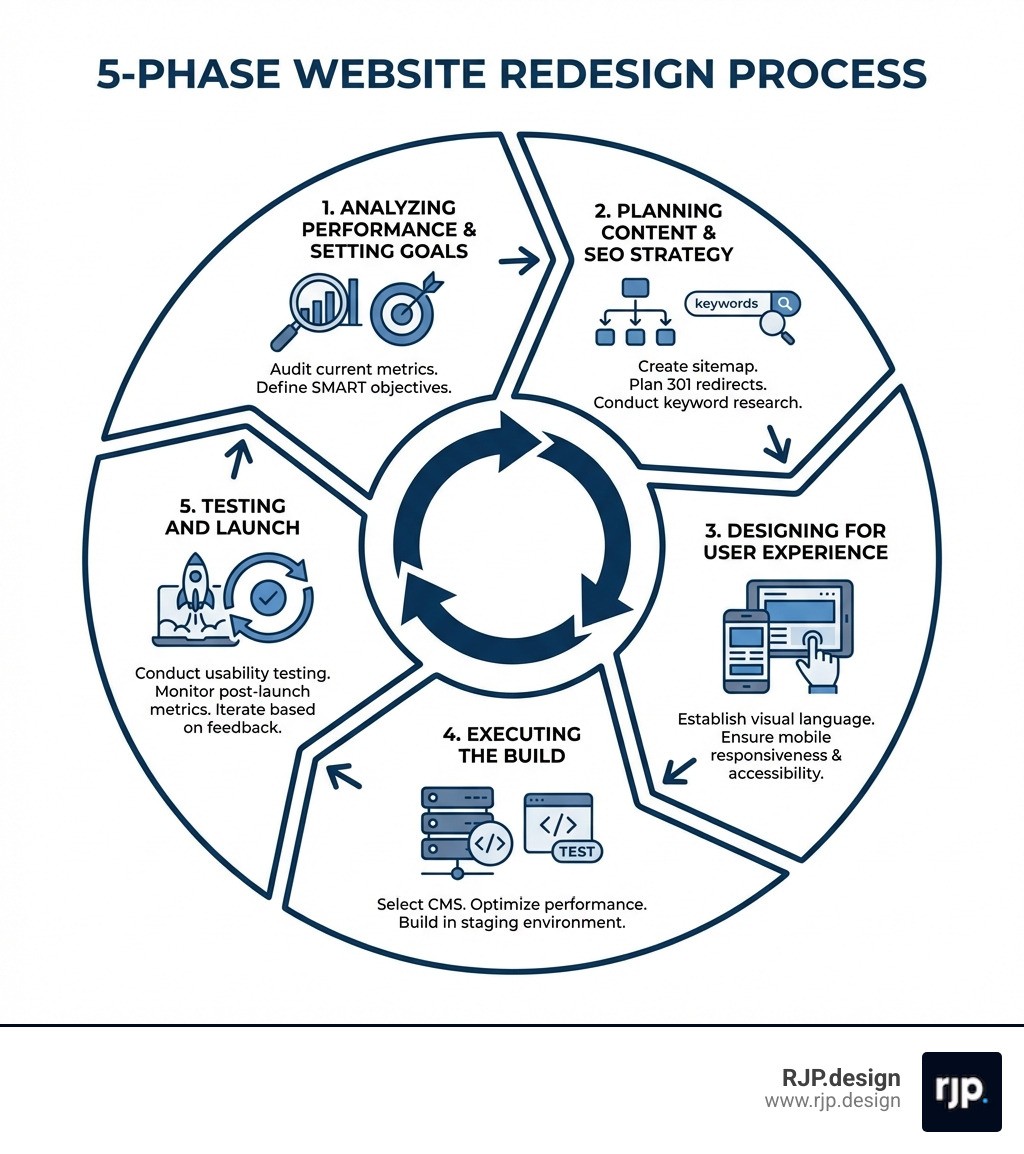
How to Redesign Website: The Strategic 5-Phase Process
Redesigning a website is like remodeling a house. You wouldn't just slap a fresh coat of paint on a crumbling foundation and call it a day. You need a blueprint, a budget, and a clear understanding of who will be living there. In the digital world, that means moving beyond "making it look pretty" and diving into the structural and functional elements that drive business growth.

Redesign vs. Refresh: What’s the Difference?
Before we dive into the process, it’s important to understand the scope of your project. Many businesses confuse a "refresh" with a "redesign." While a refresh is like buying new furniture and curtains, a redesign is a full-scale renovation.
Feature | Website Refresh | Website Redesign |
|---|---|---|
Scope | Surface-level changes (colors, fonts, images) | Structural, functional, and visual overhaul |
Impact | Maintains existing structure and SEO | Changes site architecture and user flows |
Timeline | 2–4 weeks | 4 weeks to 6 months+ |
Cost | Low to Moderate | Moderate to High |
Goal | Brand alignment and visual update | Improved performance, UX, and conversion |
The Reality of Timelines and Costs
When we talk about how to redesign website projects, the "how long" and "how much" are often the first questions asked. Based on industry data, a simple redesign for a small business typically takes 4–6 weeks and costs between $2,000 and $10,000. For larger, more complex sites with e-commerce or custom integrations, timelines can stretch to 3–6 months with budgets ranging from $15,000 to $50,000+.
The danger lies in the "hidden" costs. 63% of marketers were unaware of their final redesign costs. This usually happens due to scope creep—adding features mid-project—or failing to account for content creation and technical SEO migration. At RJP.design, we prioritize transparency and stakeholder alignment to ensure your project stays on track and within budget.
Phase 1: Analyzing Performance and Setting Goals
A successful redesign is rooted in data, not gut feelings. Before you change a single pixel, you need to understand how your current site is performing. This is where tools like Google Analytics and Hotjar become your best friends.
The Performance Audit
We start by documenting your baseline metrics. If you don't know where you are, you can't measure how far you've come. We look at:
Bounce Rates: Are people leaving immediately?
Dwell Time: How long are they staying?
Conversion Rates: Are they taking the desired action (buying, calling, signing up)?
Traffic Sources: Where are your visitors coming from?
Setting SMART Goals
"I want a better website" is a wish, not a goal. To succeed, your objectives must be Specific, Measurable, Achievable, Relevant, and Time-bound. For example, instead of saying "increase traffic," a SMART goal would be: "Increase organic traffic by 20% within six months of launch by optimizing for target keywords."
By identifying your buyer personas and their intents—what they want to know, go, do, or buy—we can tailor the redesign to meet their specific needs. If you're feeling overwhelmed by the technical side of this, exploring More info about website redesign services can help you find the right partner to handle the heavy lifting.
Phase 2: Planning Your Content and SEO Strategy
This is the phase where most redesigns fail. Businesses often focus so much on the "look" that they forget about the "findability." If you change your URL structure without a plan, you risk losing years of "link juice" and search engine authority.
The Sitemap and Migration Map
Think of your sitemap as the backbone of your site. We recommend keeping your main navigation simple—no more than five to seven main categories. Once the new structure is set, we create a migration map. This is a spreadsheet that pairs every old URL with its new equivalent.
Protecting Your Rankings with 301 Redirects
If a page URL changes, you must implement 301 redirects. This tells search engines that the content has moved permanently, ensuring users don't hit a "404 Not Found" error and that your SEO value transfers to the new page.
Content Inventory: Water and the Cup
There’s a common saying in design: "Content is water, and design is the cup." If you have too much water for a small cup, it overflows. If the cup is too big, it looks empty. We conduct a full content inventory to decide what to keep, what to refresh, and what to delete. For those using specific platforms, our WordPress Website Redesign Services Guide offers deep insights into managing content within the world's most popular CMS.
Phase 3: Designing for User Experience and Accessibility
Now we get to the visual part, but with a twist: we design for humans first, and aesthetics second. A beautiful site that no one can navigate is a failure.
Visual Language and Color Psychology
Did you know that color is accountable for 85% of conversion? Your visual language—typography, color palette, and imagery—should reflect your brand identity while guiding the user's eye toward your primary Call to Action (CTA). We use high-fidelity wireframes to create a "skeleton" of the site before adding colors, ensuring the layout works logically.
Mobile Responsiveness and Accessibility
Since 2016, mobile browsing has surpassed desktop. Google now uses mobile-first indexing, meaning it primarily looks at your mobile site to determine your rankings. Your design must be responsive, adjusting smoothly to any screen size.
Furthermore, accessibility is no longer optional. Following WCAG (Web Content Accessibility Guidelines) ensures that people with disabilities can use your site. This includes:
Contrast: High contrast between text and background.
Alt Text: Descriptions for images so screen readers can "see" them.
Keyboard Navigation: Ensuring users can navigate without a mouse.
For a look at the latest trends in this area, check out Website Revamp Best Practices 2025.
Phase 4: Executing the Build: How to Redesign Website
With the blueprints and designs approved, we move into the development phase. This is where the "magic" happens, but it should always happen in a controlled environment.
The Staging Environment
We never build on your live site. Instead, we use a staging environment—a private clone of your website where we can build, break, and fix things without the public seeing. This ensures zero downtime for your business during the construction phase.
Choosing the Right CMS
Whether it's WordPress, Elementor, or a custom-coded solution, your Content Management System (CMS) should empower your team, not hinder them. We prioritize systems that allow you to make easy updates without needing a developer for every minor change.
Speed and Technical Health
A site that takes more than three seconds to load will lose nearly half its audience. We use PageSpeed Insights to monitor load times, optimizing images, minifying code, and leveraging caching to keep things lightning-fast. Clean code and robust security protocols are the foundation of a Professional Website Redesign.
Phase 5: Testing and Launch: How to Redesign Website
Before we hit the "Launch" button, we put the site through a rigorous "stress test." This is the most nerve-wracking but rewarding part of the process.
The Quality Assurance (QA) Checklist
We don't just check if the buttons work. We perform:
Cross-Browser Testing: Does it look the same on Chrome, Safari, and Firefox?
Device Testing: How does it feel on an iPhone vs. an Android tablet?
Functional Testing: Do the forms submit? Does the checkout process work?
SEO Audit: Are the meta tags in place? Are the 301 redirects active?
The Soft Launch
In many cases, we recommend a "soft launch"—releasing the site to a small group of trusted users or employees first. This allows us to catch any minor bugs or usability bottlenecks that weren't apparent during internal testing.
Post-Launch Monitoring
Once the site is live, the work isn't over. We monitor performance metrics immediately to ensure that the redesign is hitting the SMART goals we set in Phase 1. If you want to see the full picture of what happens after the "Go Live" moment, our Website Redesign Complete Guide has you covered.
Conclusion: Ensuring Long-Term Success
Redesigning your website is a journey, not a destination. The digital landscape changes every day, and your website should be a living, breathing entity that evolves with your business. By following this 5-phase playbook, you move from a reactive "we need a new look" mindset to a proactive, strategic approach that drives real ROI.
At RJP.design, we believe that high-quality service shouldn't come with high-brow attitudes. Our down-to-earth team is dedicated to client satisfaction, ensuring that the process of how to redesign website assets is as smooth and stress-free as possible. We don't just build websites; we build growth engines that help your business stand out in a crowded market.
Ready to transform your online presence? Let’s make your website outstanding together. Start your web design and development journey with us today.