
Marketing
The Ultimate Guide to Google Business Profile Optimization
Mar 17, 2026
Why Local Search Visibility Matters More Than Ever
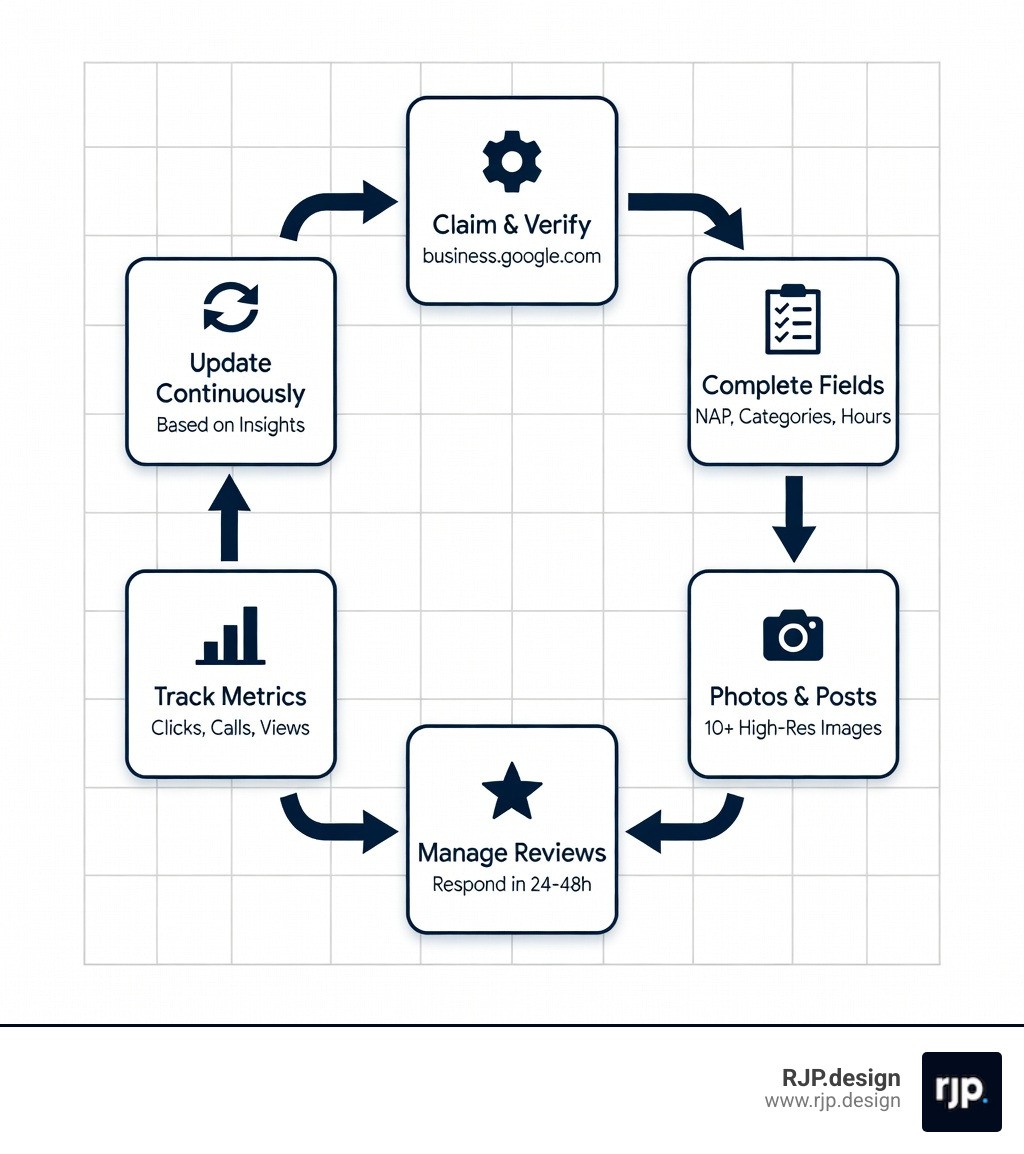
How to optimize GMB? Start by claiming and verifying your listing, ensuring NAP (Name, Address, Phone) consistency across all platforms, selecting the most specific primary category, uploading high-resolution photos, actively managing reviews, posting regular updates, and tracking performance metrics to make data-driven improvements.
Quick optimization checklist:
Claim and verify your Google Business Profile at business.google.com
Complete every field including business name, address, phone, hours, and description
Choose accurate categories with one highly specific primary category
Upload 10+ high-quality photos of your storefront, interior, products, and team
Generate and respond to reviews within 24-48 hours
Post weekly updates using offers, events, or news
Track your insights monthly to identify what's working
The stakes for local search visibility have never been higher. 46% of all Google searches are looking for local businesses, and 50% of those searchers click on a Map Pack listing before they ever visit a website. For small business owners struggling with online visibility, your Google Business Profile often serves as your digital storefront—sometimes appearing before your actual website in search results.
Yet most businesses leave this powerful tool underutilized. They claim their listing but never optimize it. They ignore reviews. They upload a single photo and forget about it. Meanwhile, competitors who understand Google Business Profile optimization are capturing those clicks, calls, and customers.
The research is clear: businesses with complete profiles get 7 times more clicks than incomplete ones. Profiles with 100+ photos receive 520% more calls. Complete listings are 2.7 times more likely to be trusted by potential customers. These aren't marginal gains—they're transformative results that directly impact your bottom line.
I'm Ross Plumer, and through my work with businesses that have generated over $20 million in revenue, I've seen how to optimize GMB effectively and turn local search into a reliable customer acquisition channel. This comprehensive guide will walk you through every proven strategy—from the foundational setup steps to advanced multi-location tactics—so you can compete and win in your local market.
Quick How to optimize GMB? definitions:
How to optimize GMB?
To understand How to optimize GMB?, we must first understand how Google decides who wins the "Local 3-Pack" (those three coveted spots at the top of the search results). Google doesn't just pick names out of a hat; it uses a sophisticated algorithm based on three core pillars: Relevance, Distance, and Prominence.
Factor | What it Means | How We Optimize It |
|---|---|---|
Relevance | How well your profile matches what someone is searching for. | Detailed descriptions, correct categories, and keyword-rich services. |
Distance | How far your business is from the searcher's location. | Accurate NAP data and clearly defined service areas. |
Prominence | How well-known or authoritative your business is. | Review count, high-quality backlinks, and consistent citations. |
Optimizing your profile is about signaling to Google that you are the most relevant, trustworthy, and prominent option for a user’s query. This starts with NAP consistency. NAP stands for Name, Address, and Phone number. If your name is "Main Street Pizza" on Google, but "Main St. Pizzeria" on Yelp, Google gets confused. Inconsistency breeds distrust in the algorithm.
Selecting the right Business categories is perhaps the most significant ranking factor you can control. You are allowed one primary category and up to nine secondary categories. Be specific! If you are a "Personal Injury Lawyer," don't just settle for "Lawyer."
For those who don't have a physical storefront where customers visit, Service areas are your best friend. You can list up to 20 service areas (cities or zip codes) to tell Google exactly where you operate. Finally, don't overlook Business attributes. These are small tags like "Wi-Fi available," "Women-led," or "Wheelchair accessible" that help you show up in filtered searches. If you're feeling overwhelmed, our Local SEO Services can help you navigate these technical waters.
Claiming and Verifying Your Profile
Before you can reap the rewards, you have to own the digital dirt. You can Manage your business by visiting the official portal and searching for your name. If it exists, you'll need to claim it; if not, you'll create it from scratch.
Verification methods vary depending on your business type. While the classic postcard (arriving in 14 days) is still standard, Google now offers video verification, phone calls, and even instant verification if you've already verified your site through Google Search Console.
Sometimes, you might find that someone else has already claimed your listing. Don't panic! You can submit Ownership requests through the GMB interface. The current "owner" has seven days to respond. If they don't, Google often grants you the keys.
Once you have access, it’s vital to understand User access levels. We always recommend that the business owner remains the "Primary Owner." You can then grant "Manager" access to agencies or employees. This ensures you never lose control of your most valuable local asset. For a deeper dive into these technicalities, check out our Google Business Profile Ultimate Guide.
Best Practices for How to Optimize GMB Listings
Now that you have the keys, let's decorate. Learning How to improve your local ranking on Google involves a mix of art and science.
First, your Primary categories should reflect your main revenue driver. If you're a dentist who also does whitening, "Dentist" is your primary; "Teeth whitening service" is your secondary.
Next, write a Keyword-rich description. You have 750 characters to tell your story. Use the first 244 characters wisely, as they are the most visible. Describe what you do, where you do it, and what makes you unique—but avoid "salesy" language or promotional links, as Google tends to frown upon them in this section. For more tips on staying ahead of the curve, see our Local SEO Guide 2025.
Keep your Operating hours updated religiously. There is nothing that earns a one-star review faster than a customer showing up to a "closed" sign when Google said you were "open." Use the "Special Hours" feature for holidays or team training days. Finally, if you are a service-based business, add Appointment links. Integrating a direct booking URL can drastically increase your conversion rate by removing friction for the customer.
Leveraging Reviews and Engagement for How to Optimize GMB
Reviews are the lifeblood of local search. 74% of consumers read at least two reviews before making a purchase, and Google uses the keywords within those reviews to understand what you offer. If a customer writes, "best gluten-free pizza in town," Google now associates your business with that specific search term.
Review responses are just as important as the reviews themselves. 89% of consumers expect a response, and replying to 100% of your reviews can actually boost your ranking position by an average of 2.1 spots! When responding, try to naturally include Keyword-rich feedback. Instead of "Thanks for the review," try "Thanks for the review! We're glad you enjoyed our organic landscaping services in Seattle."
Don't forget Google Posts. Think of these as free mini-ads. You can post about:
What's New: General updates or behind-the-scenes looks.
Offers: Coupons or discounts (these get great click-through rates!).
Events: Upcoming workshops or sales.
Regular activity—at least once a week—signals to Google that your business is active and relevant. Additionally, manage your Q&A section. Did you know you can "self-seed" questions? You can ask and answer your own frequently asked questions to ensure customers get the right information immediately. This is a core part of our Local SEO Best Practices Guide.
Visual Content and Media Optimization
According to Google, businesses with photos get 42% more requests for directions. Humans are visual creatures; we want to see the vibe of a restaurant or the professionalism of an office before we show up.
High-resolution photos are a must. Your photos should be at least 720x720 pixels and in JPG or PNG format. Aim for a mix of:
Exterior: Help people find your building.
Interior: Show off your atmosphere.
Team at work: Build trust by showing the real people behind the brand.
Products: Let your work speak for itself.
Beyond static images, consider Virtual tours and videos. Videos must be under 30 seconds and 100MB, but they receive 2.3x more engagement than standard images. If you're looking to Optimize Local Listings, visual storytelling is your secret weapon. Pro tip: Use "User-Generated Content" (UGC). Photos uploaded by your customers often feel more authentic and can drive 28% more engagement than professional stock photos.
Advanced Multi-Location Management
If you manage a franchise or a business with 10+ locations, the "one-by-one" approach will drive you crazy. This is where Bulk verification comes in. By uploading a spreadsheet to Google, you can verify all your locations at once, provided they meet Google's eligibility requirements.
To stay organized, use Location groups. Think of these as folders for your listings. You can grant access to a regional manager for only the "West Coast" group, for example. Store codes are another essential for multi-location pros; these are unique IDs for each shop that help you sync data with Google Ads and Merchant Center.
While you want Brand consistency (the same logo and general description), you must also prioritize localization. Each location should have its own local phone number and Localized landing pages on your website. Linking each GMB profile to a specific page for that city—rather than just the homepage—is a massive ranking signal. Managing this at scale is a specialty of our Local Citations SEO team.
Tracking Performance and Insights
You can't improve what you don't measure. Google Performance insights provide a goldmine of data. You can see exactly how people found you (was it a "Direct" search for your name or a "Discovery" search for your service?) and what they did next.
Key Engagement metrics to watch:
Direction requests: If these drop, check if your map pin has moved!
Website clicks: Are people interested enough to learn more?
Call clicks: The ultimate "ready to buy" signal.
We recommend using Call tracking. By placing a tracking number in the primary phone slot and your real business line in the secondary slot, you can see exactly how many leads GMB is generating without hurting your NAP consistency. Use this data to make Data-driven adjustments. If you see a spike in searches for a specific service you offer, create a Google Post about it! For more on using data to dominate, read Habazar Google My Business Optimization to Help Rank Your Sites.
Conclusion
At RJP.design, we believe that your online presence shouldn't be a source of stress—it should be your most hardworking employee. Our down-to-earth team is dedicated to ensuring that your business is not only found but chosen. Whether you're a single-location boutique or a multi-state enterprise, the fundamentals of How to optimize GMB? remain the same: be accurate, be active, and be authentic.
By following this guide, you're not just ticking boxes; you're building a foundation for long-term local visibility and client satisfaction. Don't let your competitors own the Map Pack. Take control of your profile today and watch your local impact grow.
Ready to take the next step? Maximize your local impact with Google Search Optimization and let's put your business on the map—literally.