
Web
A Practical Guide to Website Redesign
Jun 19, 2026

What Website Redesign Means and When It’s Time to Act
Website redesign is the process of overhauling your existing site — its structure, design, content, and functionality — to better serve your business goals and the people visiting it.
If you're trying to understand what a website redesign actually involves, here's a quick overview:
Question | Quick Answer |
|---|---|
What is it? | A strategic overhaul of your site's structure, design, content, and navigation |
How is it different from a refresh? | A refresh updates visuals; a redesign transforms architecture and functionality |
When do you need one? | Every 18–30 months, or when traffic, conversions, or UX start to suffer |
How long does it take? | Typically 3–6 months depending on complexity |
What does it cost? | Ranges from ~$5,000 for simple sites to $150,000+ for complex builds |
What's the ROI? | Every $1 invested in UX can return $100 in value |
Your website is often the first thing a potential customer sees. And first impressions stick. A site that loads slowly, looks dated, or confuses visitors doesn't just frustrate people — it quietly costs you business every single day. In fact, 38% of users will leave a website they find outdated, and nearly half of all internet traffic now comes from mobile devices.
The problem is that most small business owners don't realize how much their website is holding them back — until the leads dry up or a competitor's site makes theirs look ten years old by comparison.
A website redesign isn't just a cosmetic exercise. Done well, it's one of the highest-leverage investments you can make in your digital presence. Done poorly — without clear goals, proper redirects, or user research — it can actually hurt your traffic and conversions.
This guide breaks down everything you need to know: when to redesign, how to plan it, what to watch out for, and how to measure whether it worked.
I'm Ross Plumer, a digital marketing and web design strategist with experience helping businesses market over $20 million in revenue — and website redesign is one of the core disciplines I've applied across industries and company sizes. I'll walk you through the full picture so you can make smart, confident decisions about your own site.
In May 2026, a website is no longer just a digital brochure; it is your hardest-working salesperson. However, even the best sales team needs new tools and training eventually. A website redesign is a fundamental transformation of your site’s foundation. It goes beyond the surface to fix how a site works, how it talks to search engines, and how it guides a user from "just looking" to "shut up and take my money."
As user expectations evolve, the "shelf life" of a design has shortened. Industry leaders typically look at a significant update every 18 to 30 months to stay ahead of the curve.
What is a website redesign vs. a website refresh?
We often hear clients ask if they need a "new look" or a "new site." Understanding the difference is key to budgeting and planning. Think of a website refresh like a fresh coat of paint and new furniture in a house. You’re updating colors, fonts, and maybe some images to keep things modern.
A website redesign, on the other hand, is a full renovation. We’re knocking down walls, moving the plumbing, and perhaps adding a second floor. This involves changing the site architecture, the Content Management System (CMS), and the underlying navigation. If your current site has structural limits that prevent you from reaching your business goals, a redesign is the only way forward. For a deeper dive into these differences, check out our Website Redesign Complete Guide.
Feature | Website Refresh | Website Redesign |
|---|---|---|
Primary Focus | Visual Aesthetics | Strategy & Functionality |
Changes | Colors, Fonts, Imagery | Architecture, Navigation, CMS |
SEO Impact | Minimal | Significant (requires redirect maps) |
Timeline | 2–4 weeks | 3–6 months |
Goal | Modernize the brand | Improve ROI, UX, and performance |
Signs your business needs a website redesign
Is your website helping you or hurting you? Sometimes the signs are subtle, like a slow creep upward in your bounce rate. Other times, they are glaring, like a security warning or a layout that breaks on the latest iPhone.
Here are the red flags we look for:
High Bounce Rate: If nearly 50% of people leave as soon as they arrive, your site isn't meeting their needs.
Mobile Misery: Since roughly 50% of internet usage occurs on mobile devices, a site that isn't "mobile-first" is essentially invisible to half your audience.
Declining Conversions: If traffic is steady but leads are dropping, your sales funnel is likely broken.
Accessibility Gaps: If your site doesn't follow WCAG guidelines, you’re excluding users and risking legal trouble.
Outdated Design: 38% of users leave outdated websites immediately.
The business case for redesign: UX, trust, and ROI
Investing in a website redesign isn't just about vanity; it’s about the bottom line. The statistics are hard to ignore: every $1 invested in User Experience (UX) results in a return of $100. That is a staggering 9,900% ROI.
When visitors land on a professional, fast-loading site, they subconsciously assign trust to your brand. Conversely, 53% of visitors will abandon a page if it takes more than 3 seconds to load. By optimizing your "Core Web Vitals" and streamlining your sales funnels, we turn a "pretty" site into a lead-generation machine. If you want to see how we handle these high-stakes projects, explore our approach to Professional Website Redesign.
How to Plan and Execute a Successful Website Redesign
A successful website redesign doesn't happen by accident. It requires a "strategy-first" mindset. Many businesses make the mistake of picking out colors before they’ve defined their goals. We recommend following a structured 15-step guide to website redesign to ensure no detail—from SEO to sitemaps—is missed.
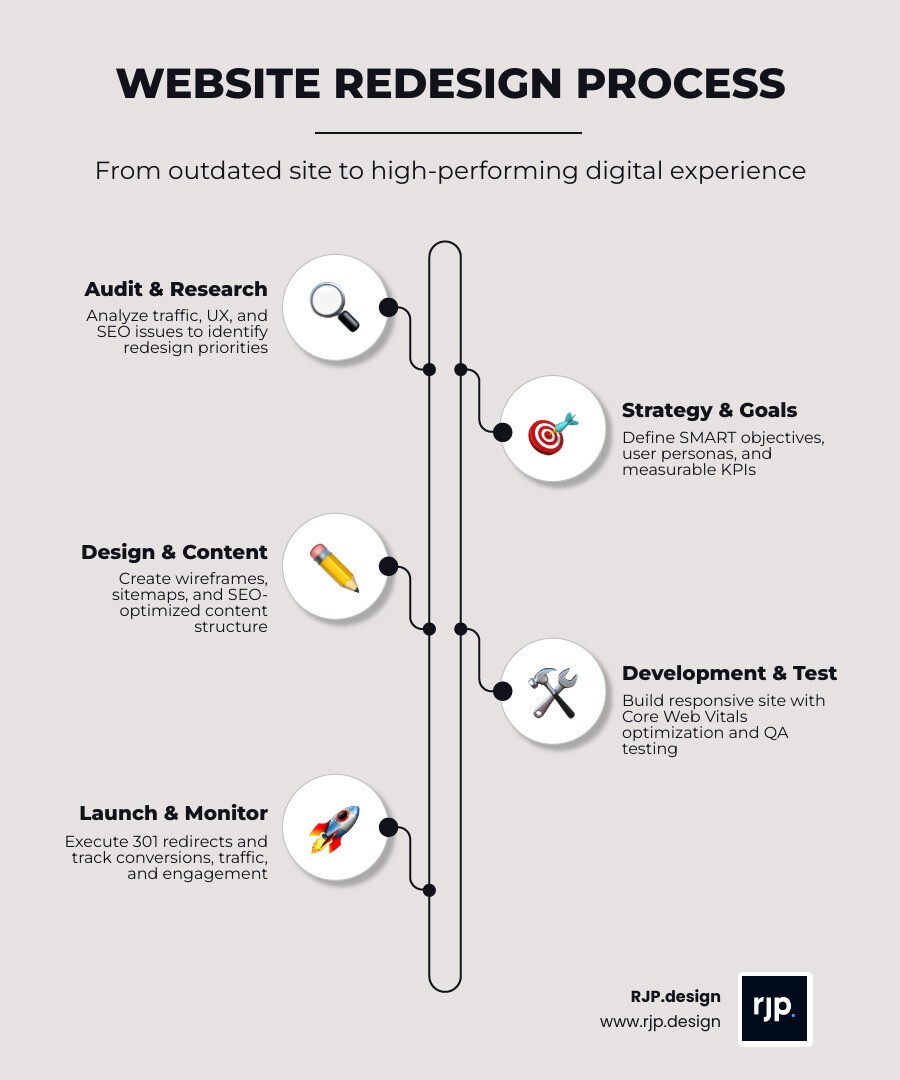
The core phases of a successful website redesign process
We break the process down into five main stages to keep things manageable and on track:
Discovery & Research: We audit your current metrics and set SMART goals (Specific, Measurable, Achievable, Relevant, Time-bound). We also create "user personas" to understand exactly who we are building for.
Planning & Strategy: This is where we build the sitemap and wireframes. We focus on the "content-first" approach—writing the story before we build the stage.
Design: We move into high-fidelity prototypes. This is your chance to see how the brand looks and feels across different devices.
Development & Testing: Our team builds the site using clean, optimized code. We perform rigorous QA testing to find bugs before your customers do.
Launch & Post-Launch: After a "soft launch" to check for issues, we go live. But the work doesn't stop there; we monitor performance daily for the first 30 days.
For a comprehensive walkthrough of these steps, see our Complete Website Redesign Guide.
How AI tools and multiple AI models can improve website redesign
In 2026, AI is a game-changer for the website redesign process. At RJP.design, we use AI not to replace human creativity, but to supercharge it. By using multiple AI models like GPT-4, Claude 3.5, and Gemini in parallel, we can generate various design perspectives from a single prompt.
This "multi-model" approach allows us to:
Compare Variants: See how different AI "brains" interpret your brand vision side-by-side.
Reduce Repetitive Work: AI can handle up to 60% of the front-end "grunt work," like generating basic layouts or cleaning up code.
Visual Refinement: We can quickly iterate on color palettes and typography hierarchy.
Clean Code Export: AI helps us generate production-ready code for platforms like WordPress, Next.js, or Tailwind CSS faster than ever.
UX, SEO, and CTA best practices that protect performance during redesign
A beautiful site is useless if nobody can find it or if they don't know what to do once they arrive. We follow strict best practices to protect your hard-earned rankings:
SEO Preservation: We create a 301 redirect map for every single URL. Changing a URL structure without a redirect is the fastest way to lose 20-50% of your organic traffic.
Accessibility: We ensure high color contrast, keyboard-friendly navigation, and descriptive alt text for images.
Effective CTAs: Your "Call to Action" buttons should be clear, compelling, and use contrasting colors. Instead of "Submit," try "Get My Free Quote."
Performance: We optimize images and minify code to ensure lightning-fast load times, which is a key ranking factor for Google.
Learn more about how we integrate these elements into our Website Redesign Service.
Measuring Results, Avoiding Mistakes, and Learning From Real Redesigns
The launch is just the beginning. To know if your website redesign was a success, you need to look at the data. We believe in being "data-driven, not gut-driven."
How to measure website redesign success with KPIs and analytics
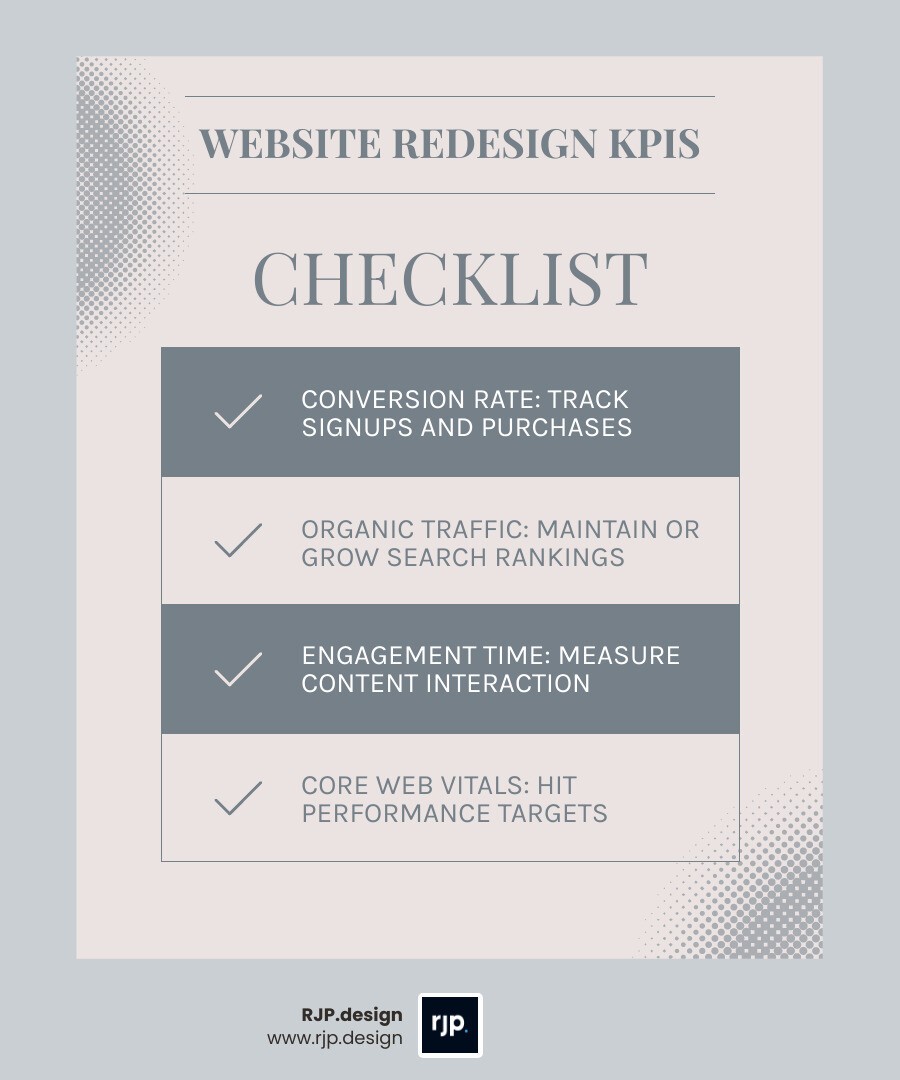
We track several Key Performance Indicators (KPIs) to measure the impact of our work:
Conversion Rate: Are more people signing up or buying?
Organic Traffic: Has our SEO strategy maintained or improved our search rankings?
Engagement Time: Are people actually reading the content or bouncing?
Technical Performance: Is the site hitting its Core Web Vitals targets?
For example, a major outdoor retailer recently saw a 3% lift in conversions just by redesigning their navigation to be more intuitive. Small changes can lead to big revenue. To understand how an agency tracks these for you, see our Web Redesign Agency Complete Guide.
Common website redesign mistakes to avoid
We’ve seen it all, and most "failed" redesigns fall into the same traps. Here is what to avoid:
Designing in a Vacuum: Making choices based on what the CEO likes rather than what the customer needs.
Ignoring Content: Trying to "fit" your old, clunky text into a sleek new design.
No Redirect Plan: This is the "SEO suicide" of redesigns. Always map your old URLs to your new ones.
Scope Creep: Trying to add "one more thing" until the project is months behind schedule.
Rushing the Launch: Skipping the testing phase leads to broken forms and frustrated users.
By learning from these pitfalls, we ensure a smooth transition. If you're looking for the Best Website Redesign Services, it’s important to find a partner that prioritizes these technical details. Our Website Redesign Service Agency and Web Redesign Service teams are dedicated to making sure your site doesn't just look better—it works better.
Ready to transform your online presence? At RJP.design, we combine high-end strategy with a down-to-earth approach. We don't just build websites; we build growth engines. If your site feels like it’s stuck in 2020, it’s time for a change.
Get your professional website redesign roadmap from RJP.design today.