
Web
The Ultimate Webpage Speed Guide: Quick Wins to Stop the Slowdown
Jun 23, 2026

Why Slow Pages Are Silently Killing Your Business
If you want to improve webpage speed, here are the most effective steps you can take right now:
Compress and convert images to WebP or AVIF format
Minify CSS and JavaScript to reduce file sizes
Enable browser caching so returning visitors load your site faster
Use a Content Delivery Network (CDN) to serve content from servers closer to your users
Eliminate render-blocking resources that delay page rendering
Upgrade your hosting if your server response time exceeds 800ms
Implement lazy loading so off-screen images only load when needed
Reduce redirects to cut unnecessary round-trip delays
Every second counts online. Literally.
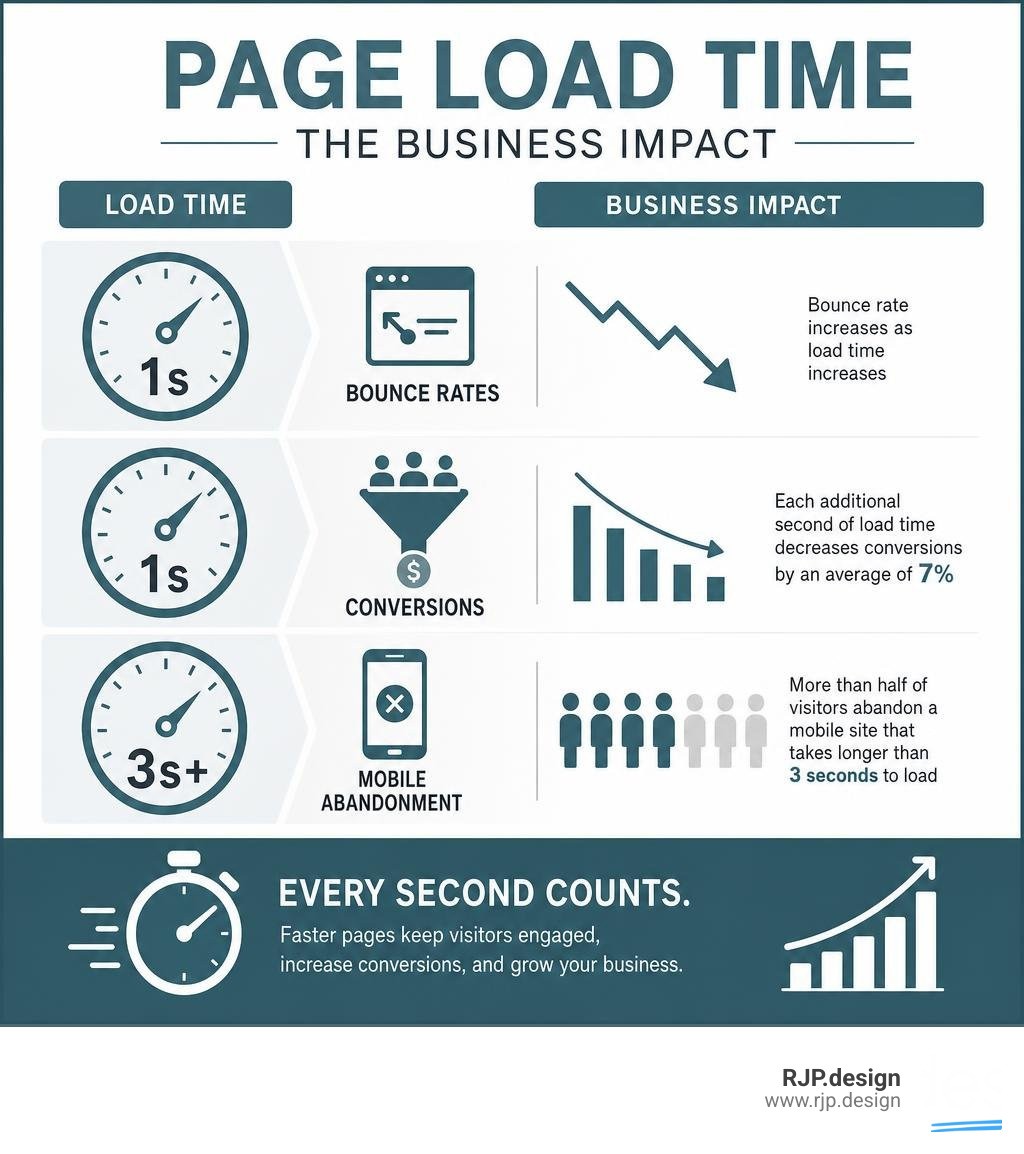
A website that loads in one second converts visitors at nearly three times the rate of a site that takes five seconds. And if your page hasn't loaded within three seconds on mobile? More than half of your visitors have already left — without seeing a single word you wrote.
That's not a small problem. That's a business problem.
Most small business owners pour time and money into great design, compelling copy, and smart marketing — then unknowingly let a slow website undo all of it. A sluggish page doesn't just frustrate visitors. It actively hurts your rankings on Google, increases bounce rates, and chips away at your revenue one slow load at a time.
Every additional second of load time decreases conversions by an average of 7%. Moving from a two-second to a three-second load time alone can increase bounce rates by 50%. These aren't abstract stats — they represent real customers who clicked away before you had a chance to earn their business.
The good news? Most speed problems are fixable. Many don't require a developer or a complete website rebuild. They just require knowing where to look and what to prioritize.
I'm Ross Plumer, a digital marketing and web development specialist who has worked with businesses generating over $20 million in revenue — and helping clients improve webpage speed is one of the highest-impact changes I make to underperforming websites. In this guide, I'll walk you through exactly what's slowing your site down and how to fix it.
Why You Must Improve Webpage Speed for SEO and Conversions
When we talk about search engine optimization, we often focus on keywords, backlinks, and high-quality content. However, search engines like Google prioritize user experience above almost everything else. Since 2018, page speed has been an official mobile ranking factor, and today, Google’s mobile-first indexing means the speed of your mobile site determines your search visibility.
If your website loads slowly on a mobile device, Google's crawlers notice the high bounce rates and demote your rankings accordingly. In fact, a slow page can reduce your search rankings by 15% to 25%.
Conversely, the financial rewards of optimizing your speed are massive. A 0.1-second improvement in mobile site speed can increase retail conversion rates by 8.4% and average order value by 9.2%. When we build SEO Friendly Websites, we ensure that clean code and rapid loading times are baked into the foundation, allowing your business to capture every possible lead.
How to Measure Performance and Core Web Vitals
Before we can fix the slowdown, we must measure it. Google provides excellent free tools to diagnose performance bottlenecks. We recommend starting with PageSpeed Insights and Google Lighthouse to gather baseline data.
Google evaluates user experience through a framework called Core Web Vitals. These metrics measure real-world performance at the 75th percentile of page loads:
Largest Contentful Paint (LCP): Measures loading performance. This is the time it takes for the largest image or text block in the viewport to become visible. To provide a good user experience, LCP should occur within 2.5 seconds of when the page first starts loading.
Interaction to Next Paint (INP): Measures visual responsiveness. Replaced in March 2024, this metric tracks how quickly a page responds to user interactions like clicks or keypresses. A good INP score is 200 milliseconds or less.
Cumulative Layout Shift (CLS): Measures visual stability. Have you ever tried to click a button on a mobile screen, only for the page to jump and cause you to click an ad instead? That is a layout shift. A good CLS score is 0.1 or less.
To learn more about how Google evaluates these metrics, you can explore the resources at Make the Web Faster | Google for Developers and check your site directly on PageSpeed Insights .
Here is a quick look at the Core Web Vitals thresholds we target:
Metric | Good (Pass) | Needs Improvement | Poor (Fail) |
|---|---|---|---|
Largest Contentful Paint (LCP) | 2.5 seconds or less | 2.6 to 4.0 seconds | Greater than 4.0 seconds |
Interaction to Next Paint (INP) | 200 milliseconds or less | 201 to 500 milliseconds | Greater than 500 milliseconds |
Cumulative Layout Shift (CLS) | 0.1 or less | 0.11 to 0.25 | Greater than 0.25 |
How to Improve Webpage Speed: Core Web Vitals and Technical Fixes

Now that we know how to measure our performance, let's explore how to actually improve webpage speed. True speed optimization requires a balanced approach across four key layers: the backend server, network delivery, frontend rendering, and user interactivity. If you want a deeper look at this holistic approach, read our guide on How to Optimize Performance.
Step-by-Step Guide to Improve Webpage Speed
To make your code as lean as possible, we must eliminate unnecessary weight and reduce the number of HTTP requests the browser has to make. Every external script, stylesheet, and image requires a separate request to the server, which adds fractions of a second to your load time.
Here are the most effective steps to optimize your code assets:
Minify CSS, JavaScript, and HTML: Remove unnecessary spaces, comments, and line breaks from your code. Developers can use automated tools to shrink these files without changing their functionality.
Defer Non-Critical JavaScript: By default, browsers stop parsing the HTML of your page when they encounter a JavaScript file. By adding the defer or async attributes to your script tags, you allow the browser to continue loading the visual parts of your page while the scripts load in the background.
Eliminate Render-Blocking Resources: Ensure that essential styles are loaded inline in the head of your document, while non-essential styles are loaded asynchronously.
Enable File Compression: Use modern compression algorithms like Brotli or Gzip on your web server. Brotli compression can make text-based assets 15% to 25% smaller than traditional Gzip compression.
Optimizing Images and Media Assets

Images typically account for 50% to 70% of a webpage's total weight. If you upload unoptimized photos straight from a camera or smartphone, you are forcing your visitors to download multi-megabyte files that destroy your page speed.
To optimize your media assets:
Convert to Modern Formats: Avoid using heavy PNG or JPEG files for standard web images. WebP is 30% to 50% smaller than JPEG, and AVIF can reduce file sizes by up to 50% to 70% without any visible loss in quality.
Implement Native Lazy Loading: By adding the loading="lazy" attribute to your images and iframes, you tell the browser only to load media when it is about to enter the user's viewport. This technique can reduce initial page load times by 30% or more.
Use Responsive Images: Never serve a massive 2000-pixel desktop hero image to a 375-pixel mobile screen. Use the HTML srcset and sizes attributes to serve appropriately scaled images to each device.
Use SVGs for Vector Graphics: For logos, icons, and simple illustrations, use SVG format. SVGs are code-based vector graphics that scale infinitely and can reduce file sizes by 60% to 80% compared to PNGs.
Advanced Server and Infrastructure Upgrades
Even if your frontend code is perfectly optimized, your website will still feel slow if your server takes too long to respond. This delay is measured as Time to First Byte (TTFB).
A good TTFB is 0.8 seconds or less, while values greater than 1.8 seconds indicate poor server performance. To dive deeper into server-side performance, read the guide on how to Optimize Time to First Byte | Articles | web.dev .
To optimize your infrastructure:
Leverage a Content Delivery Network (CDN): Physical distance adds latency. A CDN stores cached copies of your static assets on a global network of edge servers, delivering content to users from the server closest to them. Implementing a CDN can reduce load times by 40% to 60%.
Configure Browser Caching: Tell your visitors' browsers to store static files (like logos, CSS, and JS) locally. This means returning visitors don't have to re-download these assets, reducing load times for repeat visits by 50% to 90%.
Upgrade Your Hosting: Shared hosting plans are cheap because hundreds of websites share the same server resources. Upgrading to high-quality managed hosting often yields a 30% to 50% improvement in server response times.
Adopt Modern Protocols: Ensure your server supports HTTP/2 and HTTP/3 (QUIC), which allow multiple files to load simultaneously over a single connection, bypassing the limitations of older HTTP/1.1 protocols.
Conclusion: Maintaining a Fast Website for Long-Term Success
Speed optimization is not a one-time project; it is an ongoing practice of healthy site maintenance. As you add new blog posts, products, and marketing scripts, your website will naturally experience performance drift if left unchecked.
At RJP.design, we prioritize clean, high-performance development from day one. Our down-to-earth team works closely with you to build beautiful, lightning-fast web experiences that keep your users engaged and your conversion rates high. If you are ready to stop losing sales to a slow website, explore our professional services at https://rjp.design/services/web-design-development.
Ongoing Monitoring and Performance Audits
To ensure your website remains fast over time, we recommend establishing a performance budget — a set of maximum limits for page weight, HTTP requests, and Core Web Vitals scores that your team must not exceed.
Additionally, make sure to:
Monitor your Core Web Vitals weekly via Google Search Console.
Audit your third-party tracking scripts and plugins quarterly, removing any that are no longer in use.
Schedule a professional performance and search engine optimization checkup using our SEO Optimizer Audit to identify and fix new bottlenecks before they impact your business revenue.