
Web
Don't Scare Away Donors with Bad Nonprofit Web Design
Jun 24, 2026

Why First Impressions Can Make or Break Your Nonprofit's Donor Relationships
Nonprofit web design is one of the most powerful — and most overlooked — tools your organization has for building trust, attracting donors, and turning casual visitors into committed supporters.
Here's a quick look at what makes nonprofit web design effective:
What Matters Most | Why It Matters |
|---|---|
Clear mission statement | Donors decide within seconds if they care |
Prominent donation button | Reduces friction in the giving process |
Mobile-friendly layout | Most traffic comes from phones |
Impact storytelling | Builds emotional connection and trust |
Fast load speed | Slow sites lose donors before they even read |
Accessible design | Reaches more people, required by ADA standards |
Tool integrations | Connects your site to CRM, email, and donor management |
Your website is often the very first interaction a potential donor or volunteer has with your organization. In that split second, they're asking themselves: "Can I trust these people with my money?"
And here's the uncomfortable truth — 44% of nonprofit site visits come from organic search. That means nearly half your audience is landing on your site cold, with no prior relationship. If your site looks outdated, loads slowly, or makes donating confusing, you're losing real support every single day.
A confusing donation process, poor mobile experience, or a homepage that buries your mission? Those aren't just design problems. They're revenue problems.
I'm Ross Plumer, a digital marketing and web design strategist with experience helping businesses and mission-driven organizations market over $20 million in revenue — including work in non profit web design where credibility and conversion go hand in hand. In this guide, I'll walk you through exactly what separates a high-performing nonprofit website from one that quietly scares donors away.
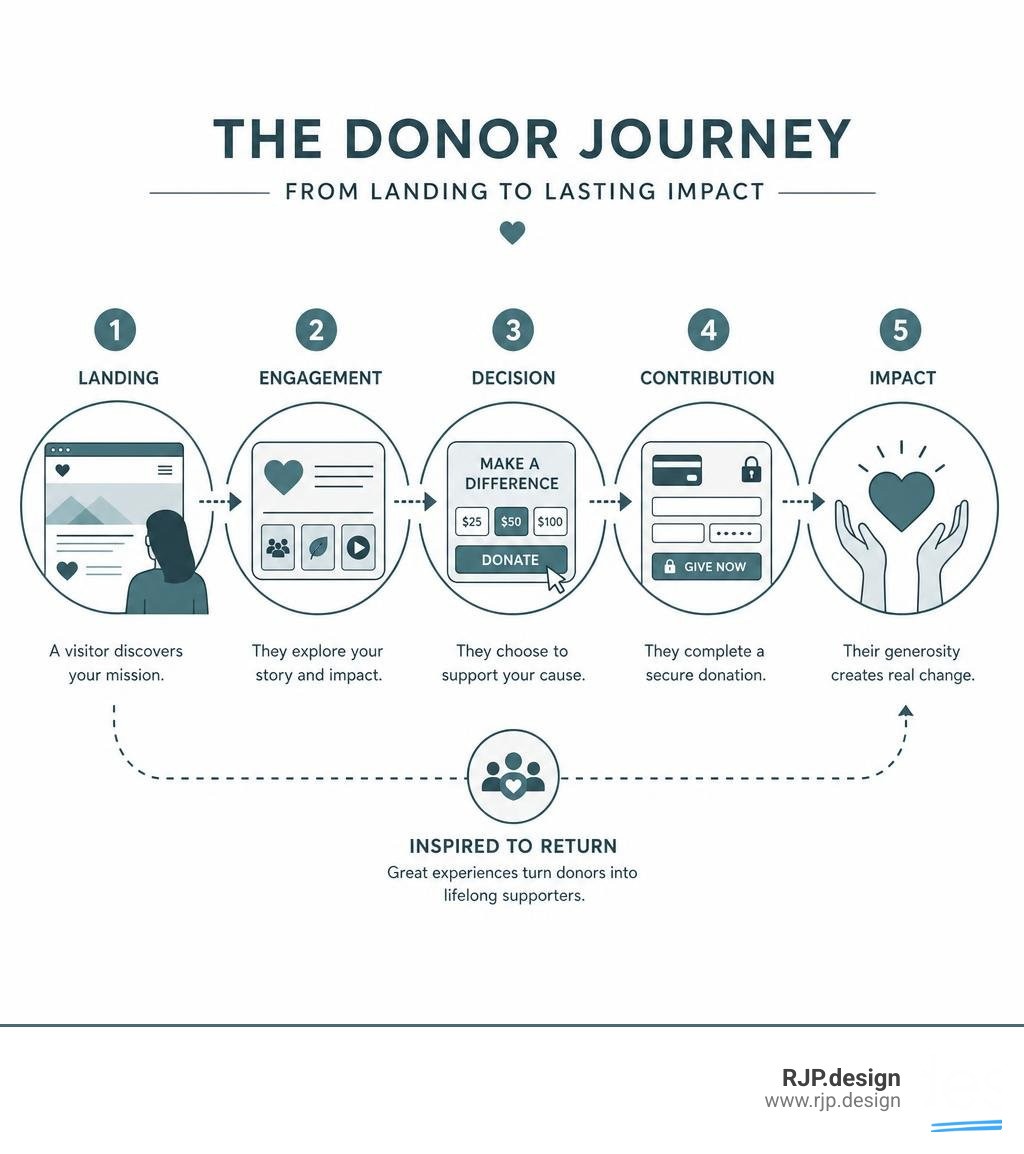
Essential Strategies for Effective Non Profit Web Design
To create a website that actually advances your mission in 2026, you need a strategy that goes beyond basic templates. It requires a deep understanding of user experience (UX), conversion optimization, and brand identity. When we approach non profit web design, we don't just build pages; we build digital bridges between your cause and the people who want to support it.
Key Differences: Nonprofit vs. For-Profit Web Design
While a commercial website focuses on a direct transaction—selling a product or service—a nonprofit website has a much more complex set of goals. You aren't just selling something; you are inspiring belief, building a community, and proving your impact.
Feature / Goal | For-Profit Website | Nonprofit Website |
|---|---|---|
Primary Action | Purchase, demo request, or lead form | Donation, volunteering, or event sign-up |
Core Motivator | Personal gain, solving a business pain point | Altruism, shared values, community impact |
Key Currency | Competitive pricing, features, ROI | Trust, transparency, emotional connection |
Target Audience | Defined buyer personas | Donors, volunteers, beneficiaries, board members |
For-profit sites can rely on transactional design patterns. In contrast, nonprofit sites must master the art of trust-building. If a visitor doesn't feel an immediate sense of organizational integrity, they will leave. This is why investing in Professional Website Design is so critical for organizations that rely on public trust to survive.
Must-Have Features for Modern Non Profit Web Design
An effective nonprofit website is a functional engine. To convert passive readers into active supporters, your site needs specific, high-performing tools built directly into its structure.

Frictionless Donation Forms: Don't make donors jump through hoops. Keep your forms on-site rather than redirecting to a sketchy-looking third-party page.
Diverse Payment Gateways: According to donor preference data, 63% of donors prefer to give via credit/debit card, while 5% prefer wire transfers, and 1% prefer digital wallets. Your site should support these options seamlessly.
Recurring Giving Options: A simple checkbox that allows donors to turn a one-time gift into a monthly contribution can dramatically increase your long-term funding.
Interactive Event Calendars: Whether you are hosting a gala, a clean-up day, or a webinar, your supporters need a clean, searchable calendar to register and buy tickets.
Streamlined Volunteer Sign-Ups: Make it easy for people to give their time with simple, intuitive forms that route directly to your volunteer coordinator.
To make all of these elements work together without slowing down your site, you need modern Website Design and Web Development Services that prioritize clean code and robust security.
Balancing Storytelling with Clear Calls-to-Action
One of the most common mistakes we see in non profit web design is a website that does one of two things: it either tells a beautiful story but forgets to ask for support, or it screams "DONATE NOW" on every pixel without explaining why.
You must balance emotional, visual storytelling with clear, strategic calls-to-action (CTAs).
To achieve this balance, we recommend the "Story-Impact-Action" framework:
The Story: Lead with real human elements. Use high-quality photography, ambient background videos, and personal testimonials to show the reality of your work.
The Impact: Back up the emotion with hard data. Use visual elements like dynamic stat bars or interactive donation thermometers to show exactly where the money goes. For example, show that "$50 feeds a family for a week."
The Action: Place a prominent, high-contrast CTA button (like "Join Us" or "Donate Today") in the top right of your navigation and at logical transition points throughout the page.
By integrating these storytelling elements with custom graphics, you can create a highly tailored experience. Explore our Custom Website Solutions to see how we build these high-converting pathways.
Accessibility, Mobile Optimization, and SEO in Non Profit Web Design
A beautiful website is useless if your audience can't access it or find it in the first place.
Web Accessibility (WCAG 2.1 AA)
Roughly 15% of the world's population lives with some form of disability. If your website isn't compliant with the WCAG 2.1 AA Guidelines, you are locking out a massive portion of your potential supporter base. Accessibility isn't just a legal recommendation under the ADA; it's a moral imperative. Your site must feature:
Proper semantic HTML structure for screen readers.
High color contrast ratios for visually impaired users.
Full keyboard navigability (no mouse required).
Alt text for all meaningful images.
Mobile Optimization
Most of your traffic is viewing your site on a mobile device. If your donation form is too small to tap on a smartphone screen, or if your text wraps weirdly, donors will give up. Mobile-first design is no longer optional.
Search Engine Optimization (SEO)
With 44% of site traffic coming from organic search (as highlighted in the M+R Benchmarks Report), SEO is the lifeblood of your digital outreach. You need to conduct thorough keyword research to target terms your supporters are searching for, and optimize your site speed.
A single-second delay in page load time can reduce conversions by 7%. Fast, clean code is essential. For a deep dive into building search-optimized, high-performing websites, check out our Website Design Development Services Guide.
Integrations, Budgeting, and Measuring Website ROI
Your website shouldn't exist on an island. It needs to connect directly with the tools your team uses every single day to manage operations.
Essential Integrations
CRM & Donor Management: Sync your website forms with platforms like Salesforce, Bloomerang, or DonorPerfect so donor data is automatically logged.
Email Marketing: Automatically feed newsletter sign-ups into Mailchimp or HubSpot to nurture new leads.
Analytics Tracking: Use Google Analytics to track where your traffic is coming from and where users are dropping off in the donation funnel.
Budgeting & Pricing Models
We believe in transparency. When budgeting for a website, you generally face three tiers of investment:
Basic Site ($5,000 – $10,000): Best for smaller, local nonprofits. Usually 5 to 10 pages, focusing on core storytelling, basic donation integration, and contact forms.
Advanced Site ($10,000 – $20,000): Best for growing regional organizations. Includes 15 to 25 pages, custom event calendars, volunteer portals, and deeper CRM integrations.
Enterprise Platform ($20,000+): Best for national or global organizations. 30+ pages, custom databases, multi-language support, and highly secure custom donor portals.
If you are looking for high-quality results that respect your organization's budget constraints, we specialize in providing Affordable Web Design packages designed to maximize your return on investment.
Avoiding Common Mistakes and Planning Post-Launch Maintenance
A website launch is a milestone, but it is not the finish line. To keep your site secure and effective, you must avoid common pitfalls and plan for long-term maintenance.
Common Web Design Mistakes to Avoid
Confusing Navigation: If a user has to click four times to find your donation page or your mission statement, they will leave. Keep your main menu simple and direct.
Ignoring Security Updates: Outdated plugins and CMS platforms are prime targets for hackers. A compromised website can instantly destroy decades of donor trust.
Ignoring Staff Turnover: Nonprofits often face high staff turnover. If your website is too complicated for your team to update without writing code, it will quickly become outdated.
Post-Launch Maintenance Checklist
To keep your site running smoothly, ensure your team has a plan for:
Daily Backups: In case of an emergency, you need to be able to restore your site instantly.
Regular Security Patches: Keep your core platform and plugins updated weekly.
Staff Training: Choose a user-friendly CMS (like WordPress or Webflow) and ensure multiple team members know how to make basic text and image updates.
For a comprehensive look at how to choose the right partner to guide you through this process, check out our Website Design Agency Ultimate Guide.
Conclusion
Your nonprofit's mission is too important to be held back by an outdated, confusing, or inaccessible website. Every day that your site remains difficult to navigate or slow to load is a day you are missing out on donations, volunteers, and community impact.
At RJP.design, we specialize in creating beautiful, highly functional, and search-optimized websites that build trust and drive action. Our down-to-earth team is dedicated to your satisfaction, ensuring your custom digital presence looks incredible and is easy for your supporters to find online.
Ready to stop losing donors to bad design? Get started with RJP.design's Web Design and Development Services today, and let's build something that makes a real difference.