
Web
A Comprehensive Guide to Affordable Small Business Websites
Aug 27, 2026

Essential Elements and Strategies for Successful Small Business Websites
Creating a successful website begins with prioritizing the user experience. Visitors expect your site to load quickly, look sharp across every device, and get them straight to the point without clutter. A mobile-first design strategy ensures your layout adjusts seamlessly whether a prospect views it on a smartphone, tablet, or desktop.
Clear site navigation forms the foundation of this strategy. When users visit small business websites, they shouldn't have to guess where to find pricing, business hours, or service descriptions. Keep your header menu focused on primary pages, and use standard labels like "Services," "About Us," and "Contact."
How StoryBrand and Clear Copy Drive Conversions on Small Business Websites
Great layout choices must be paired with clear, persuasive copy. The StoryBrand framework helps small businesses position the customer as the main character facing a specific problem, while the business acts as the trusted guide providing a solution.
Instead of opening with lengthy company histories, lead with a simple value proposition that directly addresses your customer's primary pain point.
Key principles for high-converting website copy include:
Clear Primary Calls-to-Action (CTAs): Place prominent buttons such as "Book a Call" or "Get a Quote" in the hero section and repeat them consistently down the page.
Whitespace Readability: Surround text blocks with plenty of whitespace so readers can easily skim your content.
Simplified Language: Avoid industry jargon and speak directly to the core benefit your customer receives.
To dive deeper into crafting user-focused messaging, read our comprehensive Small Business Web Design Guide.
Choosing the Right Platform and Features for Small Business Websites
Selecting the right platform depends on your technical comfort, growth plans, and internal bandwidth. Broadly, website options split into hosted website builders and open-source Content Management Systems (CMS).
Feature / Consideration | Hosted Website Builders | Open-Source CMS (e.g., WordPress) |
|---|---|---|
Setup & Ease of Use | Simple drag-and-drop editors; native AI setup tools | Requires manual setup, hosting, and theme configuration |
Custom Control | Limited to platform design boundaries | Unlimited customization via custom code, plugins, and themes |
Maintenance | Platform handles updates, security, and hosting | Site owner manages plugin updates, security, and database backups |
E-Commerce & SEO | Integrated tools out of the box | Advanced features via integrations like WooCommerce and SEO plugins |
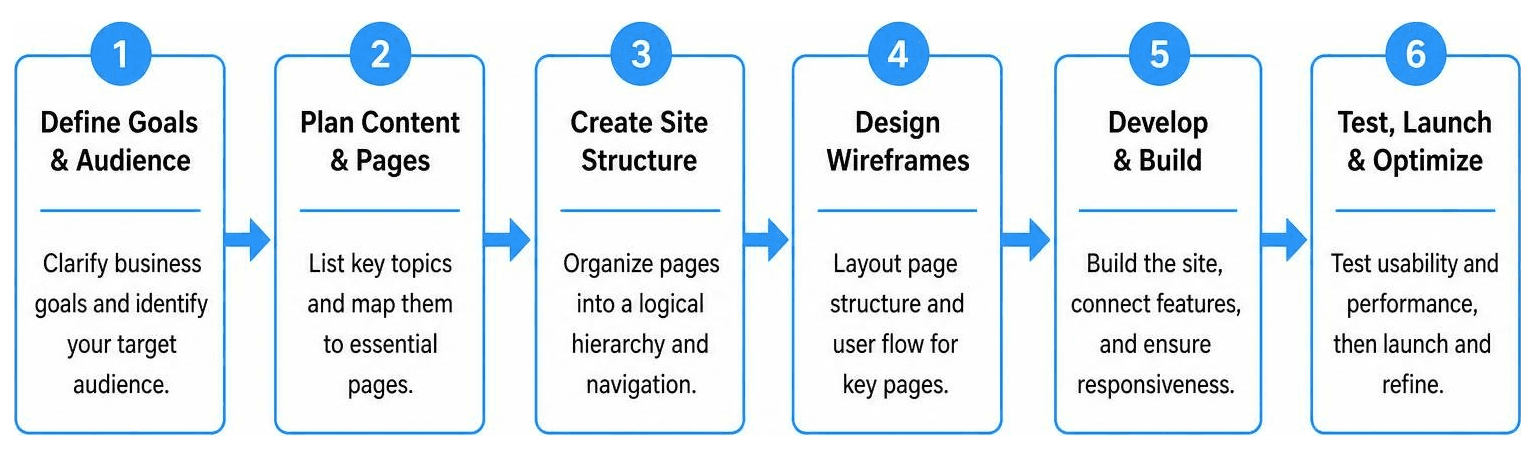
Modern platforms now incorporate artificial intelligence tools that build initial wireframes, write draft copy, and configure automated SEO features in minutes. If you are preparing to launch a new site, consult our step-by-step Small Business Website Setup Guide.
Key Web Design Examples Across Local Services and E-Commerce

Different industries require specialized website features to drive customer action:
Local Service Providers: A plumbing, salon, or landscaping business benefits from direct booking workflows built directly into the site navigation, eliminating unnecessary back-and-forth phone calls.
B2B Companies: Business-to-business sites often convert browsers into leads by offering tactile lead magnets—such as a physical sample kit or downloadable industry guide—rather than overwhelming visitors with technical machinery specs.
Creative Professionals: Photographers and designers rely on full-screen visual imagery to establish immediate quality and artistic style.
Niche E-Commerce: Craft artisans and retail stores use minimal aesthetic styling combined with detailed product specs to showcase items clearly.
Explore further real-world implementation strategies in our Small Business Web Presence Complete Guide.
Search Engine Optimization and Local Marketing Tactics
Building a visually appealing website is only half the battle; potential customers must also be able to find it. Effective local SEO strategies help your pages rank when prospective clients search for solutions in your immediate geographic area.
Start by creating dedicated service landing pages for every specialized solution you offer. Dedicated pages serve a dual purpose: they give search engines distinct topics to index, and they function as tailored landing pages for local advertising campaigns.
Ensure your Google Business Profile integration is complete, embedding consistent name, address, and phone details across your site. Finally, optimize page load speed by compressing images and using content delivery networks (CDNs). Slow page load speeds harm both search engine indexability and customer conversion rates.
For custom support structuring your site for search engine performance, take a look at our dedicated Small Business Web Design Services.
Cost Breakdown and Next Steps for Your Website Project

Understanding the true costs associated with small business websites prevents unexpected surprises down the road. Initial website creation costs vary widely based on whether you build the site yourself using software templates or partner with professional web designers.
Beyond the initial build, every business owner should budget for ongoing operational expenses:
Domain Management: $15 to $30 annually for domain registration.
Website Hosting: $10 to $50 monthly for reliable hosted environments or secure WordPress hosting.
Maintenance & Updates: $50 to $200+ monthly for software updates, security backups, and ongoing content changes.
While modern free website builders may seem enticing initially, they come with substantial limitations, including forced third-party ads, subdomains instead of custom domain branding, restricted SEO tools, and non-portable code. Investing in a clean, professional web presence upfront protects your brand identity.
Review transparent options tailored to your growth goals on our Website Packages for Small Business page.
How to Build Trust and Credibility Online
Online visitors judge your business's legitimacy within seconds of landing on your homepage. Incorporating established social proof indicators immediately reduces customer hesitation.
Display client testimonials, review star ratings, and industry certifications prominently on key pages. Security indicators are equally critical: an active SSL certificate (the secure padlock in the browser address bar) reassures visitors that their personal information is protected. Pair these features with clear, transparent contact options—such as a direct phone number, address, and quick contact form—to show visitors that real humans stand behind your services.
Partnering with Professionals for Long-Term Growth
Managing a business while trying to build, update, and optimize a website can quickly become overwhelming. At RJP.design, we specialize in building custom websites and managing online presences so business owners can stay focused on running their operations.
Our down-to-earth team prioritizes client satisfaction, delivering high-quality web designs that help your business stand out and get found online. Whether you need a fresh visual layout, responsive mobile design, or complete website management, we bring practical expertise to every step of the process.
Explore our hands-off solutions with Full Service Web Design and Management for Small Business, or get started immediately by visiting our page to Build Your Small Business Website Today.