
Web
One Simple Way to Update Your Website Fast
Aug 28, 2026

Update Your Website Quickly Without Guesswork
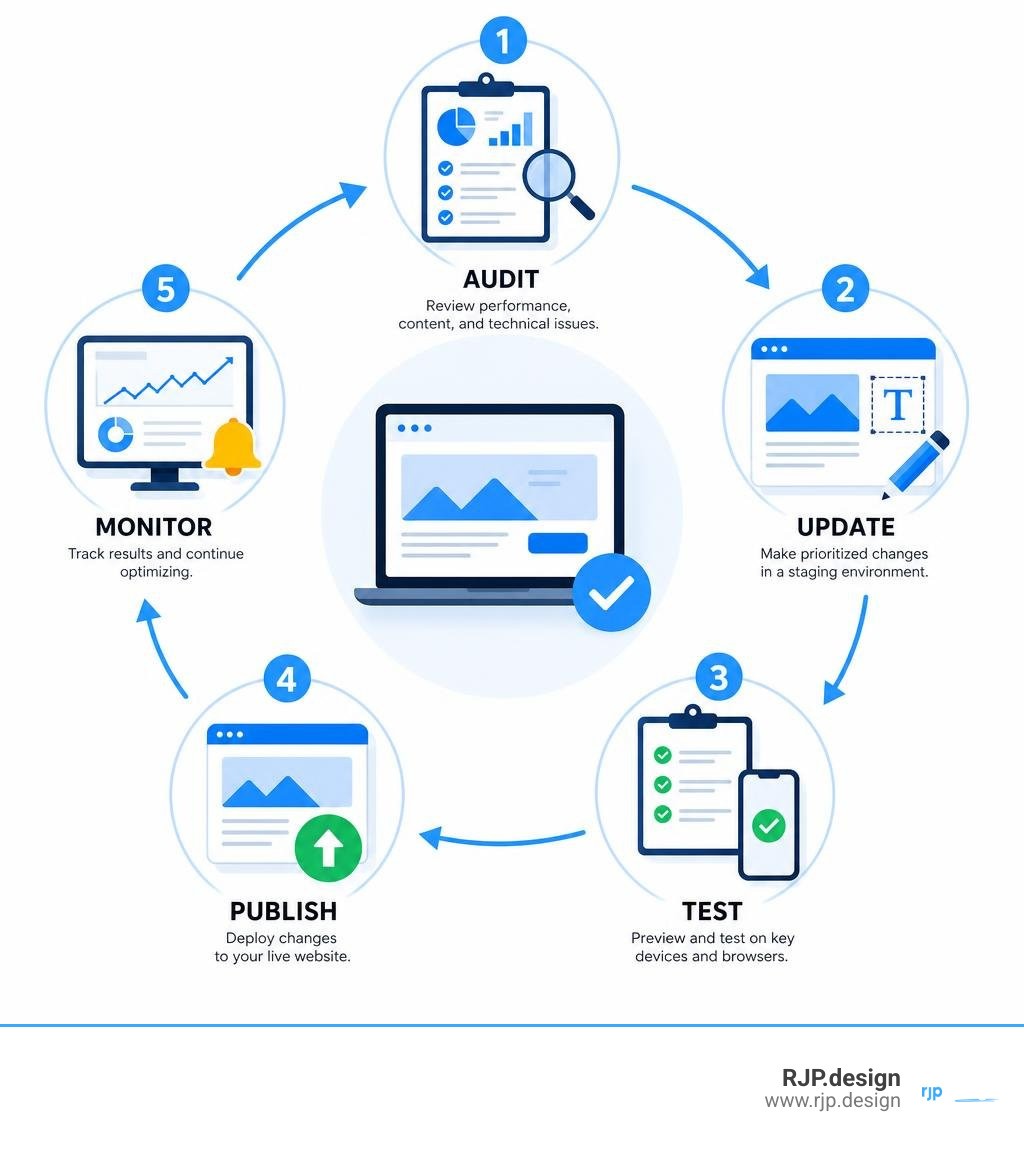
The fastest reliable way to update a website is to audit what is underperforming, make prioritized changes in a staging environment, test them, and then publish. Start with pages that have declining traffic, outdated business details, broken links, slow load times, or poor mobile usability.
Check analytics and search data to find pages losing visits or conversions.
Refresh inaccurate copy, offers, images, titles, and internal links.
Fix technical issues such as broken links, oversized images, outdated plugins, and mobile layout problems.
Preview and test changes before they go live, then monitor results.
This approach prevents a common mistake: redesigning pages based on preference instead of evidence. Your website should stay accurate, fast, secure, and easy to use - especially on mobile, which accounts for more than half of global web traffic.
I’m Ross Plumer, an entrepreneur and digital marketing professional with experience helping businesses improve websites that support significant revenue growth. In this guide on How to update website content and performance, I’ll show you a practical process for making improvements without turning a simple update into a risky rebuild.
How to update website helpful reading:
Introduction

Websites are living assets. When left untouched, digital decay sets in fast. Outdated plugins introduce vulnerabilities, obsolete facts frustrate visitors, and search rankings slide. Over 54% of global website traffic comes from mobile devices, and 53% of mobile users abandon a site if it takes longer than three seconds to load. If your pages take three seconds instead of one to load, the probability of a bounce increases by 32%.
A stale website damages brand credibility and conversion rates. Search engines prioritize sites that offer fresh, technically sound, and user-friendly experiences. Regularly refreshing your digital presence ensures your messaging matches your current business goals while keeping your audience engaged.

How to Update Website Performance, Content, and Design
A successful update strikes a balance between content relevance, visual design, and technical stability. Instead of tearing everything down, tackle your updates systematically across four focused stages.
Step 1: Audit Decaying Traffic and Quick-Win Pages
Before altering a single line of text, look at your data. Use Google Search Console and web analytics to pinpoint underperforming areas rather than guessing what to fix.
Group your update tasks into three strategic categories:
Decaying pages: High-value articles or landing pages that have steadily lost search traffic over recent quarters.
Quick-win pages: Pages ranking between positions 5 and 15 that can climb into the top tier with minor keyword adjustments, updated stats, and new subheadings. The top five search results capture 67% of all clicks, making these pages prime targets.
Competitor gaps: Missing topics and search queries your competitors address that your current website lacks.
Understanding Why Update Old Content helps you protect hard-earned rankings while capturing fresh organic interest.
Priority Level | Page Type | Focus Areas | Primary Metric |
|---|---|---|---|
High Priority | Decaying Core Pages | Intent realignment, new data, fresh media | Organic search recovery |
High Priority | High-Bounce Landing Pages | CTA placement, load speed, mobile layout | Conversion rate |
Medium Priority | Quick-Win Pages (Pos 5–15) | Meta tags, secondary keywords, internal links | Keyword ranking bump |
Routine Maintenance | Evergreen Blog Posts | Broken link fixes, minor year/date tweaks | User engagement |
Step 2: How to Update Website Content and On-Page SEO
Once you know which pages to prioritize, evaluate the copy itself. Search intent shifts over time, meaning what answered a user's question two years ago might now feel incomplete.
Follow these steps to upgrade your on-page content:
Revitalize outdated details: Replace stale industry statistics, old pricing figures, discontinued services, and outdated team bios.
Incorporate rich multimedia: Add high-quality graphics or video explainers. 91% of consumers want more video content from brands, and dynamic media boosts average on-page dwell time.
Refine on-page SEO signals: Rewrite title tags, update meta descriptions to encourage clicks, and ensure heading tags (H1, H2, H3) follow a logical hierarchy.
Strengthen internal links: Link newly created resources back to older cornerstone articles, and direct readers toward conversion points.
If you are planning to completely Redesign Existing Website content structures, make sure your page URLs stay consistent or implement permanent 301 redirects to preserve SEO equity.
Step 3: Refresh Visual Layouts and Modernize User Experience
A visual refresh should improve usability, not just aesthetics. If visitors cannot scan your pages effortlessly, they will leave.
Key design elements to modernize include:
Mobile responsiveness: Verify that buttons are thumb-friendly, typography adjusts seamlessly, and horizontal scrolling is completely eliminated.
Visual hierarchy: Use clean typography, generous white space, and high-contrast call-to-action (CTA) buttons so users intuitively know where to look next.
Simplified navigation: Streamline crowded navigation bars into clear, essential categories.
For comprehensive design shifts, reviewing a Complete Website Redesign Guide or studying Website Revamp Best Practices provides useful layout inspiration without sacrificing brand identity.
Step 4: How to Update Website Technical Foundations and Core Web Vitals
Visual and content updates fall flat if your website takes too long to load or contains broken links. Technical maintenance keeps your platform safe and indexed properly by search crawlers.
Focus on these essential technical checkpoints:
Fix broken internal and external links: Run regular crawler audits to locate and repair 404 errors that frustrate visitors and waste crawl budget.
Optimize media assets: Convert legacy PNGs and JPEGs into modern WebP or AVIF image formats, which reduce file sizes by 25% to 34% without visible loss in quality. Enable lazy loading for below-the-fold media.
Clean up code and caching: Minify CSS and JavaScript files, eliminate unused tracking scripts, and implement server-side caching.
Update CMS core files and plugins: Apply software patches immediately. When working with self-hosted environments, follow official guidelines on updating core CMS software and database files safely to avoid database mismatches or site lockouts.
Prioritizing technical Website Optimization ensures seamless Core Web Vitals performance across desktop and mobile screens.
Streamlining Ongoing Website Maintenance and Security
Updating your site should not be a once-every-three-years emergency. An iterative maintenance schedule keeps your business secure and prevents traffic drops before they compound.
At RJP.design, we help businesses build, update, and manage high-performing digital assets that drive tangible growth. If you want hands-on support refining your site's search visibility and performance, explore our professional digital marketing and website growth services.
Creating a Sustainable Maintenance Schedule and Staging Protocol
To keep updates smooth and risk-free, establish a structured maintenance rhythm:
Weekly to Monthly: Apply security patches, update plugins, run full database backups, and check form conversion workflows.
Quarterly: Conduct a content audit, repair broken links, monitor Core Web Vitals, and review user heatmaps to spot friction points.
Annually: Perform a deep competitor gap analysis and review your overarching technical infrastructure.
Always make substantial structural or code changes inside a dedicated staging environment first. Testing plugins, layout changes, and tracking scripts in a sandbox prevents downtime on your live site. Protect your administrative logins with two-factor authentication (2FA), maintain active web application firewalls, and keep verified rollback backups on hand before deploying any major update.