
SEO
The Ultimate Guide to Getting Your Small Business Online
Apr 8, 2026
Why Every Small Business Needs a Website (And How to Set One Up Right)
Small business website setup is one of the most important steps you can take to grow your business online. Here's a quick overview of how to do it:
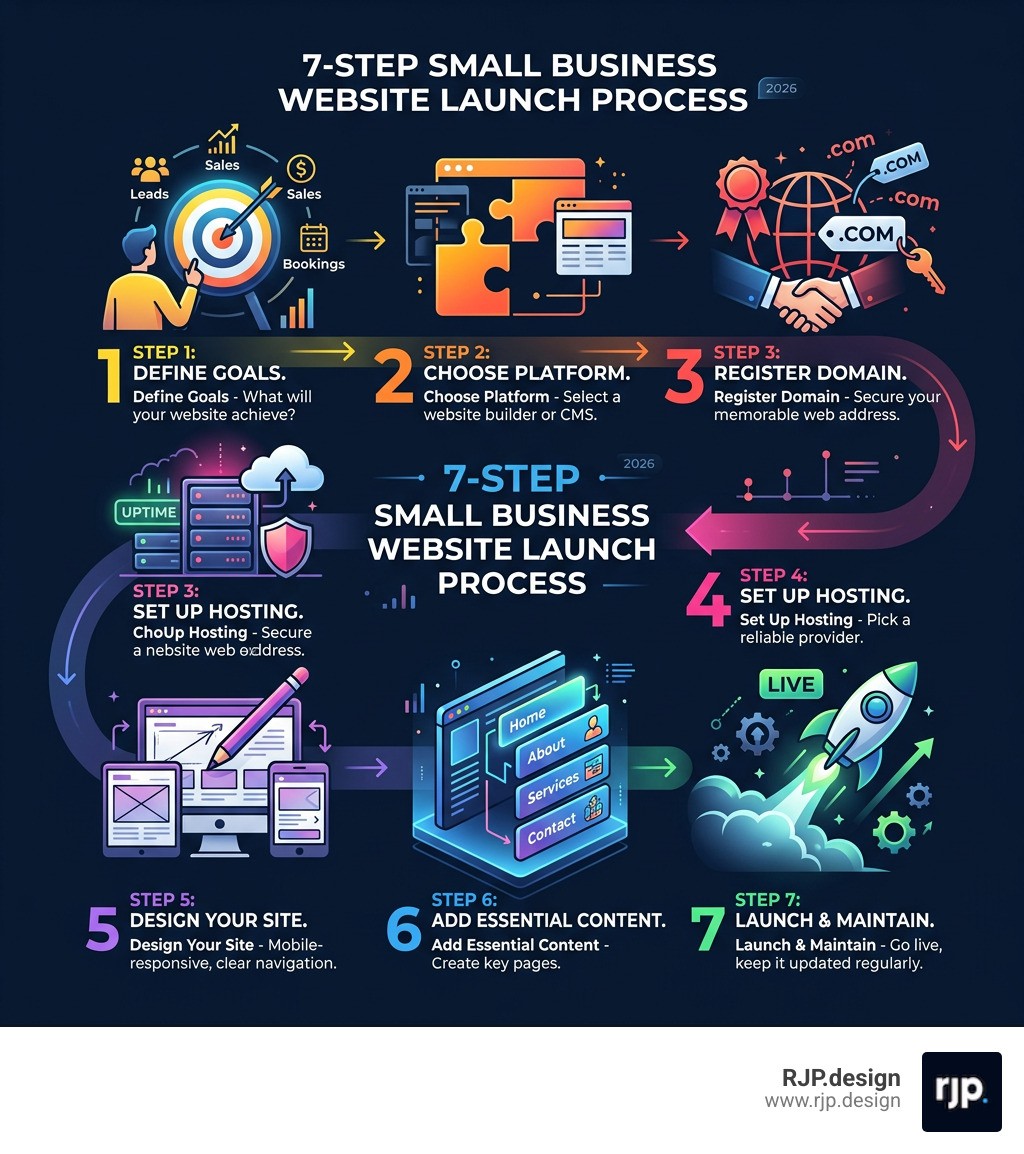
Define your goals - Know what you want your website to achieve (leads, sales, bookings)
Choose a platform - Pick a professional CMS like WordPress or a flexible website builder that scales with your business
Register a domain - Secure a short, memorable .com address ($10-25/year)
Set up hosting - Choose a reliable provider with strong uptime guarantees
Design your site - Build mobile-responsive pages with clear navigation and calls-to-action
Add essential content - Create your Home, About, Services, and Contact pages
Launch and maintain - Test everything, go live, and keep your site updated regularly
Nearly 80% of people research a business online before ever walking through the door or making a purchase. That means your website isn't just a nice-to-have — it's your first impression. For many potential customers, it's the deciding factor between choosing you or a competitor.
Yet for many small business owners, the process feels overwhelming. Which platform do you use? Do you need a developer? How do you even get a domain name? These are real questions, and the good news is that the barrier to getting online has never been lower.
Whether you're starting from scratch or rebuilding something outdated, this guide walks you through every step — clearly and without the technical jargon.
I'm Ross Plumer, a digital marketing and web design expert with hands-on experience helping businesses market over $20 million in revenue, and small business website setup is one of the core areas where I've seen the biggest impact. Let's make sure your website works as hard as you do.
Small business website setup helpful reading:
Essential Steps for a Successful Small Business Website Setup
Building a website is a lot like building a house. If you start pouring concrete without a blueprint, you’re going to end up with a bathroom in the middle of your kitchen. In the digital world, that blueprint is your site architecture and planning phase.
Before we touch a single line of code or pick a color palette, we need to ask: What is the primary job of this website? Is it to sell products directly, book appointments for a service, or simply provide information so people can find your physical store? Understanding your target audience is key. You aren't building this site for yourself; you're building it for the person who needs your help at 2:00 AM.
Statistics show that nearly 80% of people research a business online before visiting a physical location. This means your site needs to answer their questions immediately. We focus on "visitor actions"—the specific things you want a user to do within seconds of landing on your page. Whether it’s clicking a "Call Now" button or filling out a quote form, every design choice should lead toward that goal.

Choosing the Right Platform and Hosting for Your Small Business Website Setup
One of the most frequent questions we hear is: "Which platform should I use?" There isn't a one-size-fits-all answer, but there are clear categories to choose from:
CMS Platforms (Content Management Systems): WordPress is the undisputed king here, powering over 40% of the entire internet. It offers maximum flexibility and ownership. If you want a site that can grow from a simple blog to a massive e-commerce store, WordPress.org (the self-hosted version) is usually the best bet.
All-in-One Builders: Drag-and-drop platforms are often used by beginners who want an all-in-one solution. They handle the hosting for you, which simplifies things, though you often trade away some long-term flexibility and pay higher monthly fees as your needs evolve.
E-commerce Specialists: If your primary goal is selling physical goods, specialized e-commerce platforms are the standard. They are built specifically to handle inventory, shipping, and secure payments.
Once you’ve picked a platform, you need a place for it to live—this is your web hosting. For a small business website setup, we recommend looking for providers with at least 99.9% uptime reliability. If your site is down, your "open" sign is effectively turned off. While shared hosting is an affordable web design starting point (costing $3-10/month), as your traffic grows, you may want to move to a VPS or managed hosting for better speed and security.
Domain Registration and Professional Email Configuration
Your domain name is your digital street address. Ideally, you want a .com extension because it's what customers remember most easily. If your business name is "Greenwood Landscaping" and greenwood.com is taken, try greenwoodlandscaping.com rather than something obscure.
Domain registration typically costs between $10-25 annually. A pro tip: always register the domain yourself in your own account. This ensures you maintain full ownership of your brand’s identity, even if you hire a developer later. We also strongly recommend adding "Domain Privacy Protection." Without it, your personal name, phone number, and email are listed in a public database, which is a magnet for telemarketers.
Once your domain is secured, it’s time to stop using that @gmail.com or @outlook.com address for business. Setting up a custom email (like hello@yourbusiness.com) via Google Workspace or Microsoft 365 is essential for professional communication. It builds instant trust and ensures your invoices and quotes don't end up in a client's spam folder.
Designing for User Experience and Mobile Responsiveness
Design isn't just about looking pretty; it's about "Visual Hierarchy." This means guiding the user's eye to the most important information first. Your phone number and primary Call-to-Action (CTA) should be "above the fold"—the part of the screen visible without scrolling.
People are browsing on their phones more than ever. In fact, over half of all web traffic now comes from mobile devices. If your site looks great on a desktop but is impossible to navigate on an iPhone, you are losing half of your potential customers. This is why responsive web design is non-negotiable. A responsive site automatically adjusts its layout to fit any screen size, from a giant monitor to a small smartphone.
Keep your navigation menus simple. If a visitor has to hunt through five sub-menus to find your pricing, they’ll likely leave. Aim for a "two-click rule": any important information should be no more than two clicks away from the homepage.
Launching and Maintaining Your Online Presence
The "launch" isn't just hitting a big red button. It’s a strategic process. Before we go live, we run through a rigorous checklist. We test every link, every form, and every button on multiple devices. There’s nothing that kills credibility faster than a "Contact Us" form that sends messages into a black hole.
Content Strategy and SEO Basics for Small Business Website Setup
Content is the fuel that drives your website. For a standard small business website setup, you need at least four core pages:
Homepage: Your digital storefront. It should clearly state what you do, who you do it for, and what the visitor should do next.
About Page: This is where you build trust. People do business with people, so share your story and your values.
Services/Products Page: Focus on benefits, not just features. Instead of saying "We have 24/7 plumbing," say "We fix your leaks fast so you can get back to sleep."
Contact Page: Make it incredibly easy to reach you. Include a form, your phone number, and a map if you have a physical location.
To get found on Google, you need SEO (Search Engine Optimization). This starts with keyword research—finding the terms your customers actually type into the search bar. Use these keywords naturally in your page titles, meta descriptions, and "alt text" (descriptions for your images). Don't try to "stuff" keywords in; write for humans first, and search engines second.
Security Measures and Pre-Launch Testing
Security is often overlooked until it’s too late. Every modern website must have an SSL certificate. This is what puts the "https" in your URL and the padlock icon in the browser bar. It encrypts data sent between the visitor and your site, which is vital if you're collecting contact info or payments.
We also recommend implementing security protocols like malware scanning and firewalls. For WordPress users, following a Wordfence installation guide is a great way to add a layer of protection against hackers.
During pre-launch testing, we also check "browser compatibility." Your site might look perfect in Chrome but behave strangely in Safari or Firefox. We also look for "broken links"—links that lead to 404 error pages—which can hurt your SEO rankings and frustrate users.
Ongoing Maintenance and Professional Growth
A website is not a "set it and forget it" project. It is a living asset that requires ongoing maintenance to stay secure and functional. This includes:
Software Updates: Keeping your CMS, themes, and plugins updated to patch security holes.
Regular Backups: Ensuring you have a recent copy of your site in case something goes wrong.
Content Refreshes: Updating your hours, pricing, and adding new blog posts to show Google (and customers) that you are still active.
While many owners start with a DIY approach, there is immense value in professional website management. At RJP.design, we specialize in taking the technical weight off your shoulders. We ensure your site is not only beautiful but also optimized for speed and conversion. If you're looking for small business web design services that prioritize your growth and satisfaction, we’re here to help.
Frequently Asked Questions
How much does it cost to build a small business website? If you DIY it, you might spend $200-$500 on a domain, hosting, and a premium theme. If you hire a professional for a custom 8-page marketing site, expect to invest between $1,000 and $3,000+.
How long does it take to get a website live? A basic DIY site can be done in a weekend if you have your content ready. A professional, strategically designed site typically takes 2 to 4 weeks.
Should I use a free website builder? Free tiers are great for practice, but we don't recommend them for a serious business. They usually force you to use a subdomain (like yourbusiness.serviceprovider.com) and display ads for the service on your site, which looks unprofessional.
Getting your business online is a journey, not a sprint. By following this guide for your small business website setup, you're laying a foundation that will support your business for years to come. For more in-depth strategies, check out our small business web presence complete guide. Ready to get started? Let’s build something great together.