SEO
The Ultimate Guide to Google SEO Local Success
Jul 29, 2026

Why Google MyBusiness SEO Is the Most Powerful Tool for Local Visibility
Google MyBusiness SEO is the practice of optimizing your Google Business Profile (GBP) so your business appears prominently when nearby customers search for what you offer — in Google Search, Google Maps, and the Local 3-Pack.
If you want the quick answer on how to improve your local rankings, here's what actually moves the needle:
Claim and verify your Google Business Profile at business.google.com
Complete every field — business name, address, phone, hours, categories, description, and photos
Choose the right primary category that matches your core service
Maintain NAP consistency (Name, Address, Phone) across your website and all online directories
Generate and respond to reviews consistently — recency and velocity matter
Post regular updates — photos, offers, and events — to signal an active, trustworthy business
Add service descriptions with natural, location-specific language
Embed LocalBusiness schema markup on your website to reinforce your profile signals
Do those eight things well, and you'll outrank most of your local competitors.
Here's the reality most small business owners don't realize: 46% of all Google searches have local intent, and nearly 80% of people search for local businesses every single week. When someone types "plumber near me" or "best Italian restaurant in [city]," Google isn't just pulling up websites — it's surfacing Business Profiles. Your profile is your storefront in those results.
And yet, most profiles are half-filled, months out of date, and sitting completely still while competitors quietly pull ahead.
The gap between a neglected profile and a well-optimized one is enormous. A complete Google Business Profile is seven times more likely to be clicked than an incomplete one. Businesses with photos receive 42% more direction requests. And businesses that respond to reviews are considered nearly twice as trustworthy by potential customers.
This guide walks you through everything — from the basics of setup and verification to the advanced tactics that are reshaping local SEO in 2026, including how Google's AI Overviews are now pulling directly from your profile to generate local recommendations.
I'm Ross Plumer, a digital marketing strategist with experience helping businesses generate over $20 million in revenue through strategies that include Google MyBusiness SEO and local search optimization. I'll cut through the noise and show you exactly what works — so you can focus on running your business while Google sends customers your way.
Google mybusiness seo further reading:
Mastering Google MyBusiness SEO for Local Rankings
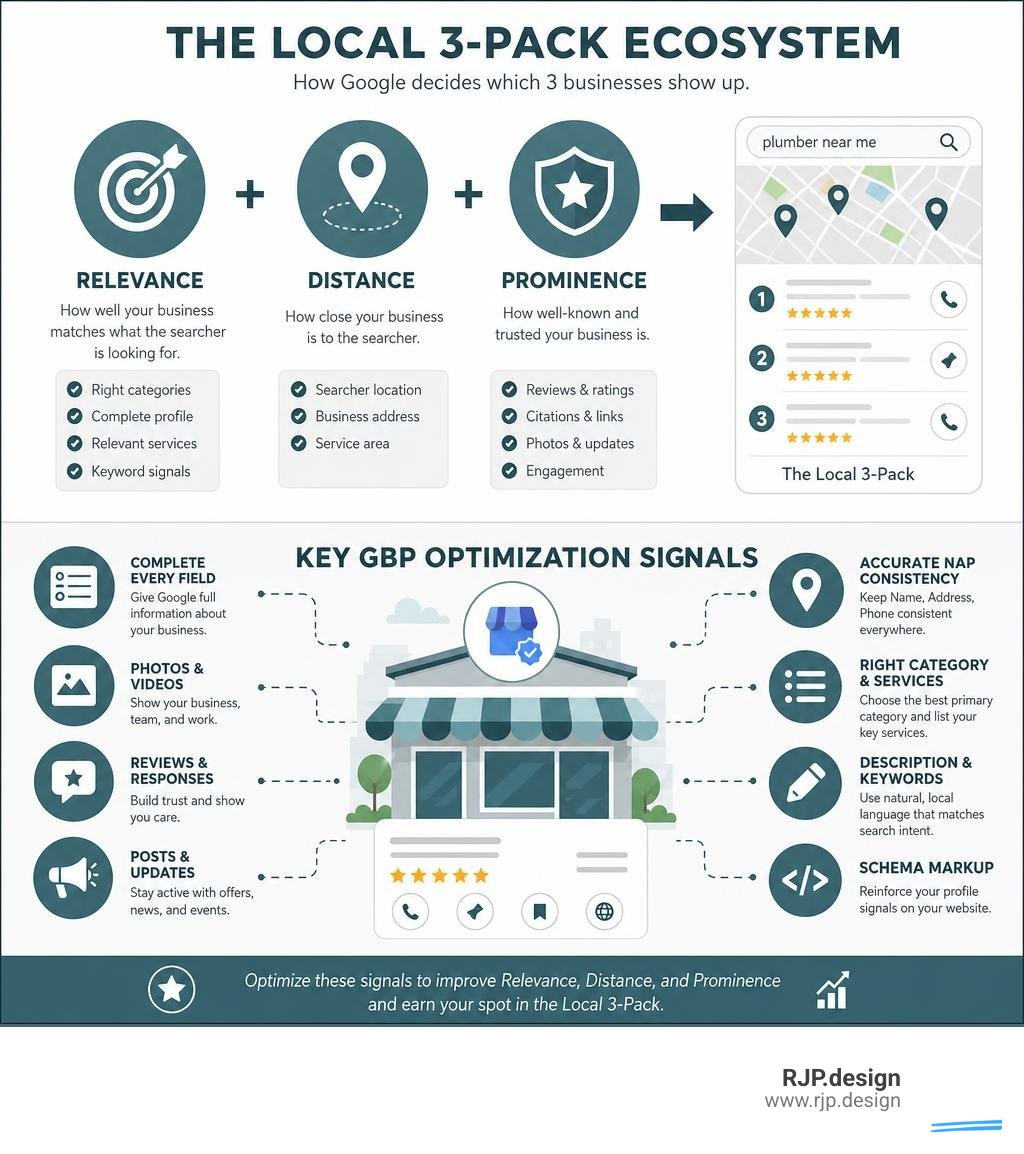
To win the local search game in July 2026, we have to look beyond basic directories. Google Business Profile (formerly known as Google My Business) has evolved from a simple phone-book listing into a highly interactive, AI-driven data layer. When we optimize a profile, we aren't just filling out forms to look pretty; we are feeding structured signals directly into Google's core local algorithm.
Optimizing your profile is the fastest way to land your business in the coveted "Local 3-Pack"—the trio of map listings featured at the very top of local Google searches. Because over 70% of search traffic comes from mobile devices, ranking in this space is the difference between an overflowing inbox and complete digital silence.
For a deeper dive into ranking mechanics, you can read our guide on Optimize Local Listings or explore Google My Business Optimization to Help Rank Your Sites.

Core Pillars of Google MyBusiness SEO
Google calculates local search rankings using three primary pillars: Relevance, Distance, and Prominence. Understanding how these pillars interact is essential for any successful local strategy.
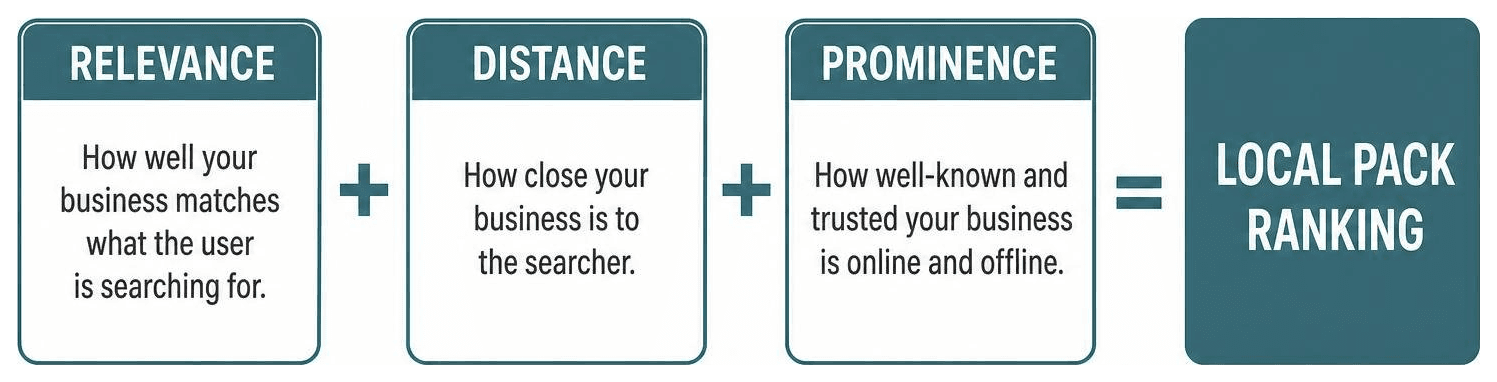
Here is a breakdown of how Google evaluates these three pillars:
Pillar | What It Measures | How to Optimize It |
|---|---|---|
Relevance | How well your business profile matches what the user is searching for. | Select precise categories, write descriptive service details, and keep your business description updated. |
Distance | How far your business is from the searcher or the location term used. | Keep your address and map pin 100% accurate; define precise service areas if you travel to clients. |
Prominence | How well-known and trustworthy your business is, both offline and online. | Gather consistent reviews, build quality local backlinks, and maintain active profile engagement. |
While you cannot control a searcher's physical distance, you have total control over your relevance and prominence. According to official guidelines, Google ranks businesses purely algorithmically—you cannot pay for a better local ranking.
To explore the official framework, check out these Tips to improve your local ranking on Google - Google Business Profile Help.
Step-by-Step Setup and Verification
If you haven't claimed your profile yet, that is your absolute first priority.
Create or Claim Your Listing: Go to google.com/business. Search for your business name. If it exists, click "Claim this Business." If not, create a new one using your professional domain email.
Input Accurate Basics: Enter your legal business name exactly as it appears on your physical storefront signage. Select your primary business category.
Set Your Location: If you have a physical storefront, place your map pin precisely on your building. If you are a service-area business (like a plumber or mobile detailer) operating without a physical storefront, hide your address and define specific service areas.
Choose a Verification Method: Google requires verification to prove you genuinely represent the business. The most common methods include:
Postcard Verification: Google mails a physical postcard with a unique 5-digit code to your address (usually arrives in 5-14 days).
Phone/SMS Verification: Receive a quick call or text with your code.
Video Verification: Record a continuous video showing your street sign, business tools, and secure workspace to prove legitimacy.
For a complete walkthrough of this setup, review our Google Business Profile Ultimate Guide.
Advanced Tactics to Optimize Your Profile
Once verified, it is time to turn your profile into a local conversion machine.
Perfect Your NAP Consistency
NAP stands for Name, Address, and Phone number. Google's algorithm cross-references this data across thousands of directories on the web. If your profile lists "Suite 100" but your website says "Ste. 100" or your Facebook page lists an old phone number, Google's trust in your location drops. Keep this data identical everywhere.
Master Call Tracking Without Hurting SEO
Many businesses use call tracking numbers to monitor their marketing ROI. You can do this without ruining your NAP consistency! Simply place your tracking number in the Primary Phone field, and insert your main, consistent landline/business number in the Additional Phone field. Google will still recognize and match your consistent NAP signal across the web.
Pick the Right Categories
Google offers over 4,000 categories, and you can select one primary category and up to nine secondary categories. Your primary category holds massive ranking weight. Align it directly with your highest-revenue, most important service.
For more advanced strategies, read Google My Business and SEO: A Comprehensive Guide | Contentbase.
Review Management and Active Engagement Signals
Reviews are the lifeblood of prominence. Google doesn't just look at your overall star rating; it evaluates review recency (how fresh they are) and review velocity (how frequently you receive them). Under Google's "FreshnessTwiddler" algorithm system, a steady stream of new reviews will easily outrank an older profile with hundreds of stale ratings.
Furthermore, Google highly values descriptive reviews containing 200+ characters. Encourage your customers to write detailed feedback mentioning the specific service they received and their neighborhood.
When you reply, avoid repetitive, automated templates. In 2026, Google's "ReviewReplyState" moderation system actively flags and silently holds replies that look like spammy, keyword-stuffed AI copy. Write genuine, helpful responses to every review within 48 hours.
To learn more about managing customer interactions, check out our guide on How to Use GMB.
Avoiding Common Google MyBusiness SEO Mistakes
Even experienced business owners fall into traps that can lead to ranking drops or complete profile suspension.
Keyword Stuffing the Business Name: Adding extra words to your name (e.g., "Plumber Dallas - Fast & Cheap Plumbing") is a direct violation of Google's guidelines. It can result in an instant suspension, and the algorithm is trained to ignore stuffed keywords anyway.
Using Fake Physical Addresses: Do not buy a P.O. Box or a virtual UPS address to try and rank in a city where you don't actually operate. Google easily detects these and suspends the profiles.
Allowing Your Profile to Go Static: The modern algorithm penalizes inactivity. If you don't update your hours for holidays, upload new photos, or post updates for 30+ days, your profile's search impressions will begin to drop.
For a broader look at avoiding algorithmic penalties, check out our Local SEO Guide 2025 or read Medium.
Navigating AI Overviews and Semantic Search in 2026
Local search has shifted dramatically. Google's AI Overviews and Gemini models now synthesize data directly from your Google Business Profile to answer conversational user queries.

Because Google semantically indexes your profile, it understands the intent behind search queries rather than just matching exact keywords. If your profile has highly detailed service descriptions, active weekly posts, and rich review sentiment, Google's AI is much more likely to recommend your business in conversational search results.
A neglected profile is essentially invisible to these AI models. For an honest look at how your website and profile work together to feed these search engines, read Does Google My Business Help SEO? The Real Answer.
Conclusion: Partnering for Local Search Dominance
Optimizing your profile for Google MyBusiness SEO isn't a "set-and-forget" task. It requires continuous management, review generation, and active updates to show both search engines and local customers that your business is thriving.
At RJP.design, we specialize in building high-performing digital presences for local businesses. We are a down-to-earth, friendly team that takes the stress out of local SEO, ensuring your website and your Business Profile work together seamlessly to drive real calls, bookings, and sales.
Ready to take your local rankings to the next level? Explore our professional local SEO services and let's get your business found online!