
SEO
Your Guide to SEO-Friendly Web Development in 2026
Sep 28, 2026

Build a Website Search Engines and Customers Can Actually Use
SEO-friendly web development means building your site so people, search engines, and AI answer tools can quickly access, understand, and use its content. Start with these essentials:
Put important page content, links, and metadata in the initial HTML whenever possible.
Use descriptive titles, headings, URLs, internal links, canonical tags, and structured data.
Make pages fast, mobile-friendly, accessible, and visually stable.
Give every valuable page a clear purpose - and make it easy to reach through navigation and an XML sitemap.
This is not about chasing a secret ranking trick. It is about removing technical barriers that keep a useful business website from being discovered. A polished site that is slow, difficult to navigate on a phone, or dependent on client-side JavaScript for its core content can frustrate visitors and limit visibility in traditional search and AI-driven results.
In 2026, SEO-friendly web development also means planning for how modern crawlers consume information. Google can render JavaScript, but important content may be processed later; many AI crawlers are less dependable with JavaScript-heavy pages. The practical default is simple: deliver critical information in crawlable HTML, then use JavaScript to improve the experience rather than to reveal the whole page.
I'm Ross Plumer, an entrepreneur with experience across digital marketing, website design, and development for businesses that have marketed more than $20 million in revenue. In this guide, I'll translate SEO-friendly web development into practical decisions that help small businesses build visibility, trust, and a website that supports real customer action.

SEO-friendly web development terms to remember:
Core Foundations of SEO-Friendly Web Development
Building an organic traffic engine begins in the codebase. When search engines visit your site, their primary goal is to understand what your pages are about and whether they satisfy user search intent. However, crawlers operate under finite crawl budgets—the limited time and computational resources assigned to fetch and evaluate your site. If pages take too long to respond or require complex client-side execution, search bots may miss critical assets.
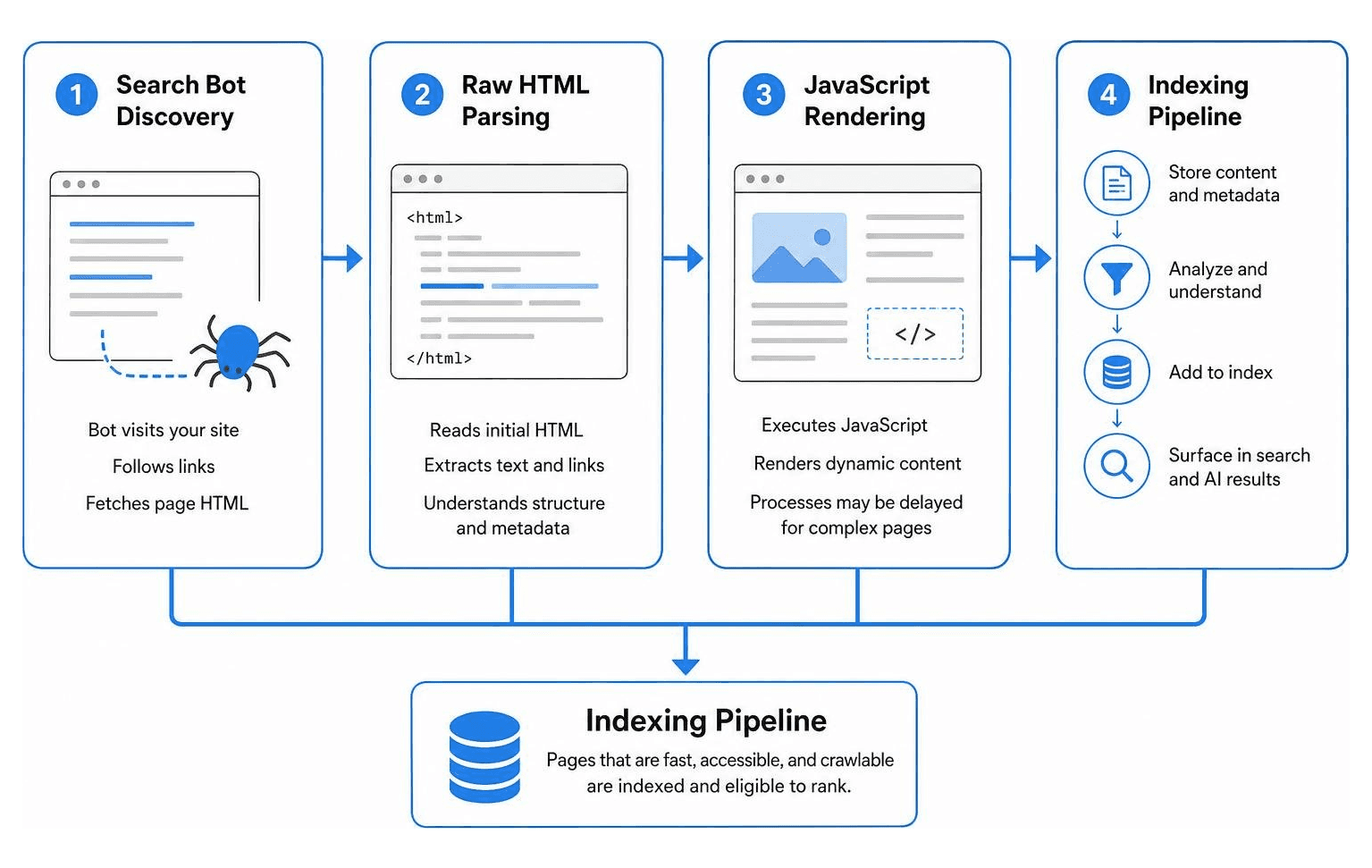
Understanding how automated tools read markup is essential. Search engines prioritize websites that serve raw HTML immediately, reducing processing overhead and allowing the indexing pipeline to store page data without delays. When we build sites that pair lightweight server responses with intuitive layouts, we improve both search bot efficiency and overall user experience.
How Search Engines and AI Crawlers Index Modern Code
Traditional search engines like Google process modern web applications using a two-pass indexing system. In the first pass, the crawler downloads the raw server HTML to immediately extract links and primary text. In the second pass, a headless browser executes JavaScript to render dynamic components. Because rendering millions of JavaScript-heavy pages requires immense computing power, dynamic rendering can sit in a queue for days or weeks.
Modern AI answer engines, such as GPTBot and PerplexityBot, take a more restrictive approach. As detailed in this guide on SEO for engineers, AI crawlers rarely execute client-side JavaScript. Instead, they fetch the raw HTML and extract text strings instantly. If your key content, product details, or pricing tables rely entirely on client-side scripts, AI crawlers will simply see an empty page.
To ensure your code remains accessible to all bots, prioritize clean server responses:
Return clear HTTP status codes (200 for live pages, 301 for permanent moves, 404/410 for deleted content).
Configure accurate server headers, including
Content-Typeand caching rules.Avoid burying core body content inside client-side execution paths.
Technical Essentials in SEO-Friendly Web Development
A rock-solid technical foundation prevents indexing issues before they happen. Search engines require specific signals to understand content hierarchy and prevent duplication.
Our comprehensive SEO meta tags guide breaks down how these header elements guide search snippets:
Unique Title Tags: Keep titles between 50 and 60 characters, placing primary topics front and center.
Meta Descriptions: Write concise, human-focused summaries (150–160 characters) that encourage clicks.
Canonical Tags: Specify self-referencing canonical URLs by default to prevent duplicate content issues across URL parameters.
JSON-LD Structured Data: Provide explicit context using schema markup like
Organization,Article,Product, orBreadcrumbList. Always validate your markup using rich results testing tools before pushing changes live.Robots.txt & XML Sitemaps: Use
robots.txtto guide crawler access away from administrative paths while explicitly pointing to your up-to-date XML sitemap. Never block the CSS or script assets required to render the main page layout.
Rendering Architecture and Core Web Vitals Optimization
The architectural decisions you make early in a build directly influence page loading speeds and organic visibility. By partnering with experienced technical SEO experts, teams can align their frontend development with search engine requirements and real-user monitoring data.
Balancing SSR, SSG, and CSR for Search Visibility
Choosing how your web application renders HTML is one of the most consequential decisions for technical visibility. Reviewing modern SEO fundamentals for developers highlights the clear trade-offs between static delivery, server rendering, and client-side processing:
Strategy | Search Crawlability | Initial Load Speed | Technical Complexity |
|---|---|---|---|
Server-Side Rendering (SSR) | Excellent | High | Moderate |
Static Site Generation (SSG) | Best | Fastest | Low to Moderate |
Client-Side Rendering (CSR) | Poor to Delayed | Slow | High (for SEO workarounds) |
Static Site Generation (SSG) and Server-Side Rendering (SSR) guarantee that complete, semantic HTML arrives in the initial server response. This eliminates indexing bottlenecks and ensures both search bots and AI answer engines can parse your content on the very first pass. Client-Side Rendering (CSR) should be reserved for authenticated user dashboards rather than public marketing pages.
Optimizing LCP, INP, and CLS in Code
Google measures real-world user experience using Core Web Vitals. Optimizing these metrics in code ensures your platform remains competitive across organic search:
Largest Contentful Paint (LCP): Target an LCP of under 2.5 seconds. Optimize your critical rendering path by preloading hero images with
<link rel="preload">and applyingfetchpriority="high". Ensure back-end server response times remain low through efficient caching.Interaction to Next Paint (INP): Target an INP of under 200 milliseconds. Keep the main JavaScript thread unblocked by breaking up long tasks, deferring non-essential third-party scripts, and using web workers for heavy data calculations.
Cumulative Layout Shift (CLS): Target a CLS score below 0.1. Prevent unexpected content jumps by setting explicit
widthandheightattributes on all image and video tags, or by using modern CSSaspect-ratiorules. Always reserve dedicated layout space for dynamic elements and embeds.
Advanced Architecture, Mobile UX, and Strategy Execution
Modern websites must perform seamlessly across screens of all sizes. Mobile devices account for roughly 60% of global web traffic, making responsive web design a baseline requirement for search indexation and user retention.

Google operates entirely on mobile-first indexing, meaning its crawlers evaluate your mobile viewport layout to determine rankings. Always declare a valid viewport meta tag: <meta name="viewport" content="width=device-width, initial-scale=1">
Beyond viewport sizing, web accessibility directly enhances SEO. Clear font hierarchies (minimum 16px body copy), accessible contrast ratios (at least 4.5:1), and descriptive image alt tags create an inclusive experience for humans while providing machines with unambiguous context.
Best Practices for SEO-Friendly Web Development and Information Architecture
A clean website architecture distributes authority evenly and allows both visitors and search engines to discover key landing pages within three clicks of the homepage.
When engineering your platform, apply these structural standards:
Descriptive URL Paths: Build clean, lowercase, hyphen-separated URLs that reflect your content directory hierarchy (e.g.,
/services/web-development) rather than cryptic database IDs.Breadcrumb Navigation: Implement structured breadcrumb markup on every secondary page to strengthen internal link pathways and improve SERP snippets.
Internal Link Equity: Use native HTML
<a href="...">anchor tags with clear, descriptive anchor text. Avoid relying on JavaScriptonClickhandlers for page navigation, which search crawlers frequently fail to follow.Generative Engine Optimization (GEO): Structure key factual statements, definitions, and FAQs in clear, quote-ready paragraphs near the top of the page. This inverted-pyramid style allows large language models to easily cite your content.
Investing in tailored custom web design services helps businesses implement clean site architectures that turn casual visitors into paying clients.
Avoiding Costly Developer Mistakes and Maximizing Impact
Even seasoned teams can make straightforward mistakes that severely impact organic performance. Here are some of the most common pitfalls to monitor before launching code:
Leaving
noindexTags Active: Forgetting to remove a staging environment's<meta name="robots" content="noindex">tag upon production deployment is the digital equivalent of locking your front doors.Creating Redirect Chains: When updating site structures, implement direct 301 redirects from old URLs to new destinations. Avoid daisy-chaining multiple hops (A to B to C), which drains crawl budget and slows page loads.
Blocking CSS and JavaScript in
robots.txt: Crawlers must render pages identically to human visitors. Blocking style or script assets prevents search engines from verifying mobile responsiveness.Sacrificing UX for Keyword Placement: Keyword stuffing harms readability and conversion rate optimization. Build clean interfaces that balance SEO requirements with smooth user journeys.
At RJP.design, we believe high-performing web platforms should look exceptional, load instantly, and be effortless for search engines to find. Our down-to-earth team prioritizes client satisfaction, delivering technical execution that grows your business.
If you are ready to expand your visibility, reach local customers, and build a technically sound online presence, explore our dedicated local SEO services to get started today.