
Web
The Ultimate Sitemap Generator: Build Your Google Sitemap Online, Fast & Free
Apr 17, 2026

Why Every Website Needs a Sitemap (And How to Create One Fast)
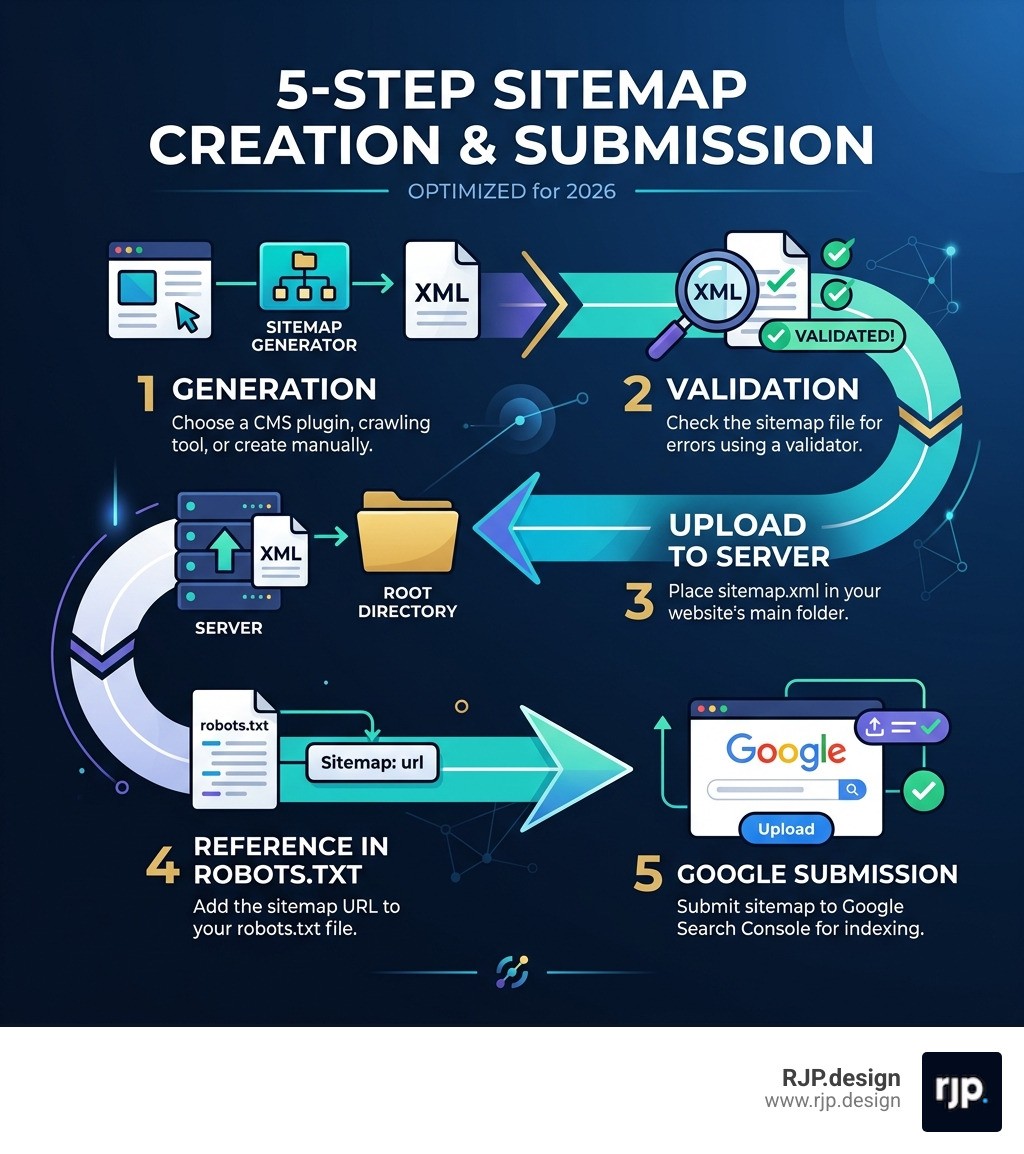
How to create sitemap? Here's the quick answer:
Choose your method - Use a CMS plugin (like Yoast SEO for WordPress), a crawling tool (like Screaming Frog or xml-sitemaps.com), or create one manually
Generate your sitemap - Your tool will produce an XML file listing all your important URLs
Validate it - Check for errors using a sitemap validator tool
Upload it - Place the file in your website's root directory (e.g.,
yoursite.com/sitemap.xml) and reference it in yourrobots.txtfileSubmit it - Add it to Google Search Console and Bing Webmaster Tools so search engines can find and crawl your pages
The whole process takes twenty minutes or less for most websites.
Search engines like Google discover your website's pages by following links — but they don't always find everything. If your site is new, large, or has pages buried deep in its structure, some of your content may never get indexed. That's a real problem when you're trying to grow your online visibility.
A sitemap solves this. It's essentially a roadmap you hand directly to search engines, telling them exactly which pages exist and when they were last updated. There are three main types worth knowing about:
XML sitemaps - Machine-readable files designed for search engines
HTML sitemaps - Human-readable pages that help visitors navigate your site
Visual sitemaps - Diagrams used during website planning and design
For most small business owners, the XML sitemap is the priority. It's the one that directly impacts how efficiently Google crawls and indexes your site.
I'm Ross Plumer, a digital marketing and web development expert who has helped businesses generating over $20 million in revenue improve their online presence — and knowing how to create sitemap files correctly is one of the first technical SEO steps I recommend to every client. Let's walk through exactly what you need to do.
Relevant articles related to How to create sitemap?:
How to Create Sitemap?
When we talk about How to create sitemap? protocols, we are essentially discussing the architectural blueprints of your digital home. Without a blueprint, a builder might miss a room; without a sitemap, a search engine might miss your most profitable landing page.
In SEO, we generally deal with three distinct formats, each serving a unique purpose:
XML Sitemaps (Extensible Markup Language): This is the "technical" one. It is a file hosted on your server that lists your URLs along with metadata. It tells search engines which pages are the most important and when they were last modified.
HTML Sitemaps: This is a standard web page, often found in the footer, that lists links to all the main sections of a site. It’s built for humans to help them find their way around, though search engines do "read" them to understand site hierarchy.
Visual Sitemaps: These are used during the SEO website development phase. They look like flowcharts and help us plan the user journey before a single line of code is written.
Creating these isn't just about checking an SEO box. It’s about ensuring your SEO-friendly websites are actually reachable. Statistics show that making any page reachable within about three clicks of the homepage significantly improves crawlability and often correlates with better ranking performance.

Step-by-Step Guide: How to Create Sitemap?
The method you choose for How to create sitemap? generation depends largely on your technical comfort level and the platform you use.
1. Using CMS Plugins (The Easiest Way) If you are running a popular Content Management System, you likely don't need to write a single line of code.
WordPress: Since version 5.5, WordPress actually outputs a basic sitemap at
/wp-sitemap.xml. However, for better control, we recommend SEO for WordPress websites using plugins like Yoast SEO or Rank Math. With Yoast, you simply toggle the "XML Sitemaps" feature on in the settings, and it generates a dynamicsitemap_index.xmlfor you.Shopify & Wix: These platforms are even more hands-off. Shopify automatically generates a sitemap at
yourdomain.com/sitemap.xmland updates it whenever you add a new product or collection. Wix does the same once you complete their SEO Setup Checklist.
2. Using Website Crawling Tools If you have a custom-built site or want a one-time "snapshot" of your structure, crawling tools are excellent.
Screaming Frog SEO Spider: This is a desktop tool that "spiders" your site just like Googlebot. The free version allows you to crawl up to 500 pages. Once the crawl is finished, you simply go to the "Sitemaps" menu and select "Create XML Sitemap."
Online Generators: Sites like XML-sitemaps.com or Slickplan allow you to enter your URL and download a generated file in minutes.
3. Manual Creation (The "Mount Everest" Method) While you can open a text editor like Notepad or Nano and follow the sitemaps protocol, we generally don't recommend it. For a site with more than a few dozen URLs, manual entry is prone to human error and becomes a nightmare to maintain as you add new content.
Enhancing User Experience: How to Create Sitemap?
While XML is for the bots, the HTML sitemap is for your customers. Think of it as the "Table of Contents" for your website.
When building an HTML sitemap, we follow a few golden rules:
The 100-Link Rule: A good rule of thumb for HTML sitemaps is to stick to fewer than 100 links. If your site is massive, break the sitemap into categories or thematic pages.
Clean Navigation: Use simple unordered lists (
<ul>and<li>tags). You don't need flashy graphics here; clarity is king.Keyword-Rich Anchor Text: Use descriptive names for your links (e.g., "Men's Running Shoes" instead of "Click Here"). This helps both users and search engines understand what the destination page is about.
Accessibility: Ensure your sitemap is linked in the footer so it's reachable from every page on your site.
By providing a clear path, you ensure that even if your main menu is complex, users can always find a "master list" of your content, which is a core tenet of high-quality SEO website development.
Visual Sitemaps for Strategic Planning
Before we build, we plan. A visual sitemap is a diagram that represents the hierarchy of your website. It’s a vital tool for:
Spotting Gaps: Seeing your site as a flowchart helps you realize if you’ve forgotten a crucial "Contact" page or a "Privacy Policy."
Identifying Orphan Pages: These are pages that have no internal links pointing to them. If a page is an "orphan," search engines will have a very hard time finding it.
Streamlining UI/UX: It allows us to visualize the "click depth." If a user has to click six times to reach a product, we use the visual sitemap to figure out how to bring that content closer to the surface.
Submitting and Optimizing Your Sitemap
Once you’ve figured out How to create sitemap? files, the job isn't done. You have to tell the search engines where to find them.
Feature | XML Sitemap | HTML Sitemap |
|---|---|---|
Primary Audience | Search Engine Bots | Human Visitors |
Format | .xml (Code-based) | .html (Web page) |
Location | Root directory (usually hidden) | Linked in Footer (visible) |
Max URLs | 50,000 per file | Generally < 100 for UX |
SEO Impact | High (Discovery & Indexing) | Medium (Navigation & Structure) |
Submitting to Google and Bing
To get your site indexed, you need to "ping" the major players.
Google Search Console (GSC):
Log in to Google Search Console.
Select your property (your website).
Click on "Sitemaps" in the left-hand menu.
Enter the URL of your sitemap (e.g.,
sitemap.xml).Hit "Submit."
Bing & Yandex: Don't ignore the "others." Bing has a global search market share of just over 6%, with more than 900 million unique monthly users. Yandex dominates more than 55% of the search market in Russia. You can submit your sitemap to Bing Webmaster Tools and Yandex Webmaster in a very similar fashion to GSC.
Pro Tip: Always add a link to your sitemap in your robots.txt file. Simply add a line like this: Sitemap: https://www.yourdomain.com/sitemap.xml. This ensures that any crawler that visits your site—even ones you haven't manually submitted to—knows exactly where your roadmap is.
Best Practices for Maintenance
An outdated sitemap is almost as bad as no sitemap at all. Here are the technical limits and best practices we follow at RJP.design:
Size Limits: XML sitemap files should be kept under 50,000 URLs or 50 MB uncompressed. If you exceed this, you must use a "Sitemap Index" file to link multiple sitemaps together.
The
<lastmod>Tag: This tells Google when a page was last updated. While Google revealed in a 2024 API leak that they may not always "trust" this tag, it’s still a strong signal for crawlers to re-index fresh content.Gzip Compression: To save bandwidth and speed up the "handshake" with crawlers, you can compress your sitemap into a
.gzfile.Canonical URLs Only: Only include the "official" version of a page. Never include redirects (301s), broken pages (404s), or pages you've marked with a "noindex" tag.
Troubleshooting Errors with RJP.design
Even with the best tools, errors happen. We often see "Couldn't fetch" errors in Search Console or "URL blocked by robots.txt" warnings.
Common issues include:
Path Mismatches: Using
httpin the sitemap when the site ishttps, or mixingwwwand non-wwwversions.Broken Links: Including pages that return a 404 error. This wastes your "crawl budget"—the limited time Google spends on your site.
Invalid XML Syntax: A single missing bracket can break the whole file. Always use a validator tool before uploading.
At RJP.design, we provide comprehensive SEO optimization services that include deep-dive technical audits. We don't just generate a file and hope for the best; we ensure your site's architecture is built for growth. If you're struggling with "How to create sitemap?" errors or just want a professional team to handle your technical SEO, we are here to help.
Creating a sitemap is one of the highest-impact, low-effort moves you can make for your SEO. It takes less than 20 minutes, costs nothing, and ensures that the search engines see your hard work. So, what are you waiting for? Get that roadmap submitted today!