
SEO
The Ultimate Guide to SEO Backlink Audits: Spotting the Good, the Bad, and the Toxic
Sep 10, 2026

The Step-by-Step Process to SEO Audit Backlinks
SEO audit backlinks — reviewing every external link pointing to your website — is one of the highest-impact things you can do to protect and improve your Google rankings.
Here's what a backlink audit covers at a glance:
Export your link data from Google Search Console and a tool like Ahrefs or Semrush
Evaluate referring domain quality by checking authority scores, spam markers, and topical relevance
Analyze anchor text distribution to ensure branded terms dominate and exact-match keywords stay below 5%
Check link velocity for unnatural spikes that could trigger Google's SpamBrain AI
Compare your profile against competitors to find link gaps and new opportunities
Disavow toxic links only when necessary — using a correctly formatted plain-text file submitted via Google Search Console
Recover lost links through outreach and 301 redirects before chasing new ones
Set a recurring audit schedule — monthly quick checks, quarterly full exports
Most small business owners publish content, wait for traffic, and assume their backlinks are working in their favor. Often, they're not. A study of 11.8 million search results found that the top result in Google has 3.8x more backlinks than pages ranking in positions 2 through 10. And yet, 95% of all web pages have zero backlinks to speak of.
That gap is where rankings are won or lost.
Backlinks are essentially votes of confidence. When a credible, relevant website links to yours, Google interprets that as a signal that your content is trustworthy and worth surfacing. But not all links vote in your favor. Spammy, irrelevant, or manipulative links can drag your rankings down — sometimes triggering algorithmic penalties or even a manual action from Google.
As Andrey Lipattsev, Search Quality Senior Strategist at Google, confirmed: "Content and links going into your site are the two most important ranking factors." The quality of your backlink profile isn't a secondary concern. It sits at the very core of how Google decides who ranks.
The good news? You don't need to be a technical SEO expert to audit your backlink profile. You just need a clear process — which is exactly what this guide walks you through.
I'm Ross Plumer, a digital marketing strategist with hands-on experience running SEO audit backlinks analyses for businesses generating over $20 million in revenue across competitive markets. In the sections ahead, I'll show you the exact workflow we use at RJP.design to clean up toxic links, recover lost equity, and close the gap on competitors.
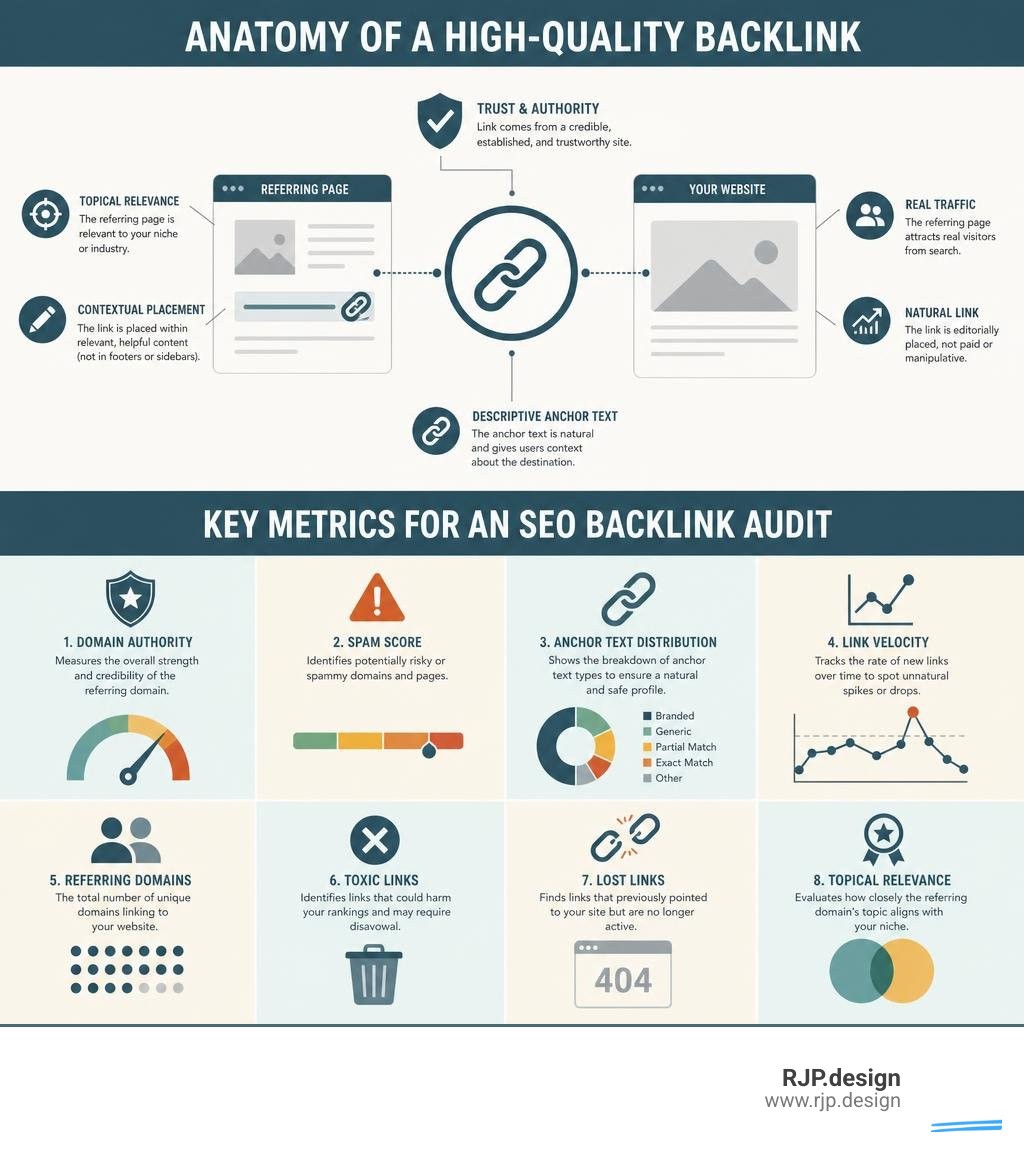
Analyzing your link profile may sound overwhelming, but breaking it down into a clear, repeatable workflow makes it highly manageable. A thorough audit for a website with 1,000 to 5,000 backlinks typically takes between 4 and 8 hours.
By taking the time to systematically review your links, you protect your search visibility and guard your site against Google's SpamBrain AI — the machine-learning system Google uses to detect and devalue manipulative link networks in real time.

How to Prepare to SEO Audit Backlinks
Before you can evaluate your links, you need to gather your data. No single SEO tool crawls the entire web, which is why we always recommend pulling data from multiple sources to get a complete picture.
To start, you will need to export your link history from:
Google Search Console (GSC): This is the most critical free tool because it shows the exact links Google has crawled and indexed for your site.
A Third-Party SEO Tool: Platforms like Ahrefs, Semrush, or Moz crawl the web independently and provide quality metrics (like Domain Rating or Authority Score) that Google GSC does not.
To learn more about setting up these tools, you can read our guide on How to Check Backlinks: A 10-Minute Audit Guide.
Once you have exported your CSV files, consolidate them into a single master spreadsheet. We use columns for Source URL, Referring Domain, Target URL, Anchor Text, Link Type (Dofollow vs. Nofollow), Domain Authority, and Toxicity/Spam Score. Remove any duplicate rows so you have a clean list of unique referring domains. For a deeper look at how this data fits into your broader technical setup, explore our guide on Search Engine Optimization Analysis.
Evaluating Link Quality: How to SEO Audit Backlinks
With your consolidated spreadsheet ready, it is time to separate the helpful links from the harmful ones.
We look closely at referring domains (the unique websites linking to you) rather than your total backlink count. A single spammy forum might generate 10,000 separate links to your site from a sidebar banner, but Google treats this as a single referring domain. In fact, having 10,000 incoming links with an average of 10 or more links per domain is often flagged as excessive and unnatural. A healthy profile typically averages 2 to 3 links per domain.
When analyzing domain quality, watch out for these common toxic link warning signs:
Mismatched Niche Relevance: A link from an IT blog pointing to a local toy store is highly suspicious.
High Spam Scores: Third-party metrics (like Moz's Spam Score above 8 or Semrush's Toxicity Score above 45) indicate a domain needs manual review.
PBN Footprints: Private Blog Networks often have a very low ratio of unique IP addresses to referring domains.
Spammy TLDs: An unusual concentration of links from irrelevant foreign top-level domains (.ru, .cn, etc.) when your business only serves local customers.
To help you quickly evaluate your list, here is a simple comparison:
Metric | Healthy Referring Domain | Toxic Referring Domain |
|---|---|---|
Topical Relevance | Highly relevant to your industry or local area | Completely unrelated (e.g., gambling sites linking to a dentist) |
Link Placement | Natural, editorial context within a helpful article | Footer, sidebar, directory farm, or automated forum profile |
Domain Authority | Legitimate, active site with real organic traffic | DA 0-10 with zero traffic and thin, auto-generated content |
Anchor Text | Branded terms or natural, conversational phrases | Over-optimized keywords or adult/pharmaceutical spam |
You can automate some of this filtering using the Backlink Audit Tool to flag high-risk domains, but always manually review them before making any final decisions. Automated tools can sometimes flag healthy, highly relevant local links as toxic simply because the site has a lower domain score. For a comprehensive look at how off-page health integrates with your overall site health, check out our guide on How to Audit SEO.
Analyzing Anchor Text and Link Velocity Patterns
Anchor text is the clickable text that holds a hyperlink. Google uses it to understand what the destination page is about, but over-optimizing this text is one of the fastest ways to trigger a ranking penalty.
A healthy, natural anchor text distribution should look like this:
Branded Anchors (40–60%): Links using your business name (e.g., "RJP design").
URL/Naked Anchors (10–20%): Links displaying your website address (e.g., "rjp.design").
Generic Anchors (10–20%): Conversational phrases like "click here", "website", or "read more".
Topical/Partial Match (5–15%): Broad industry terms (e.g., "web development team").
Exact-Match Keywords (1–5%): Your precise target search terms (e.g., "seo audit backlinks"). Keep this very low to avoid looking manipulative.
Next, examine your link velocity — the speed at which your website gains or loses links over time. A natural link profile grows steadily as you publish helpful content. A sudden spike of hundreds of low-quality links over a few days is a major red flag that suggests negative SEO or a low-quality link-building campaign. To understand how these signals impact your search visibility, read our explanation of What is Off-Page SEO.
Comparing Your Profile Against Competitors
You do not need millions of links to rank; you just need a stronger, cleaner profile than your direct competitors. A website with 200 highly relevant, authoritative referring domains can easily outperform a competitor with 2,000 weak, unrelated links.
To find where you stand, choose 3 to 5 direct competitors and run a link gap analysis.
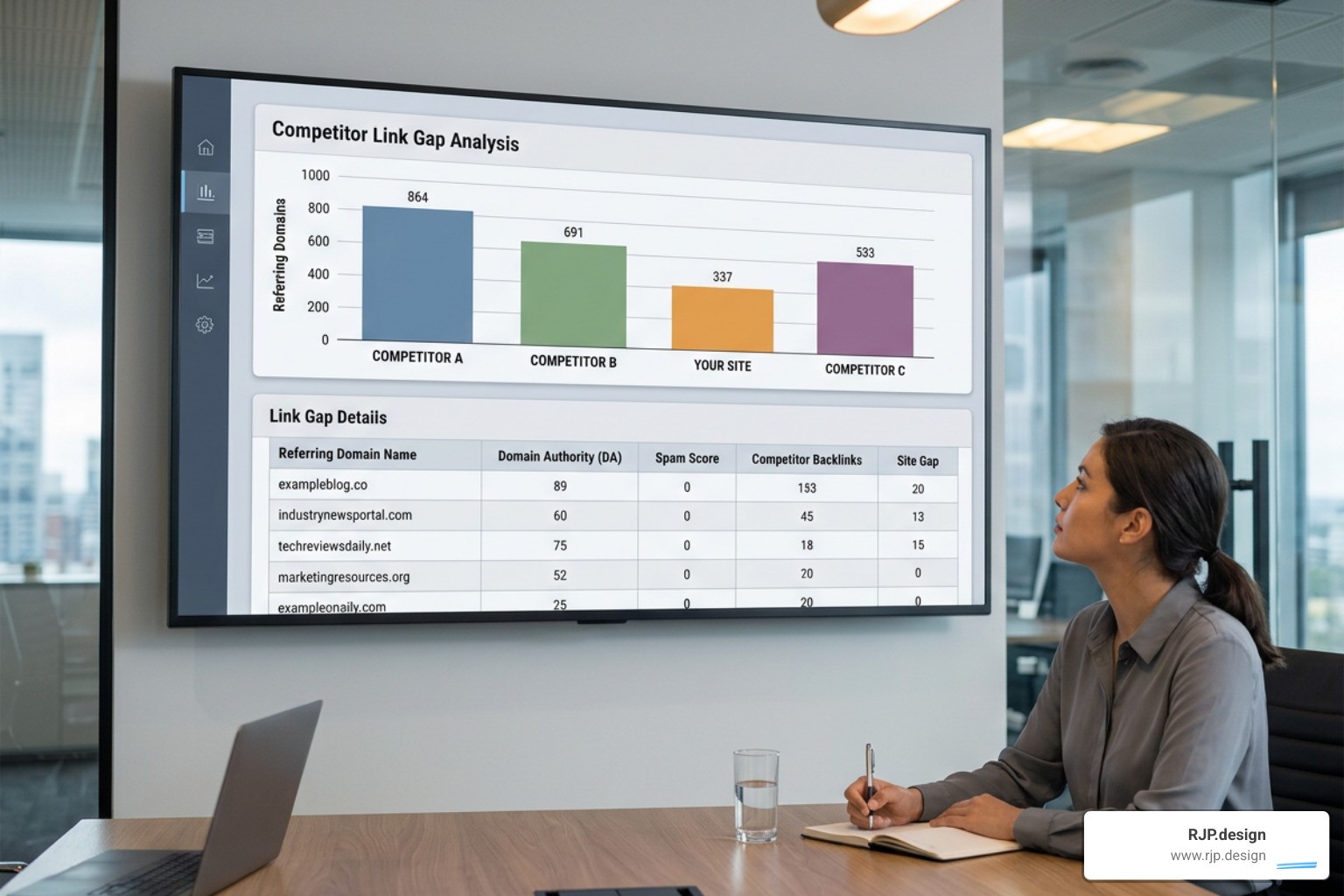
By comparing your referring domains against theirs, you can identify "high-authority gaps" — websites that link to multiple competitors but not to you. Because these sites already link to similar businesses in your industry, they are excellent, warm targets for your next outreach campaign. For a deeper dive into this strategic review, see What Is A Backlink Analysis? How To Run One In 2026 and explore our proven Off-Page SEO Strategies.
When and How to Safely Disavow Toxic Links
The Google Disavow Tool is a powerful but sensitive tool. Submitting a disavow file tells Google to completely ignore specific links when evaluating your site. However, over-disavowing or accidentally blocking healthy links can destroy your organic traffic overnight.
As a general rule, you do not need to disavow links unless:
You have received a Manual Action notification in Google Search Console.
You are experiencing a severe, obvious negative SEO attack.
You have a history of buying low-quality links and want to proactively clean your profile.
If Google's algorithms naturally ignore low-quality spam, let them do their job. But if you must disavow, you can access the submission screen within Google Search Console.
When preparing your disavow file, you must format it as a plain-text file (.txt) encoded in UTF-8 or 7-bit ASCII. Follow these exact formatting rules:
Write one entry per line.
To disavow a single page, write the full URL:
https://spammysite.com/spam-page.htmlTo disavow an entire website (highly recommended for spam networks), use the domain prefix:
domain:spammysite.comYou can add notes for your own reference by starting a line with a
#symbol. Google ignores these lines.
For a detailed walkthrough of this timeline and process, you can refer to How to Do a Backlink Audit in 30 Minutes (Step-by-Step Guide) | BetterLinks.
Reclaiming Lost Link Equity and Establishing an Audit Cadence
Earning new backlinks is hard work, but reclaiming lost ones is incredibly cost-effective. Over time, websites change their URL structures, page names, or delete old content. When this happens, external links pointing to those pages break, resulting in a 404 error and wasting valuable link equity.
During your audit, look for external links pointing to broken pages. You can quickly reclaim this authority by setting up 301 redirects from the old, broken URLs to active, relevant pages on your site.
To keep your link profile clean, we recommend a tiered audit cadence:
Monthly: Run a quick check on your link velocity and anchor text trends to spot negative SEO attacks early.
Quarterly: Conduct a full export and clean up any newly acquired toxic domains.
Annually: Run a deep competitive gap analysis to update your outreach and content strategies.
For a comprehensive guide on managing this ongoing health check, refer to How to Audit Your Backlink Profile: Complete Step-by-Step Guide and learn more about Link Building and Off-Page SEO. You can also review our structured skills/seo-backlink-audit/SKILL.md at main · rampstackco/claude-skills framework for advanced auditing standards.
Conclusion: Elevate Your Off-Page Strategy
A clean, high-performing backlink profile is the backbone of search visibility in July 2026. By systematically running an seo audit backlinks check, you protect your site from algorithmic updates, clean up toxic spam, and find high-value opportunities to outrank your competitors.
At RJP.design, we specialize in building beautiful, highly functional websites and keeping them visible online. Our down-to-earth team prioritizes real client satisfaction, taking the stress out of technical and off-page SEO so you can focus on running your business.
If you want to ensure your link profile is driving growth rather than holding you back, let us do the heavy lifting. Contact us today to explore our professional SEO Audit Services and secure your search authority.