
Web
The Ultimate Guide to Ecommerce Site Design Principles
Oct 20, 2026

Ecommerce Site Design That Helps Customers Buy
Effective ecommerce site design makes it easy to find a product, decide whether it is right, and buy it with confidence. Start with clear navigation and search, useful product photos and details, visible pricing and policies, and a simple checkout. Make every step work well on a phone, too.
A polished storefront matters, but appearance alone will not fix a confusing shopping experience. This guide shows how to combine visual hierarchy, brand consistency, trust signals, and fast, accessible pages so your store is easier to use from the first visit through checkout.
I’m Ross Plumer, and my work in digital marketing, website design, and development has included businesses that have marketed more than $20 million in revenue. I’ll use that experience to make ecommerce site design decisions easier to understand and apply.

Core Pillars of High-Converting Ecommerce Site Design
Online shopping moves quickly. Research shows visitors take only 50 milliseconds (0.05 seconds) to form a first impression of your website. If your digital storefront feels chaotic, cluttered, or dated, potential buyers bounce before seeing your catalog.
Designing an effective store requires balancing visual appeal with consumer psychology. When we plan how to design a retail website, we focus on removing friction so every visitor understands what you sell, why it matters, and how to buy it.
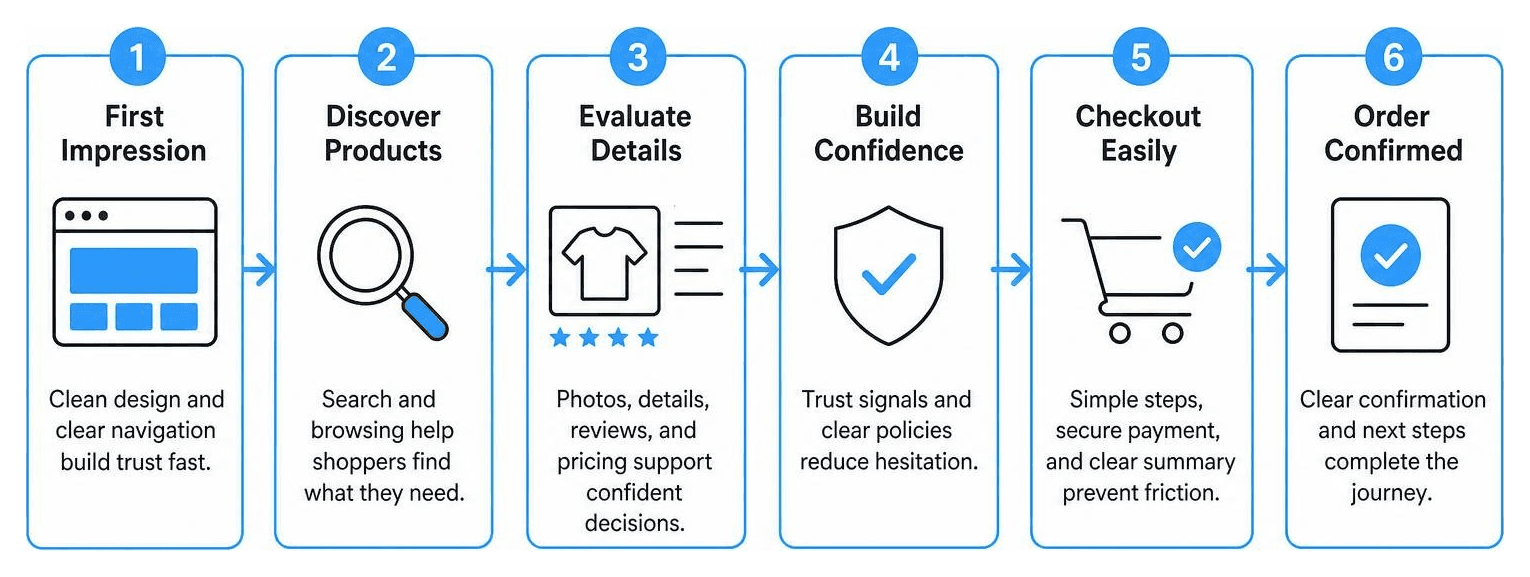
Establishing Visual Hierarchy and Brand Trust in Ecommerce Site Design
Trust is the currency of digital retail. About 75% of consumers judge a company's credibility based on its website design. If a store looks unfinished, shoppers will not risk entering their credit card details.
Building instant credibility requires strong visual hierarchy, authentic proof, and clear policies:
Structured Typography and Whitespace: Use clean heading structures to guide the reader's eye naturally from value propositions to product details. Ample whitespace keeps visitors focused on what matters.
Strategic Color Choices: Use a consistent color palette where your primary brand shades set the tone and a distinct accent color draws attention to action buttons.
Visible Security Signals: Display SSL lock icons, accepted payment badges (such as Apple Pay, PayPal, and major credit cards), and explicit privacy assurances near purchase areas.
Authentic Social Proof: Showcase verified buyer reviews, star ratings, and real customer photos directly on landing and product pages.
Transparent Terms: Make return policies, warranty info, and shipping timelines easy to find in headers and footers.
Reviewing curated ecommerce UI patterns across page types demonstrates that reducing layout clutter directly improves buyer confidence. Combining these trust elements with proven conversion strategies turns casual browsers into buyers.
Intuitive Navigation and Search Best Practices
Your navigation serves as the digital floor plan of your store. If customers cannot locate a product in a few clicks, they will look elsewhere.

Clear browsing experiences rely on structured menus and helpful search tools:
Logical Category Taxonomy: Keep main menus organized into broad, intuitive parent categories with straightforward labels. Avoid industry jargon that leaves visitors guessing.
Descriptive Mega Menus: For large catalogs, use structured mega menus that display subcategories alongside promotional imagery and bestsellers.
Predictive Search with Autocomplete: Integrate on-site search engines featuring typeahead suggestions, spelling corrections, and thumbnail previews for immediate product discovery.
Faceted Filtering: Let shoppers narrow collections by size, color, price range, brand, and customer rating without reloading the entire page.
Clear Breadcrumb Trails: Give shoppers an easy way to see where they are in your catalog and jump back to parent categories with one click.
Investing in solid user experience design ensures your store stays easy to explore as your inventory expands.
High-Converting Product Page and Visual Media Layouts
The product detail page (PDP) is where shoppers decide whether to buy. Because customers cannot touch your items in person, visual media must bridge the gap. In fact, high-quality images can increase website conversion rates by up to 40%.
Make your product pages clear and persuasive with these core elements:
Multi-Angle Photography: Include high-resolution shots on neutral backgrounds alongside lifestyle photos showing the item in use.
Interactive Media: Add zoom functionality, 360-degree spins, and short product demonstration videos to highlight construction and texture.
Concise, Benefit-Driven Copy: Highlight key specifications, materials, sizing charts, and benefits in scannable bullet points or expandable tabs.
Dynamic Stock and Delivery Alerts: Show low-stock notifications or countdown timers for same-day dispatch to provide helpful context without artificial hype.
High-Contrast Action Buttons: Give your Add to Cart and Buy Now buttons prominent placement, bold colors, and clear labels using tested call to action button design.
Optimizing the Customer Journey and Technical Architecture
A great-looking storefront needs strong technical foundations to convert consistently. Clean code, fast load speeds, and tailored architecture help provide smooth browsing across all devices. When off-the-shelf templates cannot support custom workflows, building with custom ecommerce solutions gives your brand the flexibility to scale.
Frictionless Checkout and Cart Abandonment Solutions
Cart abandonment remains one of the biggest challenges for online retailers, often caused by unexpected fees, mandatory account creation, or confusing checkout forms.

Streamline your checkout flow with these straightforward tactics:
Always Offer Guest Checkout: Never force visitors to create an account before buying. Let them purchase with just an email address, offering account creation on the confirmation page instead.
Upfront Pricing: Display shipping rates, taxes, and estimated delivery dates inside the cart drawer to prevent surprises on the final payment screen.
Single-Page or Stepped Checkouts: Reduce checkout fields down to the essentials and show a visual progress bar so customers know exactly where they are in the process.
Frictionless Express Payments: Integrate express one-click wallets like Apple Pay, Google Pay, and Shop Pay to make buying effortless.
Smart Form Autofill: Enable address lookup and auto-formatting to reduce typing errors, especially on mobile devices.
Pairing a streamlined checkout with automated abandoned cart recovery workflows helps recapture interested shoppers who drop off before finishing their order.
Mobile-First Responsiveness and Ecommerce Site Design Performance
Mobile shopping accounts for over two-thirds of all global ecommerce traffic. If your store treats mobile as an afterthought, you risk alienating the majority of your audience.
Designing mobile-first means creating layouts specifically for handheld devices before scaling up to desktop screens. Key priorities include:
Thumb-Friendly Touch Targets: Ensure buttons, form fields, and navigation links are large enough to tap easily without accidental clicks.
Sticky Add-to-Cart Bars: Keep the primary purchase button pinned to the top or bottom of the mobile screen as shoppers scroll through product details.
Fast Load Times: Compress media files into modern formats like WebP and implement lazy loading to keep pages responsive over mobile networks.
Smooth Gestures: Enable natural swipe gestures for product galleries and filter drawers.
Adopting modern responsive web design protects your search visibility and keeps mobile shoppers engaged. You can also explore real-world inspiration by benchmarking top ecommerce site examples across different retail niches.
Platform Considerations and Common Design Mistakes to Avoid
Choosing the right ecommerce platform affects your store's flexibility, ongoing maintenance, and design options. Here is how leading platforms compare:
Feature / Consideration | Shopify | WooCommerce (WordPress) | BigCommerce |
|---|---|---|---|
Best For | Fast setup & scalable retail | Deep customization & control | Multi-storefront & enterprise |
Design Flexibility | Liquid templating & drag-and-drop sections | Unlimited open-source control | Stencil framework & headless architecture |
Hosting & Security | Fully hosted with included SSL & PCI compliance | Self-hosted (requires manual updates) | Fully hosted cloud platform |
Built-In Features | Comprehensive app store ecosystem | Extensible plugin architecture | Extensive native B2B and retail tools |
Whether you need specialized Shopify development or scalable BigCommerce website development, picking the platform that fits your operational needs prevents expensive redesigns later on.
Avoid these common design mistakes that hurt conversions:
Visual Overload: Filling homepages with auto-playing video carousels, pop-ups, and competing banners overwhelms visitors and slows down page speeds.
Hidden Fees: Waiting until the final checkout screen to show shipping costs is a leading cause of abandoned carts.
Weak Typography and Contrast: Low-contrast text on image backgrounds makes product specs hard to read.
Neglecting Broken Links and 404s: Out-of-date category links and missing image files damage customer trust.
Building a high-converting online store takes more than dropping products onto a template. At RJP.design, we create clean, engaging, and accessible online stores built to grow your business. If you are ready to upgrade your storefront, discover how our team delivers professional ecommerce website design tailored to your brand goals.